PokerBoss: Club & Social Poker
Updated
Current Version
1.11.0
Offered By

With your passion for PokerBoss: Club & Social Poker, you shouldn’t have to limit yourself to the small screen of a phone. Play like a pro and take full control of the game using a keyboard and mouse. MEmu gives you everything you’re looking for. Download and play PokerBoss: Club & Social Poker on PC. Play as long as you want — no more worries about battery life, mobile data, or unexpected calls. The all-new MEmu 9 is the best way to play PokerBoss: Club & Social Poker on PC. With our expertly designed keymapping system, PokerBoss: Club & Social Poker feels just like a real PC game. The MEmu multi-instance manager lets you run two or more accounts on the same device at the same time. Most importantly, our exclusive emulation engine unlocks your PC’s full potential, delivering smooth and seamless performance.
Show more
Download PokerBoss: Club & Social Poker on PC with MEmu Android Emulator. Enjoy playing on big screen. Boss the Table on PokerBoss.



Boss the Table on PokerBoss.
PokerBoss is a club and social poker app built for players who want more out of the game. Jump into the lobby for instant action, play poker with friends, or create your own club and run the table your way.
Whether you’re here for fun, banter, rivalries, or building the kind of club people keep coming back to, PokerBoss gives you more ways to play.
Play your way
From quick games to custom tables, PokerBoss is built for every kind of player.
Join the lobby and get straight into the action
Play poker with friends in a more social, flexible setup
Create your own club and build the table your people want to be on
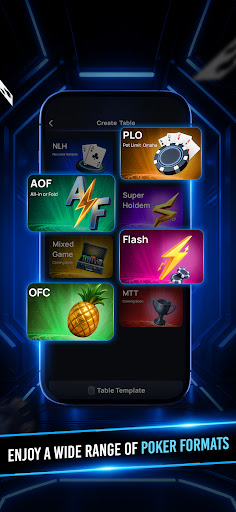
Explore a wide range of poker formats including NLH, PLO, OFC, AOF, Flash, Super Holdem, and more
More social. More fun.
Poker is better when the table has personality. PokerBoss brings more life to every session with features that make the game feel sharper, louder, and more expressive.
Boss emojis and throwables to react in real time
Table themes that match the mood of your game
Smarter table features that make every hand more engaging
Stats, rival insights, and more ways to track how you play
Built for club creators too
PokerBoss is not just for joining tables. It is also built for players who want to create and run their own clubs.
With PokerBoss, you can:
set up your own poker club
invite players and grow your table
create tables in multiple formats
build a club experience that feels more active, more social, and more fun
Features that change the game
PokerBoss comes loaded with gameplay features designed to make tables more dynamic and enjoyable.
Bomb Pot
Run It Twice
EV Cashout
VIP perks and advanced table benefits
fair-play and anti-cheating protections
secure gameplay systems
For every kind of poker player
Want to jump into the lobby and play for fun? You can.
Want to build your own club and run your own games? You can do that too.
Want a poker app that feels more social, more flexible, and more alive than the usual experience? That’s exactly what PokerBoss is built for.
If you’re looking for a social poker app, a club poker app, or a better way to play poker with friends, PokerBoss brings it all together in one place.
Download PokerBoss and Boss the Table.
Show more

1. Download MEmu installer and finish the setup

2. Start MEmu then open Google Play on the desktop

3. Search PokerBoss: Club & Social Poker in Google Play
Install
4. Download and Install PokerBoss: Club & Social Poker
5. On install completion click the icon to start

6. Enjoy playing PokerBoss: Club & Social Poker on PC with MEmu
MEmu Play is the best Android emulator and 100 million people already enjoy its superb Android gaming experience. The MEmu virtualization technology empowers you to play thousands of Android games smoothly on your PC, even the most graphic-intensive ones.
Bigger screen with better graphics; Long duration, without limitation of battery or mobile data.
Full Keymapping support for precise control of keyboard and mouse or gamepad.
Multiple game accounts or tasks on single PC at one time with Multi-Instance manager.
Play PokerBoss: Club & Social Poker on PC by following steps: