Sudoku - Classic Sudoku Puzzle
Updated
Current Version
4.1.9
Offered By

With your passion for Sudoku - Classic Sudoku Puzzle, you shouldn’t have to limit yourself to the small screen of a phone. Play like a pro and take full control of the game using a keyboard and mouse. MEmu gives you everything you’re looking for. Download and play Sudoku - Classic Sudoku Puzzle on PC. Play as long as you want — no more worries about battery life, mobile data, or unexpected calls. The all-new MEmu 9 is the best way to play Sudoku - Classic Sudoku Puzzle on PC. With our expertly designed keymapping system, Sudoku - Classic Sudoku Puzzle feels just like a real PC game. The MEmu multi-instance manager lets you run two or more accounts on the same device at the same time. Most importantly, our exclusive emulation engine unlocks your PC’s full potential, delivering smooth and seamless performance.
Show more
Download Sudoku - Classic Sudoku Puzzle on PC with MEmu Android Emulator. Enjoy playing on big screen. Sudoku Master - Classic Sudoku Free is a engaging number puzzle soduko game that tests your sodoku logical thinking and mathematical sodoku skills.
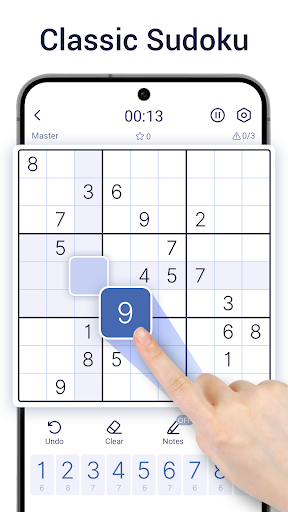

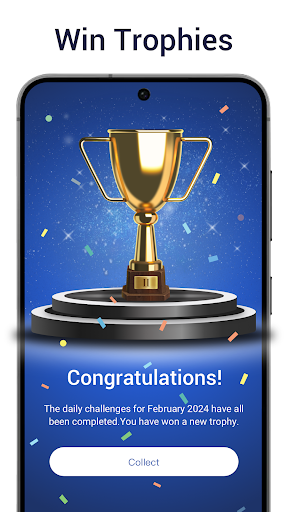
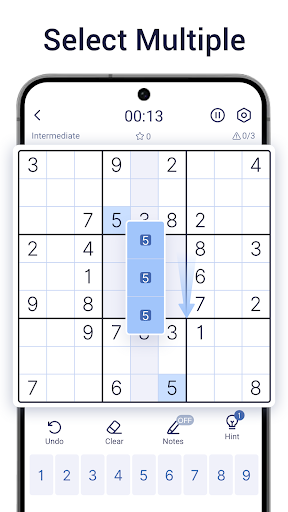
Sudoku Master - Classic Sudoku Free is a engaging number puzzle soduko game that tests your sodoku logical thinking and mathematical sodoku skills. Sudoku free offers a unique soduko challenge with each carefully crafted sudoku offline puzzle, ensuring that every soduko puzzle has only one suduko solution. Whether you’re looking to relax sodoku or stimulate your brain, Sudoku no ads is the perfect companion for both casual play and mental suduko exercise.
With over 40,000 sudoku no ads puzzles across six difficulty sodoku levels, there’s a sodoku challenge for everyone in Sudoku free. Ranging from Quick and Easy soduko levels for sudoku offline beginners to Expert and Master levels for seasoned players, Sudoku free provides a customizable experience that grows with your skills. Sudoku free starts with a partially filled 9x9 suduko grid, and your soduko goal is to complete sodoku each row, column, and 3x3 sub-grid contains the numbers 1 through 9. Using soduko logic and deduction, you’ll fill in the sodoku blanks to solve each unique sodoku puzzle in sudoku free.
Sudoku No Ads offers completely free sodoku gameplay, and with sudoku no ads mode, you can enjoy sudoku free anytime, anywhere, even no ads. Playing sudoku offline a perfect way to boost your sudoku offline memory, improve your soduko concentration, and unwind after a busy day.
Sudoku free includes diverse sodoku gameplay modes beyond traditional sudoku offline. In addition to the classic sudoku no ads grid, you’ll find innovative sodoku variations like Killer Sudoku, Super Sudoku, and sudoku offline, which bring new suduko twists to the familiar format. Sudoku no ads alternative modes are great for those who enjoy other logic puzzles like soduko, nonograms, and number matching games, providing a fresh mental suduko challenge each time you play.
Sudoku Offline is designed to be accessible to all ages, incorporating dozens of Sudoku-solving techniques. From basic soduko strategies to advanced sodoku methods, sudoku free players can explore various sudoku no ads approaches, developing critical suduko thinking skills and enhancing their sodoku problem-solving abilities. Soduko’s symmetrical number patterns add an aesthetic appeal to the classic sudoku offline experience, merging sodoku logic with the elegance of suduko mathematics.
Perfect for suduko IQ testing and mental training, this offline, sudoku no ads game suits sodoku players of all ages. Enjoy a satisfying sudoku no ads experience without WiFi, wherever you are. Download sudoku offline - Classic Sudoku Puzzle today to enjoy a refreshing, suduko brain-stimulating Sudoku free journey into the world of Sudoku free, and let the soduko power of numbers enrich your day!
Show more

1. Download MEmu installer and finish the setup

2. Start MEmu then open Google Play on the desktop

3. Search Sudoku - Classic Sudoku Puzzle in Google Play
Install
4. Download and Install Sudoku - Classic Sudoku Puzzle
5. On install completion click the icon to start

6. Enjoy playing Sudoku - Classic Sudoku Puzzle on PC with MEmu
MEmu Play is the best Android emulator and 100 million people already enjoy its superb Android gaming experience. The MEmu virtualization technology empowers you to play thousands of Android games smoothly on your PC, even the most graphic-intensive ones.
Bigger screen with better graphics; Long duration, without limitation of battery or mobile data.
Full Keymapping support for precise control of keyboard and mouse or gamepad.
Multiple game accounts or tasks on single PC at one time with Multi-Instance manager.
Play Sudoku - Classic Sudoku Puzzle on PC by following steps: