Double Tile! PC

Download Double Tile! on PC

Double Tile! PC

Double Tile!

  • Updated

  • Current Version

    1.5.0

  • Offered By

    Double Tile! PC

Features of Double Tile! on PC

With your passion for Double Tile!, you shouldn’t have to limit yourself to the small screen of a phone. Play like a pro and take full control of the game using a keyboard and mouse. MEmu gives you everything you’re looking for. Download and play Double Tile! on PC. Play as long as you want — no more worries about battery life, mobile data, or unexpected calls. The all-new MEmu 9 is the best way to play Double Tile! on PC. With our expertly designed keymapping system, Double Tile! feels just like a real PC game. The MEmu multi-instance manager lets you run two or more accounts on the same device at the same time. Most importantly, our exclusive emulation engine unlocks your PC’s full potential, delivering smooth and seamless performance.

Show more

Screenshots & Video of Double Tile! PC

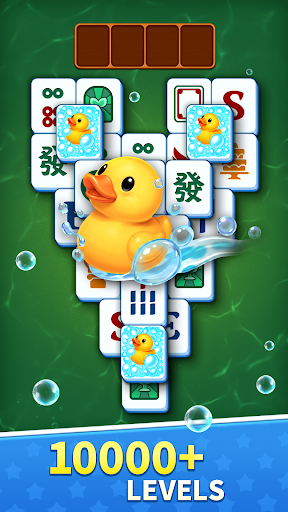
Download Double Tile! on PC with MEmu Android Emulator. Enjoy playing on big screen. Ready to unwind your brain with the newest mahjong match game?
Game Info

Ready to unwind your brain with the newest mahjong match game?
All your favorite Tile Matching Games features and Mahjong Solitaire mechanics combined in one journey.
One of the best free mahjong games you have ever played!

Welcome to Double Tile!
Come and start your brain puzzles journey in our 2026 new relaxing mahjong match solitaire game!

Double Tile! is a serene tile match puzzle game that blends mindful strategy with a calming, therapeutic atmosphere. It transforms the classic mahjong game experience into a zen mahjong solitaire game journey, inviting players to unwind, refocus, and find peace in every level of mahjong match and tile connect.

How to Master the Challenge
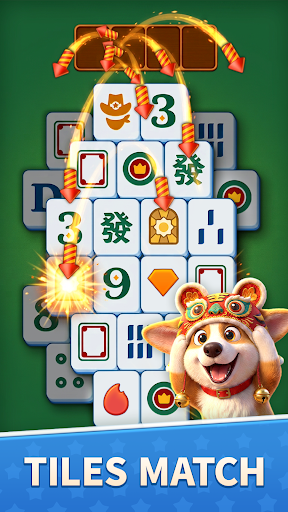
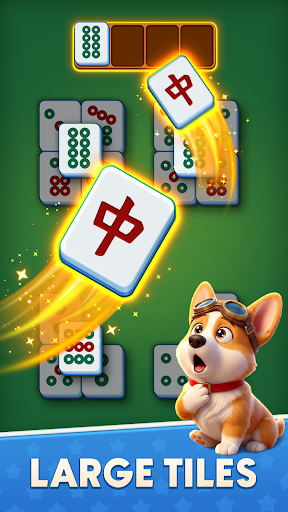
· Objective: Clear the board by matching identical tiles. A tile is matchable if it’s free on at least one side and not covered by another tile.
· Gameplay: Tap two matching tiles to connect and remove them. Please plan ahead to avoid dead ends, as the layered mahjong stacks add depth and challenge. Relax, if the puzzle blast ends, we’ll help :)
· Helpful Tools: Limited power-ups like Hints (to reveal available matching tiles) or Shuffles (to rearrange the board) offer a gentle boost when puzzles get tricky. This block game can be both a brain puzzle and a relaxing retreat.

Top Features in Double Tile!
· Calming Visuals: Classic Mahjong look and different morden tiles! Enjoy large tiles designed with delicate watercolor-style artwork inspired by nature. The free mahjong games create a soft, inviting mahjong solitaire world.
· Soothing Audio: Gentle instrumental melodies and ambient nature sounds—rainfall, rustling leaves, or distant streams—accompany you with every mahjong match in this zen match game. Immerse yourself in tranquility with mahjong solitaire tile connect.
· Delightful Mechanics: A matching tiles game combined with the soul of mahjong delivers an unlimited brain puzzle experience. Free mahjong games with surprising combos always remind you that you are a mahjong match master. We are happy to celebrate every new score you win anytime and offline.
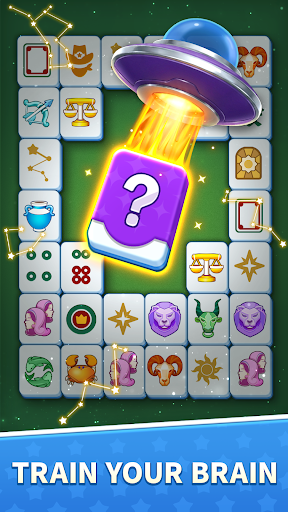
· Brain Training & Exploration: Double Tile! delivers an unlimited brain puzzles experience. These free match games are designed to remind you that you are a true tile match master and a dedicated tile explorer. Challenge yourself to discover new layouts and clear the board!
· Play Offline: We are happy to celebrate every new score you win, even offline! Enjoy matching tiles anytime, anywhere—no Wi-Fi needed.

Whether you’re seeking a mindful break or a moment of quiet focus, Double Tile! offers an uplifting way to relax and recharge through our mahjong solitaire journey.
Download now to discover the feeling of unwinding in Double Tile! We're sure every matching tiles lover will enjoy it!

Note: Double Tile! is a Mahjong Solitaire Game designed with Large Tiles. This zen match puzzle game is for brain-teasing challenges and relaxing entertainment.
If you have any questions during gameplay, please contact us via: support@hungrystudio.com

Show more

How to Download Double Tile! on PC

  • Double Tile! PC

    1. Download MEmu installer and finish the setup

  • Double Tile! PC

    2. Start MEmu then open Google Play on the desktop

  • Double Tile! PC

    3. Search Double Tile! in Google Play

  • Double Tile! PC Install

    4. Download and Install Double Tile!

  • Double Tile! PC

    5. On install completion click the icon to start

  • Double Tile! PC
    Double Tile! PC Double Tile! PC

    6. Enjoy playing Double Tile! on PC with MEmu

Why Use MEmu for Double Tile!

MEmu Play is the best Android emulator and 100 million people already enjoy its superb Android gaming experience. The MEmu virtualization technology empowers you to play thousands of Android games smoothly on your PC, even the most graphic-intensive ones.

  • Bigger screen with better graphics; Long duration, without limitation of battery or mobile data.

  • Full Keymapping support for precise control of keyboard and mouse or gamepad.

  • Multiple game accounts or tasks on single PC at one time with Multi-Instance manager.

Ready to Play?

Hot Topics

Double Tile! - FAQs

  • How to play Double Tile! on PC?

    Play Double Tile! on PC by following steps:

    • Download MEmu, then install and launch it
    • Login to Google Play Store, install the game
    • Enjoy playing the game on PC with MEmu
  • What are the minimum system requirements to run Double Tile! on PC?
    • Intel or AMD Processor
    • Microsoft Windows 7 and above
    • 2GB of memory
    • 5GB of free disk space
    • Hardware Virtualization Technology