TDS - Tower Destiny Survive
Updated
Current Version
1.2.7
Offered By

With your passion for TDS - Tower Destiny Survive, you shouldn’t have to limit yourself to the small screen of a phone. Play like a pro and take full control of the game using a keyboard and mouse. MEmu gives you everything you’re looking for. Download and play TDS - Tower Destiny Survive on PC. Play as long as you want — no more worries about battery life, mobile data, or unexpected calls. The all-new MEmu 9 is the best way to play TDS - Tower Destiny Survive on PC. With our expertly designed keymapping system, TDS - Tower Destiny Survive feels just like a real PC game. The MEmu multi-instance manager lets you run two or more accounts on the same device at the same time. Most importantly, our exclusive emulation engine unlocks your PC’s full potential, delivering smooth and seamless performance.
Show more
Download TDS - Tower Destiny Survive on PC with MEmu Android Emulator. Enjoy playing on big screen. KING OF THE CASTLE .
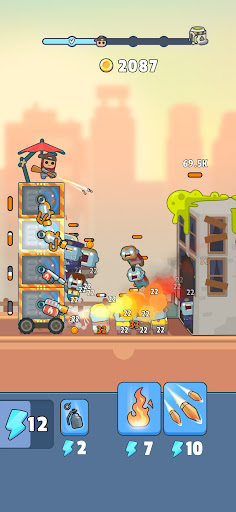
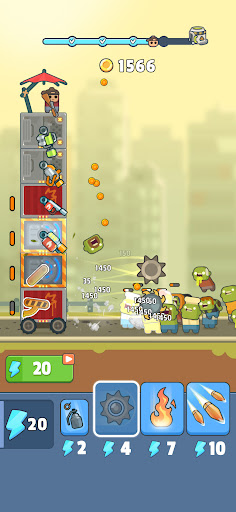
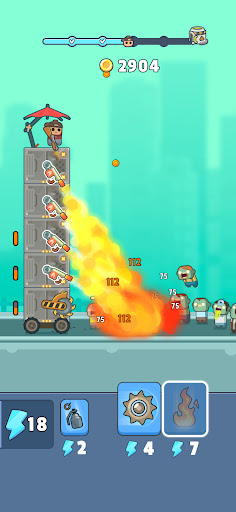
KING OF THE CASTLE
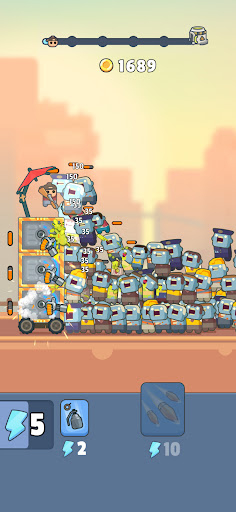
Well technically it’s a tower, but still. It’s yours, as long as you can keep the zombies away from it in this tower defense strategy game. It appears the zombie apocalypse is upon us based on how many of them are roaming the streets, so keep your gun nearby as you work to build your tower and keep it moving despite the waves of zombies.
CONSTRUCT AND DEFEND
To build your tower, you’ll need to collect different blocks as you travel, which you can then assemble to form your fortress. Within each of the levels you can add different weapons that will help keep you safe and on the go despite the masses of zombies that are trying to get in to eat your brains. Be careful, once your defenses are breached, you’re as good as dead so keep building and moving!
Ready, aim, fire – It’s a zombie tsunami! This RPG shooter will keep you busy blasting zombies as you work to build and protect your mobile castle. Wage war on the undead to avoid becoming one with them. Collect new and exciting weapons along the way, and make sure you upgrade them so that your shooter skills remain top notch.
Strategize – Use strategy to plow through your enemies as you roam in search of blocks to add to your tower. While there may be a lot of idle game play and zombie shooting, you will need to plan ahead and think about how and where you want to add weapons and more to your fortress. You’ll need all the guns and protection you can find as you advance through the levels and encounter more and more enemies!
Level up – Progress through levels in this tower defense RPG, and gain access to more exciting upgrades, weapons, tower parts, and more! The Earth is your oyster if you can remain a survivor and avoid becoming zombified, so fight for your life and keep exploring.
So lively – The graphics, not the zombies. Dive into this world of vibrant and cute characters and delightful animations that really bring everything to life. Who knew fighting off zombie waves could be so adorable? Even as you work to come up with the winning strategy you’ll be able to relax and have some fun thanks to the chill vibes.
LAND OF THE LIVING DEAD
So come on then, survivor, build your tower and wage war on the zombies in this fun and engaging strategy shooter game! Use your tower to travel across the lands as you explore and take out enemies, and have fun customizing all the different levels with neat guns and other weapons that will help you in your fight against the undead.
Download Tower Destiny Survive today to test your survival skills now!
Privacy Policy: https://say.games/privacy-policy
Terms of Use: https://say.games/terms-of-use
Show more

1. Download MEmu installer and finish the setup

2. Start MEmu then open Google Play on the desktop

3. Search TDS - Tower Destiny Survive in Google Play
Install
4. Download and Install TDS - Tower Destiny Survive
5. On install completion click the icon to start

6. Enjoy playing TDS - Tower Destiny Survive on PC with MEmu
MEmu Play is the best Android emulator and 100 million people already enjoy its superb Android gaming experience. The MEmu virtualization technology empowers you to play thousands of Android games smoothly on your PC, even the most graphic-intensive ones.
Bigger screen with better graphics; Long duration, without limitation of battery or mobile data.
Full Keymapping support for precise control of keyboard and mouse or gamepad.
Multiple game accounts or tasks on single PC at one time with Multi-Instance manager.
Play TDS - Tower Destiny Survive on PC by following steps: