Ultraman: Legend of Heroes 2
Updated
Current Version
Offered By

With your passion for Ultraman: Legend of Heroes 2, you shouldn’t have to limit yourself to the small screen of a phone. Play like a pro and take full control of the game using a keyboard and mouse. MEmu gives you everything you’re looking for. Download and play Ultraman: Legend of Heroes 2 on PC. Play as long as you want — no more worries about battery life, mobile data, or unexpected calls. The all-new MEmu 9 is the best way to play Ultraman: Legend of Heroes 2 on PC. With our expertly designed keymapping system, Ultraman: Legend of Heroes 2 feels just like a real PC game. The MEmu multi-instance manager lets you run two or more accounts on the same device at the same time. Most importantly, our exclusive emulation engine unlocks your PC’s full potential, delivering smooth and seamless performance.
Show more
Download Ultraman: Legend of Heroes 2 on PC with MEmu Android Emulator. Enjoy playing on big screen. The limited-time closed beta test for the game is about to begin.

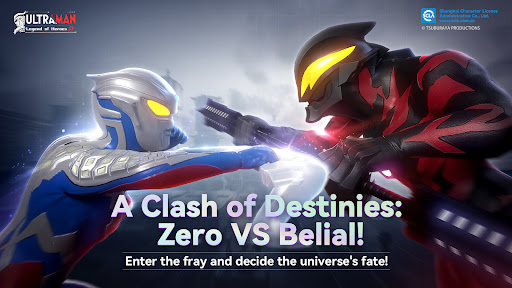
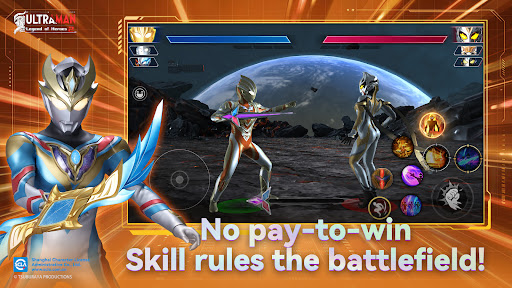
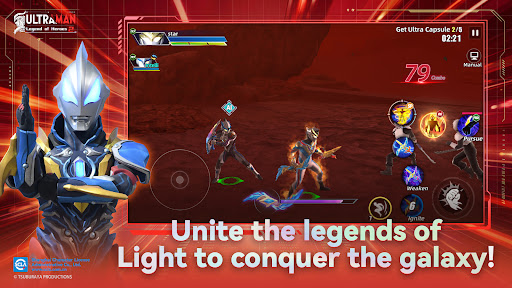
The limited-time closed beta test for the game is about to begin. Everyone is welcome to send your email address to us at ultraman@myjoymore.com. Test slots are on a first-come, first-served basis. We welcome your active participation.
To facilitate adding you to the corresponding platform for test qualification, please also indicate in your information whether your device is iOS or Android.
"Ultraman Legend of Heroes 2" is an officially authorized action mobile game by Tsuburaya. Based on the original Ultraman series and personally supervised by Tsuburaya, it highly restores the characters and skills of Ultraman, allowing players to experience the unique charm of the original to the fullest. Quickly form your own Ultraman team and embark on an adventure to defeat monsters and save the universe.
【Official Authorization】
"Ultraman Legend of Heroes 2" is officially authorized and supervised throughout by Tsuburaya Productions. Whether it's the signature beam skills or the unique combat stances, the game highly restores the forms and action skills of the Ultraman characters. Players will experience a high-quality, authentic Ultraman mobile game.
【Grand Assembly of Characters】
From popular Ultraman heroes like Zero, Tiga, Arc, Reiga, Noa, and Saga, to star monsters like Gilbaris, Gatanozoa, Zetton, and Grimude. All the Ultraman and monsters you know and love, as well as those you're less familiar with, can be found in the game. Find your favorite characters and fight alongside them.
【Cooperative Battles】
Form a team to challenge World Bosses together. Through team challenges, fight together against the darkness. By coordinating seamlessly with your team and leveraging the strengths of different Ultraman, join forces in the Ultraman world to defeat powerful bosses and protect universal peace.
【Real-Time Fair PvP】
Featuring high-quality restoration, gorgeous special effects, smooth combos, free skill combinations, and a satisfying sense of impact. In the real-time fair PvP mode, attributes don't matter; only operational skills and battle strategies determine the outcome. Enjoy pure combat fun.
Show more

1. Download MEmu installer and finish the setup

2. Start MEmu then open Google Play on the desktop

3. Search Ultraman: Legend of Heroes 2 in Google Play
Install
4. Download and Install Ultraman: Legend of Heroes 2
5. On install completion click the icon to start

6. Enjoy playing Ultraman: Legend of Heroes 2 on PC with MEmu
MEmu Play is the best Android emulator and 100 million people already enjoy its superb Android gaming experience. The MEmu virtualization technology empowers you to play thousands of Android games smoothly on your PC, even the most graphic-intensive ones.
Bigger screen with better graphics; Long duration, without limitation of battery or mobile data.
Full Keymapping support for precise control of keyboard and mouse or gamepad.
Multiple game accounts or tasks on single PC at one time with Multi-Instance manager.
Play Ultraman: Legend of Heroes 2 on PC by following steps: