Maps - Navigate & Explore
Updated
Current Version
1790073138
Offered By

Stop worrying about high battery drain when using Maps - Navigate & Explore on your phone. Free yourself from the tiny screen and enjoy the app on a much larger display. From now on, get a full-screen experience of your app with the convenience of a keyboard and mouse. MEmu offers you all the surprising features you’d expect: quick installation and easy setup, intuitive controls, and no more worries about battery life, mobile data, or unexpected calls. The all-new MEmu 9 is the choice for using Maps - Navigate & Explore on your computer. With the MEmu multi-instance manager, you can run two or more accounts at the same time. Most importantly, our exclusive emulation engine unlocks your PC’s full potential, delivering smooth and enjoyable performance.
Show more
Enjoy superb experience of using Maps - Navigate & Explore on PC with MEMU App Player. It's a powerful free Android emulator which provides you with thousands of android apps for their desktop version. Enjoy connecting with friends and polishing your work with higher efficiency! Explore and navigate the world with confidence using Google Maps.
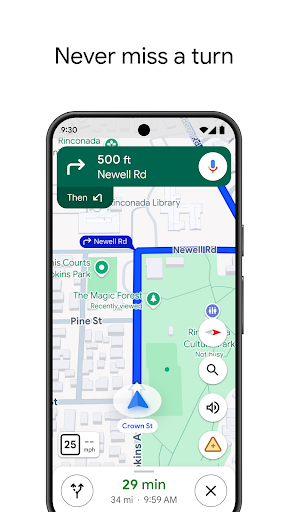
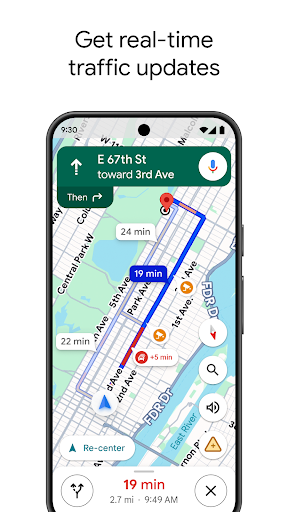
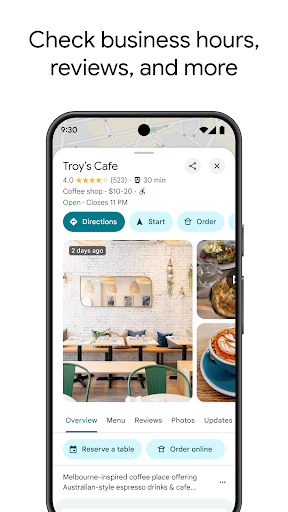
Explore and navigate the world with confidence using Google Maps. Find the best routes with live traffic data and real-time GPS navigation for driving, walking, cycling, and public transport. Discover over 250 million businesses and places - from restaurants and shops to everyday essentials – with photos, reviews, and helpful information.
Navigate the world, the way you want:
• Get to where you need to go with fuel-efficient route options
• Find the best route with real-time, turn-by-turn voice, and on screen navigation
• Save time with automatic rerouting based on live traffic, incidents, and road closures
• Catch the bus, train, and ride-share effortlessly, with real-time updates
• Find bike or scooter rentals to get around more easily
Plan trips and experiences effortlessly:
• Preview an area before you go (e.g. parking, entrances) with Street View
• Use Immersive View to experience what landmarks, parks and routes look like, and even check the weather so you can be ready in advance
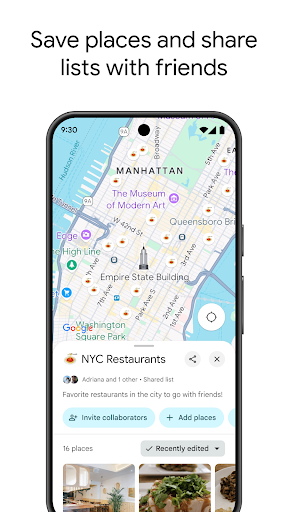
• Create custom lists of your favorite saved places and share with others
• Order delivery and takeout, make reservations, and book hotels
• Don't get lost with offline maps in an area with bad signal
• Search for local places and things to do, and decide based on user reviews and photos
Discover and explore like a local:
• Explore with confidence knowing 500 million users contribute and keep the map up to date each year
• Avoid the crowds by seeing how busy a place is before you get there
• Use Lens in Maps to see walking directions overlaid on the real world
• Filter restaurants by cuisine, hours, price, rating and more
• Ask questions about a place, from dishes to parking, and get quick answers
Add tiles and complications to your Wear OS device to quickly search and navigate.
Some features not available in all countries or cities
Navigation isn't intended to be used by oversized or emergency vehicles
Show more

1. Download MEmu installer and finish the setup

2. Start MEmu then open Google Play on the desktop

3. Search Maps - Navigate & Explore in Google Play
Install
4. Download and Install Maps - Navigate & Explore
5. On install completion click the icon to start

6. Enjoy using Maps - Navigate & Explore on PC with MEmu
MEmu Play is the best Android emulator, and 100 million users already enjoy its superb Android app experience. Powered by advanced virtualization technology, it lets you enjoy thousands of Android apps smoothly on your PC—including the most graphics-intensive ones.
Bigger screen with better graphics; Long duration, without limitation of battery or mobile data.
Full Keymapping support for precise control of keyboard and mouse or gamepad.
Multiple game accounts or tasks on single PC at one time with Multi-Instance manager.
Use Maps - Navigate & Explore on PC by following steps: