Anomalous Coffee Machine
Aggiornata
Versione corrente
1.0.0.0
Offerta da

Vista tutta la passione dimostrata nel giocare a Anomalous Coffee Machine, le tue mani non dovrebbero essere limitate al minuscolo schermo di un telefono. Gioca come un professionista e ottieni il pieno controllo del gioco con tastiera e mouse. MEmu ti offre tutto ciò che ti aspetti. Scarica e gioca a Anomalous Coffee Machine su PC. Gioca quanto vuoi, niente più limitazioni di batteria, dati mobili e chiamate inquietanti. Il nuovissimo MEmu 9 è la scelta migliore per giocare a Anomalous Coffee Machine su PC. Realizzato sulla base della nostra esperienza, lo squisito sistema di mappatura dei tasti preimpostati rende Anomalous Coffee Machine un vero e proprio gioco per PC. MEmu è un gestore multi-instanza che permette di giocare con 2 o più account sullo stesso dispositivo. E la cosa più importante, il nostro esclusivo motore di emulazione può liberare tutto il potenziale del tuo PC, rendendo tutto fluido.
Mostra altro
Scarica Anomalous Coffee Machine su PC con MEmu Android Emulator. Divertiti giocando sul grande schermo. Anomalous Coffee Machine is a unique visual novel interactive simulation style game where you encounter a mysterious girl that, for unknown reasons, asks you to use and explore her mysterious and seemingly anomalous coffee vending machine!
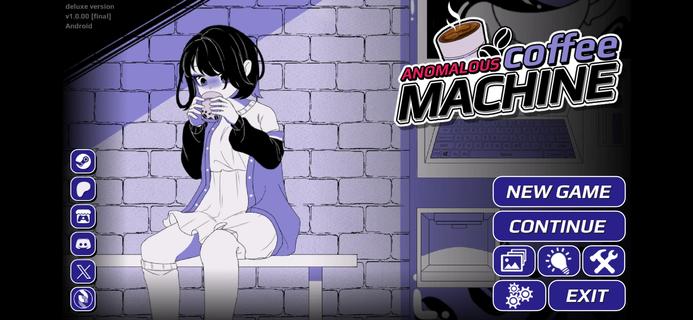



Anomalous Coffee Machine is a unique visual novel interactive simulation style game where you encounter a mysterious girl that, for unknown reasons, asks you to use and explore her mysterious and seemingly anomalous coffee vending machine!Of course, as the name implies, it's no ordinary vending machine. Instead, the coffee machine can dispense any cup of liquid, whether it's possible or impossible.Try a cup of saliva? Sure.Try a cup of coffee? Well, of course.Try a cup of blood? Sure, no problem.Try a cup of universe? Do you think it wouldn't work? Well, sure.Try a cup of death? Dare.Any cup is possible.HOW TO PLAYYou do not have any particular goals for the Anomalous Coffee Machine. All you have to do is type in all the words that you can think of and see if the machine currently has it.Depending on the supported keywords, effects, and events may occur.I won't spoil this game, so just figure it out.Just know that the game is simple. Type a word, then let her drink. Or you drink. Whatever. Shit happens. Good or bad shit, but shit will happen. Goodluck!Can you find all the keywords currently in the game?FEATURES> 700+ words to discover> 600+ transformations> 200+ animated scenes (w/ nsfw)> 100,000+ words of dialogues> 100+ unique cup art> Custom Modding support> Tons of secrets and easter eggs
Mostra altro

1. Scarica il programma di installazione di MEmu e completa l'installazione

2. Avvia il Memu e apri il Google Play sulla homepage

3. Cerca Anomalous Coffee Machine in Google Play
Install
4. Scarica e installa Anomalous Coffee Machine
5. Al termine dell'installazione, fai clic sull'icona per avviar

6. Divertiti giocando a Anomalous Coffee Machine su PC con MEmu
MEmu App Player è il miglior emulatore Android gratuito, utilizzato da 50 milioni di persone per ottenere un'esperienza di gioco Android superba. La tecnilogia di virtualizzazione MEmu ti permette di giocare a migliaia di giochi Android con semplicità sul tuo computer, anche i giochi con la grafica più esigente.
Schermo più grande con una grafica migliore; Lunga durata, senza limitazione di batteria o dati mobili.
Supporto completo per mappa di tastiera per un controllo preciso di tastiera e mouse o gamepad.
Multipli account di gioco o attività su un singolo PC contemporaneamente con il gestore di multi istanza.
Play Anomalous Coffee Machine on PC by following steps: