Anomalous Coffee Machine
Оновлено
Поточна версія
1.0.0.0
Постачальник

Перестаньте турбуватися про надмірні витрати, використовуючи ххх на своєму мобільному телефоні, звільніться від крихітного екрану і насолоджуйтеся використанням програми на набагато більшому дисплеї. Відтепер отримуйте повний екран свого додатка за допомогою клавіатури та миші. MEmu пропонує вам усі дивовижні функції, які ви очікували: швидка установка та просте налаштування, інтуїтивно зрозумілі елементи керування, більше обмежень від акумулятора, мобільних даних та тривожних дзвінків. Новий MEmu 9 - найкращий вибір використання Anomalous Coffee Machine на вашому комп’ютері. За допомогою нашого поглинання менеджер із кількома примірниками одночасно дозволяє відкрити 2 або більше рахунків. І найголовніше, наш ексклюзивний емуляційний двигун може вивільнити весь потенціал вашого ПК, зробити все гладким і приємним.
Show more
Насолоджуйтесь чудовим досвідом Anomalous Coffee Machine гри на ПК за допомогою програми MEMU App Player. Це потужний безкоштовний емулятор Android, який дозволяє вам грати в тисячі ігор Android. On mobile, Anomalous Coffee Machine places you across from a cryptic girl and a seemingly ordinary coffee vending machine.
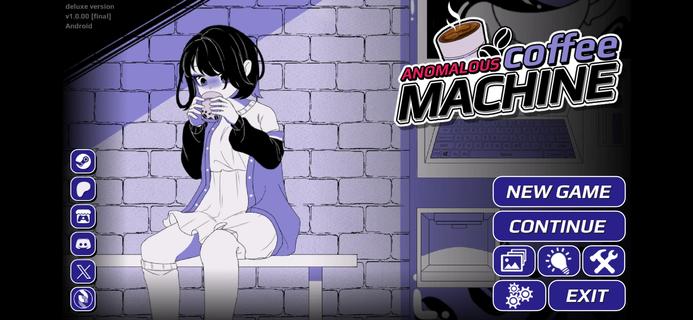



On mobile, Anomalous Coffee Machine places you across from a cryptic girl and a seemingly ordinary coffee vending machine. The narrative reacts to your decisions, so each path can shift in unexpected directions with strong replay value. The Android release is available as an Anomalous Coffee Machine APK for touch-friendly play, while PC editions are on Steam and Itch.io from HoruBrain Interactive. The series blends mystery, exploration, and consequence-driven structure that rewards experimentation across multiple runs.FeaturesBranching visual novel plus simulationAnomalous Coffee Machine combines dialogue choice, light simulation, and puzzle-like decision-making. Your selections drive the scene with the girl and the machine, and the story shifts accordingly.Extensive routes and endingsThe game supports many paths across multiple playthroughs. Reports cite more than 200 unique outcomes, so you can revisit scenes to pursue different transformations and conclusions.Mystery-focused storytellingEvery session of Anomalous Coffee Machine begins with a tense encounter around a coffee dispenser and a cryptic companion. The tone stays eerie, and the pacing is deliberate, which invites careful reading and deliberate choices.Multiple editions for different preferencesAnomalous Coffee Machine offers versions with different content profiles. Some editions include NSFW material, and there is also an SFW or Safe Edition, especially highlighted in Anomalous Coffee Machine 2.Community and mod-friendly buildsHoruBrain Interactive notes mod support on select builds to encourage community content. Availability of Anomalous Coffee Machine can vary by platform and version, so always review the build notes before installing.How to play Anomalous Coffee MachineThis guide covers the core loop for a first run. It focuses on reading context, making choices, and observing how outcomes branch.Launch Anomalous Coffee Machine on your Android phone and reach the opening scene with the vending machine and the girl. Read the dialogue carefully to understand each prompt.Choose a starting action or reply whenever a prompt appears. Your selection will immediately adjust the scene tone and available options.After your first decision, continue responding to dialogue or interaction points. Watch for clues in the text that hint at deeper routes.Then experiment with different choices at key moments to nudge the path toward new transformations or endings. Small changes can produce different sequences.So when you finish a route, start a new run and select alternative responses. Track what worked, revisit earlier branches, and aim for additional outcomes.Download Anomalous Coffee Machine nowAnomalous Coffee Machine delivers a surreal encounter that changes based on what you decide. If you want portable access to its branching paths, download Anomalous Coffee Machine on APKPure and keep exploring new routes. For updates, return to this page to download Anomalous Coffee Machine APK latest version.
Show more

1. Download MEmu installer and finish the setup

2. Start MEmu then open Google Play on the desktop

3. Search Anomalous Coffee Machine in Google Play
Install
4. Download and Install Anomalous Coffee Machine
5. On install completion click the icon to start

6. Enjoy playing Anomalous Coffee Machine on PC with MEmu
MEmu App Player є кращим безкоштовним емулятором Android, і 50 мільйонів людей вже користуються його чудовим ігровим досвідом Android. Технологія віртуалізації MEmu дає вам змогу відтворювати тисячі ігор Android на вашому комп'ютері, навіть найбільш насичених графікою.
Bigger screen with better graphics; Long duration, without limitation of battery or mobile data.
Full Keymapping support for precise control of keyboard and mouse or gamepad.
Multiple game accounts or tasks on single PC at one time with Multi-Instance manager.
Play Anomalous Coffee Machine on PC by following steps: