Anomalous Coffee Machine
अपडेट किया गया
वर्तमान वर्शन
1.0.0.0
संसाधन

अपने सेलफोन पर Anomalous Coffee Machine का उपयोग करते समय ओवरचार्ज के बारे में चिंता करना बंद करें, अपने आप को छोटी स्क्रीन से मुक्त करें और बहुत बड़े डिस्प्ले पर ऐप का उपयोग करने का आनंद लें। अब से, कीबोर्ड और माउस के साथ अपने ऐप का पूर्ण-स्क्रीन अनुभव प्राप्त करें। एमईएमयू आपको उन सभी आश्चर्यजनक सुविधाओं की पेशकश करता है जिनकी आपको उम्मीद थी: त्वरित इंस्टॉल और आसान सेटअप, सहज नियंत्रण, बैटरी की कोई सीमा नहीं, मोबाइल डेटा और परेशान कॉल। आपके कंप्यूटर पर Anomalous Coffee Machine का उपयोग करने का सबसे अच्छा विकल्प नया MEmu 9 है। हमारे अवशोषण के साथ कोडित, बहु-उदाहरण प्रबंधक एक ही समय में 2 या अधिक खाते खोलना संभव बनाता है। और सबसे महत्वपूर्ण, हमारा अनन्य उत्सर्जन इंजन आपके पीसी की पूरी क्षमता को जारी कर सकता है, सब कुछ सुचारू और सुखद बना सकता है।
और दिखाएं
डाउनलोड करें Anomalous Coffee Machine पीसी पर MEmu एंड्रॉयड एमुलेटर के साथ बड़े पर्दे पर खेलने का आनंद लें। Anomalous Coffee Machine is a unique visual novel interactive simulation style game where you encounter a mysterious girl that, for unknown reasons, asks you to use and explore her mysterious and seemingly anomalous coffee vending machine!
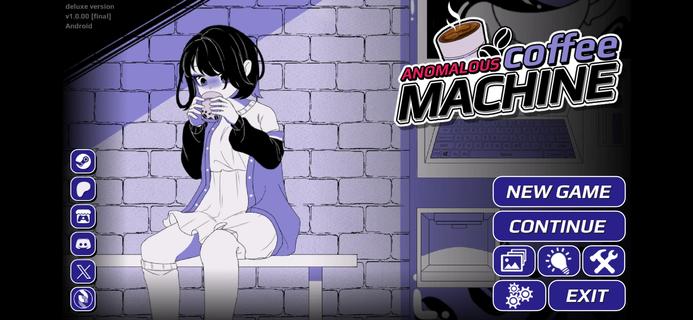


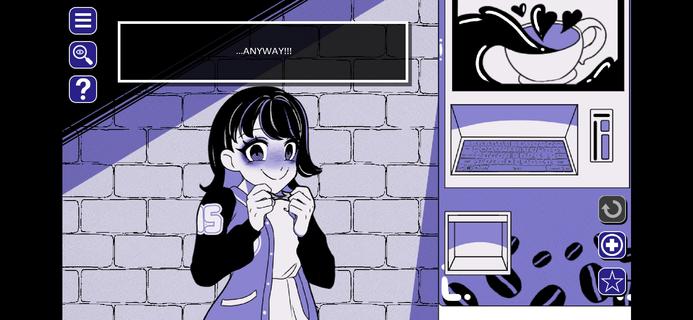
Anomalous Coffee Machine is a unique visual novel interactive simulation style game where you encounter a mysterious girl that, for unknown reasons, asks you to use and explore her mysterious and seemingly anomalous coffee vending machine!Of course, as the name implies, it's no ordinary vending machine. Instead, the coffee machine can dispense any cup of liquid, whether it's possible or impossible.Try a cup of saliva? Sure.Try a cup of coffee? Well, of course.Try a cup of blood? Sure, no problem.Try a cup of universe? Do you think it wouldn't work? Well, sure.Try a cup of death? Dare.Any cup is possible.HOW TO PLAYYou do not have any particular goals for the Anomalous Coffee Machine. All you have to do is type in all the words that you can think of and see if the machine currently has it.Depending on the supported keywords, effects, and events may occur.I won't spoil this game, so just figure it out.Just know that the game is simple. Type a word, then let her drink. Or you drink. Whatever. Shit happens. Good or bad shit, but shit will happen. Goodluck!Can you find all the keywords currently in the game?FEATURES> 700+ words to discover> 600+ transformations> 200+ animated scenes (w/ nsfw)> 100,000+ words of dialogues> 100+ unique cup art> Custom Modding support> Tons of secrets and easter eggs
और दिखाएं

1. MEmu इंस्टॉलर को डाउनलोड करें और इंस्टॉलेशन को पूरा करें

2. MEmu शुरू करें फिर होमपेज पर Google Play खोलें

3. Google Play में Anomalous Coffee Machine खोजें
Install
4. Anomalous Coffee Machine डाउनलोड कर इंस्टॉल करें
5. इंस्टॉल पूरा होने पर आइकन दबाएं

6. MEmu से पीसी पर Anomalous Coffee Machine खेलने का आनंद लें
MEmu Play सबसे बेहतरीन मुफ़्त Android एमुलेटर है और 5 करोड़ लोग पहले ही इसके शानदार Android गेमिंग अनुभव का आनंद ले चुके हैं। MEmu 9 वर्चुअलाइज़ेशन तकनीक आपको अपने PC पर हज़ारों Android गेम, यहाँ तक कि सबसे ज़्यादा ग्राफ़िक्स वाले गेम भी, आसानी से खेलने की सुविधा देती है।
असीमित बैटरी या मोबाइल डेटा के साथ बेहतर ग्राफिक्स के साथ बड़ी स्क्रीन; लंबी अवधि।
कीबोर्ड और माउस या गेमपैड के उत्तम नियंत्रण के लिए संपूर्ण कीमैपिंग का समर्थन करता हैं।
एक ही पीसी पर मल्टी-इंस्टेंस मैनेजर के साथ एक समय में कई गेम खाते या कार्य कर सकते हैं।
Play Anomalous Coffee Machine on PC by following steps: