Anomalous Coffee Machine
Ενημερώθηκε
Τρέχουσα έκδοση
1.0.0.0
Προσφέρεται από

Με όλο το πάθος σας για το παιχνίδι Anomalous Coffee Machine, τα χέρια σας δεν πρέπει να περιορίζονται σε μια μικροσκοπική οθόνη του τηλεφώνου σας. Παίξτε σαν επαγγελματίας και αποκτήστε τον πλήρη έλεγχο του παιχνιδιού σας με πληκτρολόγιο και ποντίκι. Το MEmu σας προσφέρει όλα όσα περιμένετε. Κατεβάστε και παίξτε Anomalous Coffee Machine σε υπολογιστή. Παίξτε όσο θέλετε, χωρίς άλλους περιορισμούς μπαταρίας, δεδομένων κινητής τηλεφωνίας και ενοχλητικών κλήσεων. Το ολοκαίνουργιο MEmu 9 είναι η καλύτερη επιλογή για να παίξετε Anomalous Coffee Machine σε υπολογιστή. Ετοιμασμένο με την εμπειρία μας, το εξαιρετικό σύστημα προκαθορισμένης αντιστοίχισης πλήκτρων καθιστά το Anomalous Coffee Machine ένα πραγματικό παιχνίδι υπολογιστή. Ο διαχειριστής πολλαπλών περιπτώσεων MEmu καθιστά δυνατό το παιχνίδι με 2 ή περισσότερους λογαριασμούς στην ίδια συσκευή. Και το πιο σημαντικό, η αποκλειστική μηχανή εξομοίωσης μας μπορεί να απελευθερώσει πλήρως τις δυνατότητες του υπολογιστή σας, κάνοντας τα πάντα ομαλά.
Show more
Απολαύστε την υπέροχη εμπειρία αναπαραγωγής του Anomalous Coffee Machine σε υπολογιστή με το MEMU App Player. Πρόκειται για έναν ισχυρό δωρεάν εξομοιωτή Android που σας επιτρέπει να παίζετε χιλιάδες παιχνίδια Android. On mobile, Anomalous Coffee Machine places you across from a cryptic girl and a seemingly ordinary coffee vending machine.
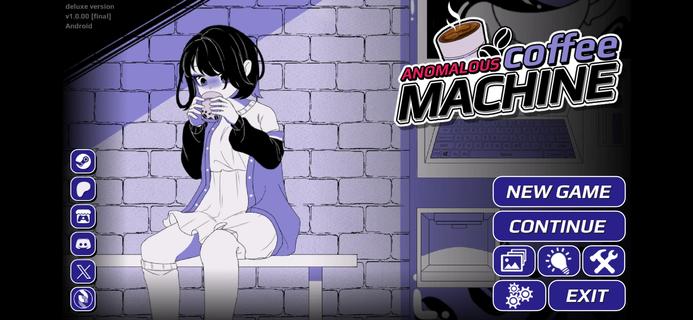



On mobile, Anomalous Coffee Machine places you across from a cryptic girl and a seemingly ordinary coffee vending machine. The narrative reacts to your decisions, so each path can shift in unexpected directions with strong replay value. The Android release is available as an Anomalous Coffee Machine APK for touch-friendly play, while PC editions are on Steam and Itch.io from HoruBrain Interactive. The series blends mystery, exploration, and consequence-driven structure that rewards experimentation across multiple runs.FeaturesBranching visual novel plus simulationAnomalous Coffee Machine combines dialogue choice, light simulation, and puzzle-like decision-making. Your selections drive the scene with the girl and the machine, and the story shifts accordingly.Extensive routes and endingsThe game supports many paths across multiple playthroughs. Reports cite more than 200 unique outcomes, so you can revisit scenes to pursue different transformations and conclusions.Mystery-focused storytellingEvery session of Anomalous Coffee Machine begins with a tense encounter around a coffee dispenser and a cryptic companion. The tone stays eerie, and the pacing is deliberate, which invites careful reading and deliberate choices.Multiple editions for different preferencesAnomalous Coffee Machine offers versions with different content profiles. Some editions include NSFW material, and there is also an SFW or Safe Edition, especially highlighted in Anomalous Coffee Machine 2.Community and mod-friendly buildsHoruBrain Interactive notes mod support on select builds to encourage community content. Availability of Anomalous Coffee Machine can vary by platform and version, so always review the build notes before installing.How to play Anomalous Coffee MachineThis guide covers the core loop for a first run. It focuses on reading context, making choices, and observing how outcomes branch.Launch Anomalous Coffee Machine on your Android phone and reach the opening scene with the vending machine and the girl. Read the dialogue carefully to understand each prompt.Choose a starting action or reply whenever a prompt appears. Your selection will immediately adjust the scene tone and available options.After your first decision, continue responding to dialogue or interaction points. Watch for clues in the text that hint at deeper routes.Then experiment with different choices at key moments to nudge the path toward new transformations or endings. Small changes can produce different sequences.So when you finish a route, start a new run and select alternative responses. Track what worked, revisit earlier branches, and aim for additional outcomes.Download Anomalous Coffee Machine nowAnomalous Coffee Machine delivers a surreal encounter that changes based on what you decide. If you want portable access to its branching paths, download Anomalous Coffee Machine on APKPure and keep exploring new routes. For updates, return to this page to download Anomalous Coffee Machine APK latest version.
Show more

1. Κατεβάστε το πρόγραμμα εγκατάστασης MEmu και ολοκληρώστε την εγκατάσταση

2. Ξεκινήστε το MEmu και στη συνέχεια ανοίξτε το Google Play στην επιφάνεια εργασίας

3. Αναζητήστε τον Anomalous Coffee Machine στο Google Play
Install
4. Λήψη και εγκατάσταση του Anomalous Coffee Machine
5. Μόλις ολοκληρωθεί η εγκατάσταση, κάντε κλικ στο εικονίδιο για να ξεκινήσετε

6. Enjoy playing Anomalous Coffee Machine on PC with MEmu
Το MEmu Play, αποτελεί την ιδανικότερη δωρεάν λύση για την εξομοίωση του λειτουργικού Android, και χρησιμοποιείται ήδη από περισσότερους από 50 εκατομμύρια χρήστες, ο οποίοι απολαμβάνουν, την καταπληκτική εμπειρία παιχνιδιού που προσφέρεται μέσω της εφαρμογής. Με τη χρήση του MEmu Virtualization, είναι δυνατή η αναπαραγωγή παιχνιδιών Android στον υπολογιστή, ακόμη και εκείνων που απαιτούν μεγάλη επεξεργαστική ισχύ γραφικών, δίχως συμβιβασμούς στην ποιότητα και στην εμπειρία χρήσης, ακριβώς όπως ένα τελευταίας γενιάς κινητό τηλέφωνο.
Μεγαλύτερη οθόνη με καλύτερα γραφικά. Μεγάλη διάρκεια ζωής, χωρίς περιορισμό μπαταρίας ή δεδομένων κινητής τηλεφωνίας.
Πλήρης υποστήριξη αντιστοίχισης πλήκτρων για ακριβή έλεγχο του πληκτρολογίου και του ποντικιού ή του gamepad.
Πολλαπλοί λογαριασμοί παιχνιδιών ή εργασίες σε έναν υπολογιστή ταυτόχρονα με τον διαχειριστή πολλαπλών περιπτώσεων.
Play Anomalous Coffee Machine on PC by following steps: