Anomalous Coffee Machine
Dikemas kini
Versi Semasa
1.0.0.0
Ditawarkan Oleh

Dengan semangat anda untuk bermain Anomalous Coffee Machine, tangan anda tidak seharusnya terhad pada skrin kecil telefon anda. Main seperti profesional dan kendalikan sepenuhnya permainan anda dengan papan kekunci dan tetikus. MEmu menawarkan semua perkara yang anda harapkan. Muat turun dan mainkan Anomalous Coffee Machine di PC. Main selagi anda mahu, tidak ada batasan bateri, data mudah alih dan panggilan yang mengganggu. MEmu 9 yang baru adalah pilihan terbaik untuk bermain Anomalous Coffee Machine di PC. Disiapkan dengan kepakaran kami, sistem pemetaan kunci pratetap yang indah menjadikan Anomalous Coffee Machine permainan PC sebenar. Dikodkan dengan penyerapan kami, pengurus multi-instance menjadikan bermain 2 atau lebih akaun pada peranti yang sama mungkin. Dan yang paling penting, enjin emulasi eksklusif kami dapat melepaskan potensi penuh PC anda, menjadikan semuanya lancar.Kami tidak hanya peduli bagaimana anda bermain, tetapi juga keseluruhan proses menikmati kebahagiaan permainan.
Tunjukkan Lagi
Muat turun Anomalous Coffee Machine pada PC dengan MEmu Android Emulator. Nikmati bermain di skrin besar Anomalous Coffee Machine is a unique visual novel interactive simulation style game where you encounter a mysterious girl that, for unknown reasons, asks you to use and explore her mysterious and seemingly anomalous coffee vending machine!
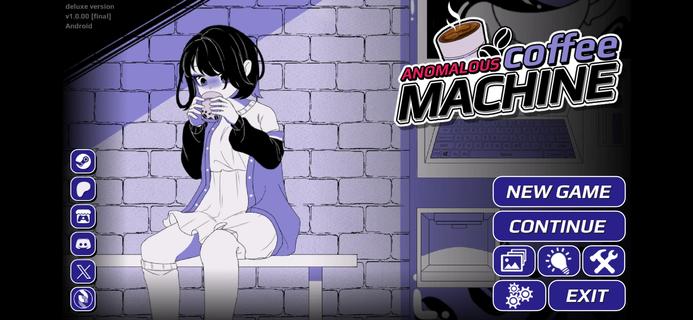



Anomalous Coffee Machine is a unique visual novel interactive simulation style game where you encounter a mysterious girl that, for unknown reasons, asks you to use and explore her mysterious and seemingly anomalous coffee vending machine!Of course, as the name implies, it's no ordinary vending machine. Instead, the coffee machine can dispense any cup of liquid, whether it's possible or impossible.Try a cup of saliva? Sure.Try a cup of coffee? Well, of course.Try a cup of blood? Sure, no problem.Try a cup of universe? Do you think it wouldn't work? Well, sure.Try a cup of death? Dare.Any cup is possible.HOW TO PLAYYou do not have any particular goals for the Anomalous Coffee Machine. All you have to do is type in all the words that you can think of and see if the machine currently has it.Depending on the supported keywords, effects, and events may occur.I won't spoil this game, so just figure it out.Just know that the game is simple. Type a word, then let her drink. Or you drink. Whatever. Shit happens. Good or bad shit, but shit will happen. Goodluck!Can you find all the keywords currently in the game?FEATURES> 700+ words to discover> 600+ transformations> 200+ animated scenes (w/ nsfw)> 100,000+ words of dialogues> 100+ unique cup art> Custom Modding support> Tons of secrets and easter eggs
Tunjukkan Lagi

1. Muat turun pemasang MEmu dan selesaikan persediaan

2. Mulakan MEnu kemudian buka Google Play di desktop

3. Cari Anomalous Coffee Machine di Google Play
Install
4. Muat turun dan Pasang Anomalous Coffee Machine
5. Apabila selesai pemasangan, menekan ikon itu untuk memulakan

6. Nikmati bermain Anomalous Coffee Machine di komputer dengan MEmu
MEmu Play adalah emulator Android terbaik dan 100 juta orang sudah menikmati pengalaman permainan Androidnya yang luar biasa. Teknologi virtualisasi MEmu memberi kuasa kepada anda untuk bermain beribu-ribu permainan Android dengan lancar di komputar anda, malah yang paling intensif grafik.
Skrin lebih besar dengan grafik yang lebih baik; Tempoh yang panjang, tanpa had bateri atau data mudah alih.
Sokongan Keymapping penuh untuk kawalan tepat papan kekunci dan tetikus atau gamepad.
Pelbagai akaun permainan atau tugas pada satu PC sekaligus dengan pengurus pelbagai contoh.
Play Anomalous Coffee Machine on PC by following steps: