
Anomalous Coffee Machine
Aktualizováno
Aktuální verze
1.0.0.0
Od vývojáře

With all your passion for playing Anomalous Coffee Machine, you hands are not supposed to be limited on a tiny screen of your phone. Play like a pro and get full control of your game with keyboard and mouse. MEmu offers you all the things that you are expecting. Download and play Anomalous Coffee Machine on PC. Play as long as you want, no more limitations of battery, mobile data and disturbing calls. The brand new MEmu 9 is the best choice of playing Anomalous Coffee Machine on PC. Prepared with our expertise, the exquisite preset keymapping system makes Anomalous Coffee Machine a real PC game. MEmu multi-instance manager makes playing 2 or more accounts on the same device possible. And the most important, our exclusive emulation engine can release full potential of your PC, make everything smooth.
Show more
Vychutnejte si vynikající zážitek z přehrávání Anomalous Coffee Machine na PC s MEMU App Player. Je to silný bezplatný emulátor pro Android, který vám umožní hrát tisíce her v systému Android. On mobile, Anomalous Coffee Machine places you across from a cryptic girl and a seemingly ordinary coffee vending machine.
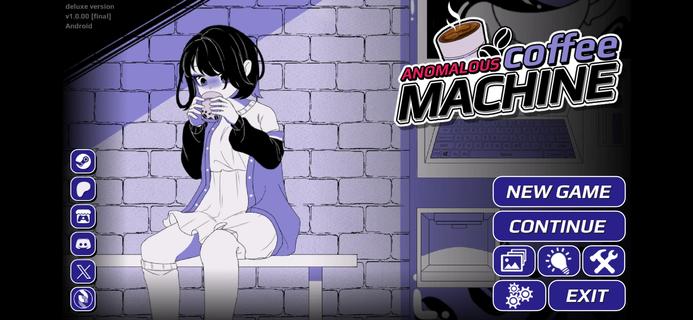



On mobile, Anomalous Coffee Machine places you across from a cryptic girl and a seemingly ordinary coffee vending machine. The narrative reacts to your decisions, so each path can shift in unexpected directions with strong replay value. The Android release is available as an Anomalous Coffee Machine APK for touch-friendly play, while PC editions are on Steam and Itch.io from HoruBrain Interactive. The series blends mystery, exploration, and consequence-driven structure that rewards experimentation across multiple runs.FeaturesBranching visual novel plus simulationAnomalous Coffee Machine combines dialogue choice, light simulation, and puzzle-like decision-making. Your selections drive the scene with the girl and the machine, and the story shifts accordingly.Extensive routes and endingsThe game supports many paths across multiple playthroughs. Reports cite more than 200 unique outcomes, so you can revisit scenes to pursue different transformations and conclusions.Mystery-focused storytellingEvery session of Anomalous Coffee Machine begins with a tense encounter around a coffee dispenser and a cryptic companion. The tone stays eerie, and the pacing is deliberate, which invites careful reading and deliberate choices.Multiple editions for different preferencesAnomalous Coffee Machine offers versions with different content profiles. Some editions include NSFW material, and there is also an SFW or Safe Edition, especially highlighted in Anomalous Coffee Machine 2.Community and mod-friendly buildsHoruBrain Interactive notes mod support on select builds to encourage community content. Availability of Anomalous Coffee Machine can vary by platform and version, so always review the build notes before installing.How to play Anomalous Coffee MachineThis guide covers the core loop for a first run. It focuses on reading context, making choices, and observing how outcomes branch.Launch Anomalous Coffee Machine on your Android phone and reach the opening scene with the vending machine and the girl. Read the dialogue carefully to understand each prompt.Choose a starting action or reply whenever a prompt appears. Your selection will immediately adjust the scene tone and available options.After your first decision, continue responding to dialogue or interaction points. Watch for clues in the text that hint at deeper routes.Then experiment with different choices at key moments to nudge the path toward new transformations or endings. Small changes can produce different sequences.So when you finish a route, start a new run and select alternative responses. Track what worked, revisit earlier branches, and aim for additional outcomes.Download Anomalous Coffee Machine nowAnomalous Coffee Machine delivers a surreal encounter that changes based on what you decide. If you want portable access to its branching paths, download Anomalous Coffee Machine on APKPure and keep exploring new routes. For updates, return to this page to download Anomalous Coffee Machine APK latest version.
Show more

1. Stáhněte si instalační program MEmu a dokončete instalaci

2. Spusťte MEmu a poté otevřete Google Play na ploše

3. Vyhledejte Anomalous Coffee Machine v Google Play
Install
4. Stáhněte a nainstalujte Anomalous Coffee Machine
5. Po dokončení instalace klikněte na ikonu pro spuštění

6. Užijte si hraní Anomalous Coffee Machine na PC s MEmu
MEmu je zdarma a ten nejlepší Android emulátor. 50 milionů lidí si užívá jeho nejlepší herní zážitky. Technologie virtualizace MEmu ti dovolí plynule hrát Android hry na PC a to i ty nejnáročnější.
Větší obrazovka s lepší grafikou; Dlouhá výdrž bez omezení baterie nebo mobilních dat.
Plná podpora mapování kláves pro přesné ovládání klávesnice a myši nebo gamepadu.
Více herních účtů nebo úkolů na jednom počítači najednou s Multi-Instance Managerem.
Play Anomalous Coffee Machine on PC by following steps: