Anomalous Coffee Machine
Zaktualizowano
Aktualna wersja
1.0.0.0
Sprzedawca

Przy całej swojej pasji do grania w Anomalous Coffee Machine, twoje ręce nie powinny być ograniczone na małym ekranie telefonu. Graj jak zawodowiec i uzyskaj pełną kontrolę nad grą za pomocą klawiatury i myszy. MEmu oferuje ci wszystko, czego oczekujesz. Pobierz i graj Anomalous Coffee Machine na PC. Graj tak długo, jak chcesz, bez ograniczeń baterii, danych komórkowych i niepokojących połączeń. Zupełnie nowy MEmu 9 to najlepszy wybór do grania w Anomalous Coffee Machine na PC. Przygotowany dzięki naszej wiedzy, znakomity, wstępnie ustawiony system mapowania klawiszy sprawia, że Anomalous Coffee Machine jest prawdziwą grą na PC. Zakodowany naszą absorpcją, menedżer wielu instancji umożliwia granie na 2 lub więcej kontach na tym samym urządzeniu. A co najważniejsze, nasz emulator może uwolnić pełny potencjał twojego komputera, sprawić, że wszystko będzie płynne. Dbamy nie tylko o to, jak grasz, ale także o cały proces czerpania radości z grania.
Pokaż więcej
Ciesz się wspaniałym doświadczeniem podczas grania w Anomalous Coffee Machine na komputerze z aplikacją MEMU App Player. Jest to potężny darmowy emulator Androida pozwalający grać w tysiące gier na Androida. Anomalous Coffee Machine is a unique visual novel interactive simulation style game where you encounter a mysterious girl that, for unknown reasons, asks you to use and explore her mysterious and seemingly anomalous coffee vending machine!
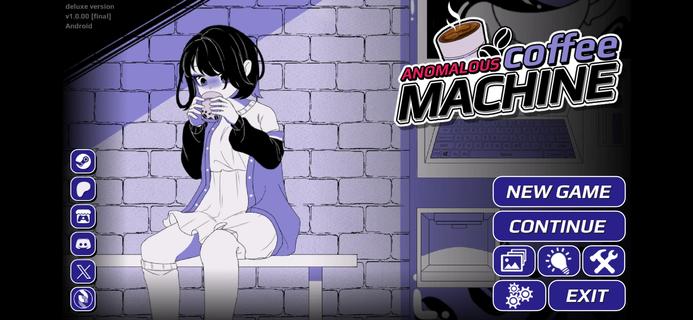



Anomalous Coffee Machine is a unique visual novel interactive simulation style game where you encounter a mysterious girl that, for unknown reasons, asks you to use and explore her mysterious and seemingly anomalous coffee vending machine!Of course, as the name implies, it's no ordinary vending machine. Instead, the coffee machine can dispense any cup of liquid, whether it's possible or impossible.Try a cup of saliva? Sure.Try a cup of coffee? Well, of course.Try a cup of blood? Sure, no problem.Try a cup of universe? Do you think it wouldn't work? Well, sure.Try a cup of death? Dare.Any cup is possible.HOW TO PLAYYou do not have any particular goals for the Anomalous Coffee Machine. All you have to do is type in all the words that you can think of and see if the machine currently has it.Depending on the supported keywords, effects, and events may occur.I won't spoil this game, so just figure it out.Just know that the game is simple. Type a word, then let her drink. Or you drink. Whatever. Shit happens. Good or bad shit, but shit will happen. Goodluck!Can you find all the keywords currently in the game?FEATURES> 700+ words to discover> 600+ transformations> 200+ animated scenes (w/ nsfw)> 100,000+ words of dialogues> 100+ unique cup art> Custom Modding support> Tons of secrets and easter eggs
Pokaż więcej

1. Pobierz instalator MEmu i zakończ instalację

2. Uruchom MEmu, a następnie otwórz Google Play na pulpicie

3. Wyszukaj Anomalous Coffee Machine w Google Play
Install
4. Pobierz i zainstaluj Anomalous Coffee Machine
5. Po zakończeniu instalacji kliknij ikonę, aby rozpocząć

6. Ciesz się grą Anomalous Coffee Machine na PC z MEmu
MEmu Play to najlepszy emulator Androida, a 100 milionów ludzi już korzysta z jego i dosta doskonałe wrażenia z gier na Androida. Technologia wirtualizacji MEmu umożliwia płynne granie w tysiące gier Androida na komputerze, nawet tych najbardziej wymagających grafiki.
Większy ekran z lepszą grafiką; Długi czas, bez ograniczeń baterii lub danych mobilnych.
Pełna obsługa mapowania klawiszy dla precyzyjnego sterowania klawiaturą i myszą lub gamepadem.
Wiele kont gier lub zadań na jednym komputerze jednocześnie z menedżerem wielu instancji.
Play Anomalous Coffee Machine on PC by following steps: