PVKK: Planetenverteidigungskanonenkommandant
Zaktualizowano
Aktualna wersja
Sprzedawca

Przy całej swojej pasji do grania w PVKK: Planetenverteidigungskanonenkommandant, twoje ręce nie powinny być ograniczone na małym ekranie telefonu. Graj jak zawodowiec i uzyskaj pełną kontrolę nad grą za pomocą klawiatury i myszy. MEmu oferuje ci wszystko, czego oczekujesz. Pobierz i graj PVKK: Planetenverteidigungskanonenkommandant na PC. Graj tak długo, jak chcesz, bez ograniczeń baterii, danych komórkowych i niepokojących połączeń. Zupełnie nowy MEmu 9 to najlepszy wybór do grania w PVKK: Planetenverteidigungskanonenkommandant na PC. Przygotowany dzięki naszej wiedzy, znakomity, wstępnie ustawiony system mapowania klawiszy sprawia, że PVKK: Planetenverteidigungskanonenkommandant jest prawdziwą grą na PC. Zakodowany naszą absorpcją, menedżer wielu instancji umożliwia granie na 2 lub więcej kontach na tym samym urządzeniu. A co najważniejsze, nasz emulator może uwolnić pełny potencjał twojego komputera, sprawić, że wszystko będzie płynne. Dbamy nie tylko o to, jak grasz, ale także o cały proces czerpania radości z grania.
Pokaż więcej
Ciesz się wspaniałym doświadczeniem podczas grania w PVKK: Planetenverteidigungskanonenkommandant na komputerze z aplikacją MEMU App Player. Jest to potężny darmowy emulator Androida pozwalający grać w tysiące gier na Androida. PVKK: Planetenverteidigungskanonenkommandant is a unique blend of strategy, action, and simulation that puts you in charge of defending your planet from an interplanetary invasion.
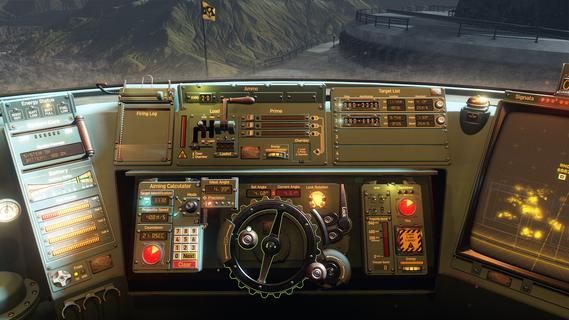
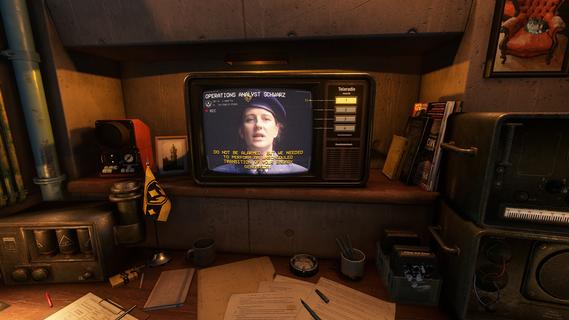
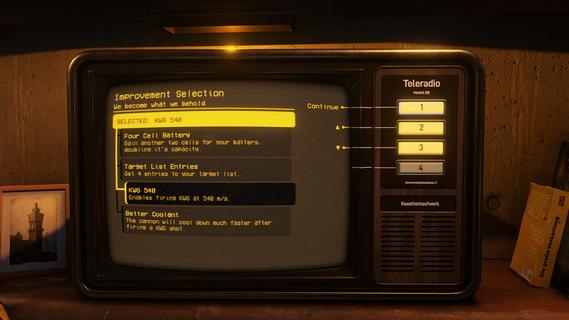
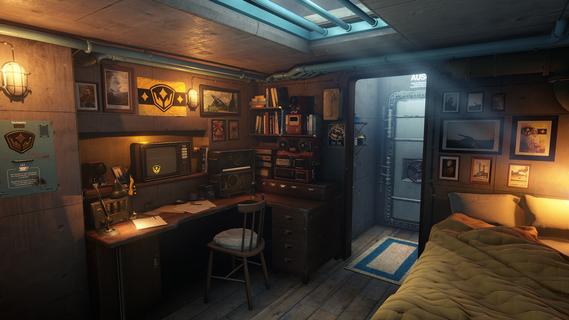
PVKK: Planetenverteidigungskanonenkommandant is a unique blend of strategy, action, and simulation that puts you in charge of defending your planet from an interplanetary invasion. Set within the confines of a cozy, well-equipped bunker, the game challenges players to operate a powerful planetary defense cannon, making split-second decisions to repel waves of alien attackers while managing limited resources and maintaining composure. The core gameplay revolves around quick reflexes and strategic thinking. As the cannon commander, you must obey orders from your superiors, who provide mission objectives and tactical advice. Success depends on pressing the right buttons at the right time to fire your cannon accurately and efficiently. Each incoming wave of enemies grows more challenging, requiring players to adapt their tactics and prioritize targets to prevent breaches. Beyond the intense action, PVKK adds a layer of immersive simulation by placing you in the bunker environment. This setting is not just a backdrop but an interactive space where you manage daily routines, such as sipping your tea ration—a small but meaningful detail that adds to the game's atmosphere and character. This blend of mundane tasks with high-stakes defense creates a compelling contrast, making the experience feel grounded despite the sci-fi premise. The game’s controls are designed to be intuitive yet demanding. Players must balance rapid-fire sequences with cooldown periods and ammunition management. Missteps can lead to catastrophic consequences, emphasizing the importance of precision and timing. The interface includes various indicators and alerts, helping you track enemy positions, cannon status, and remaining resources, all critical for maintaining planetary security. Visually, PVKK embraces a minimalist but effective design, focusing on clarity and functionality. The bunker’s interior is depicted with cozy details that contrast with the starkness of space outside, reinforcing the feeling of isolation and responsibility. Enemy ships and projectiles are clearly distinguishable, allowing players to react swiftly. Sound design complements the gameplay with alert tones, radio chatter, and the calming background hum of the bunker, enhancing immersion. PVKK also incorporates a narrative element, conveyed through communications with your superiors and occasional updates on the invasion’s progress. These interactions provide context and motivation, reminding players of the stakes involved. The story unfolds gradually, adding depth without overwhelming the core gameplay loop. For players who enjoy a mix of tactical challenge and atmospheric simulation, PVKK offers a fresh experience. It demands focus, quick thinking, and adaptability while rewarding those who master its mechanics with a satisfying sense of accomplishment. Whether you’re a fan of strategy games, action shooters, or immersive simulations, PVKK: Planetenverteidigungskanonenkommandant invites you to take your place behind the cannon and defend your world against the unknown.
Pokaż więcej

1. Pobierz instalator MEmu i zakończ instalację

2. Uruchom MEmu, a następnie otwórz Google Play na pulpicie

3. Wyszukaj PVKK: Planetenverteidigungskanonenkommandant w Google Play
Install
4. Pobierz i zainstaluj PVKK: Planetenverteidigungskanonenkommandant
5. Po zakończeniu instalacji kliknij ikonę, aby rozpocząć

6. Ciesz się grą PVKK: Planetenverteidigungskanonenkommandant na PC z MEmu
MEmu Play to najlepszy emulator Androida, a 100 milionów ludzi już korzysta z jego i dosta doskonałe wrażenia z gier na Androida. Technologia wirtualizacji MEmu umożliwia płynne granie w tysiące gier Androida na komputerze, nawet tych najbardziej wymagających grafiki.
Większy ekran z lepszą grafiką; Długi czas, bez ograniczeń baterii lub danych mobilnych.
Pełna obsługa mapowania klawiszy dla precyzyjnego sterowania klawiaturą i myszą lub gamepadem.
Wiele kont gier lub zadań na jednym komputerze jednocześnie z menedżerem wielu instancji.
Play PVKK: Planetenverteidigungskanonenkommandant on PC by following steps: