PVKK: Planetenverteidigungskanonenkommandant
อัปเดตเมื่อ
เวอร์ชันปัจจุบัน
ให้บริการโดย

เวลาคุณเล่น PVKK: Planetenverteidigungskanonenkommandant, คุณอาจรู้สึกว่ามือคุณอาจบังจอแล้วทำให้ไม่ได้เล่นแบบเต็มที่. เล่นแบบไร้ขีดจำกัดด้วยเม้าส์และคีย์บอร์ด. MEmu มีตัวเลือกหลายอย่างให้คุณใช้งานเกมที่คุณเล่นแบบที่คุณต้องการ. ดาวน์โหลดและเล่น PVKK: Planetenverteidigungskanonenkommandant บน PC. เล่นนานแค่ไหนก็ได้, ไม่ต้องชาร์จแบตเตอรี่, หรือเจอคนโทรเข้ามาระหว่างเล่น. MEmu 9 เป็นตัวเลือกสำหรับการเล่น PVKK: Planetenverteidigungskanonenkommandant บน PC. ทางทีมงานเราได้ปรับแต่งเกม, ปรับให้เล่นเกมบางเกมได้เหมือนเล่น PVKK: Planetenverteidigungskanonenkommandant เป็นเกม PC เช่นเล็งด้วยเม้าส์หรือใช้คีย์บอร์ด. ระบบของเรายังทำให้คุณสามารถเปิดเล่นได้มากกว่า 2 เกมพร้อมๆกันในคอมของคุณ. และที่สำคัญที่สุด, ระบบโปรแกรมของเราสามารถทำให้คุณใช้ระบบของ PC ทำให้เกมลื่นเหมือนกับใช้โทรศัพท์รุ่นล่าสุด. เราไม่ได้ดูแลเรื่องการเล่นเกม, แต่เราดูแลถึงความสนุกสนานที่คุณได้จากการเล่นด้วย.
แสดงเพิ่มเติม
ดาวน์โหลด PVKK: Planetenverteidigungskanonenkommandant บน PC ด้วย MEmu Android Emulator สนุกกับการเล่นบนหน้าจอขนาดใหญ่ PVKK: Planetenverteidigungskanonenkommandant is a unique blend of strategy, action, and simulation that puts you in charge of defending your planet from an interplanetary invasion.
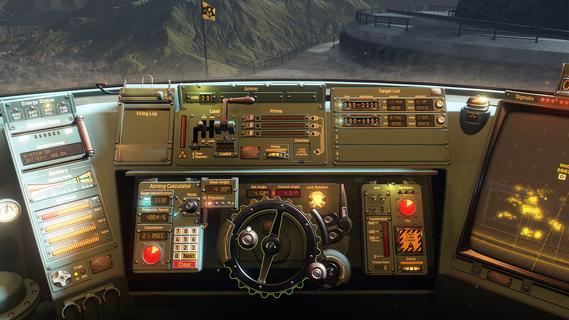
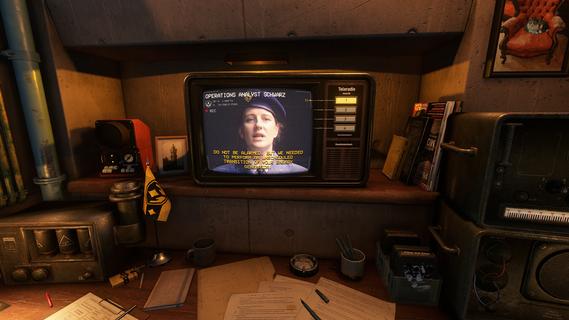
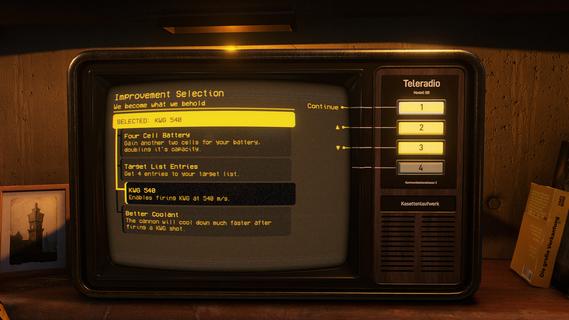
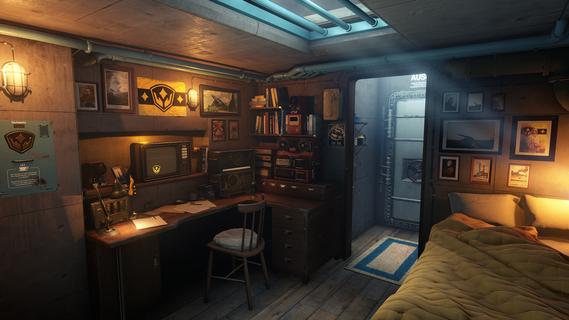
PVKK: Planetenverteidigungskanonenkommandant is a unique blend of strategy, action, and simulation that puts you in charge of defending your planet from an interplanetary invasion. Set within the confines of a cozy, well-equipped bunker, the game challenges players to operate a powerful planetary defense cannon, making split-second decisions to repel waves of alien attackers while managing limited resources and maintaining composure. The core gameplay revolves around quick reflexes and strategic thinking. As the cannon commander, you must obey orders from your superiors, who provide mission objectives and tactical advice. Success depends on pressing the right buttons at the right time to fire your cannon accurately and efficiently. Each incoming wave of enemies grows more challenging, requiring players to adapt their tactics and prioritize targets to prevent breaches. Beyond the intense action, PVKK adds a layer of immersive simulation by placing you in the bunker environment. This setting is not just a backdrop but an interactive space where you manage daily routines, such as sipping your tea ration—a small but meaningful detail that adds to the game's atmosphere and character. This blend of mundane tasks with high-stakes defense creates a compelling contrast, making the experience feel grounded despite the sci-fi premise. The game’s controls are designed to be intuitive yet demanding. Players must balance rapid-fire sequences with cooldown periods and ammunition management. Missteps can lead to catastrophic consequences, emphasizing the importance of precision and timing. The interface includes various indicators and alerts, helping you track enemy positions, cannon status, and remaining resources, all critical for maintaining planetary security. Visually, PVKK embraces a minimalist but effective design, focusing on clarity and functionality. The bunker’s interior is depicted with cozy details that contrast with the starkness of space outside, reinforcing the feeling of isolation and responsibility. Enemy ships and projectiles are clearly distinguishable, allowing players to react swiftly. Sound design complements the gameplay with alert tones, radio chatter, and the calming background hum of the bunker, enhancing immersion. PVKK also incorporates a narrative element, conveyed through communications with your superiors and occasional updates on the invasion’s progress. These interactions provide context and motivation, reminding players of the stakes involved. The story unfolds gradually, adding depth without overwhelming the core gameplay loop. For players who enjoy a mix of tactical challenge and atmospheric simulation, PVKK offers a fresh experience. It demands focus, quick thinking, and adaptability while rewarding those who master its mechanics with a satisfying sense of accomplishment. Whether you’re a fan of strategy games, action shooters, or immersive simulations, PVKK: Planetenverteidigungskanonenkommandant invites you to take your place behind the cannon and defend your world against the unknown.
แสดงเพิ่มเติม

1. ดาวน์โหลดตัวติดตั้ง MEmu และสิ้นสุดการติดตั้ง

2. เริ่ม MEmu จากนั้นเปิด Google Play บนหน้าแรก

3. ค้นหา PVKK: Planetenverteidigungskanonenkommandant ใน Google Play
Install
4. ดาวน์โหลดและติดตั้ง PVKK: Planetenverteidigungskanonenkommandant
5. เมื่อติดตั้งเสร็จให้คลิกที่ไอคอนเพื่อเริ่มใช้งาน

6. สนุกกับการเล่น PVKK: Planetenverteidigungskanonenkommandant บนพีซีด้วย MEmu
MEmu App Player เป็นอีมูเลเตอร์ Android ที่ดีที่สุดและผู้คนกว่า 50 ล้านคนเพลิดเพลินไปกับประสบการณ์การเล่นเกม Android ที่ยอดเยี่ยม เทคโนโลยีการจำลองเสมือนของ MEmu ช่วยให้คุณเล่นเกม Android หลายพันเกมได้อย่างราบรื่นบนพีซีของคุณแม้แต่เกมที่ต้องใช้กราฟิกมากที่สุด
จอใหญ่และกราฟฟิกสวยกว่า; เล่นได้นาน, ไม่ต้องใช้แบตเตอรี่โทรศัพท์หรือเน็ตโทรศัพท์.
ระบบปรับแต่งปุ่มคีย์บอร์ดและเม้าส์ตามที่คุณเลือก
เล่นมากกว่าหนึ่งเกมบน PC ในเวลาเดียวกันด้วยระบบหลายจอหรือ Multi-Instance manager.
Play PVKK: Planetenverteidigungskanonenkommandant on PC by following steps: