
Absolum
อัปเดตเมื่อ
เวอร์ชันปัจจุบัน
ให้บริการโดย

เวลาคุณเล่น Absolum, คุณอาจรู้สึกว่ามือคุณอาจบังจอแล้วทำให้ไม่ได้เล่นแบบเต็มที่. เล่นแบบไร้ขีดจำกัดด้วยเม้าส์และคีย์บอร์ด. MEmu มีตัวเลือกหลายอย่างให้คุณใช้งานเกมที่คุณเล่นแบบที่คุณต้องการ. ดาวน์โหลดและเล่น Absolum บน PC. เล่นนานแค่ไหนก็ได้, ไม่ต้องชาร์จแบตเตอรี่, หรือเจอคนโทรเข้ามาระหว่างเล่น. MEmu 9 เป็นตัวเลือกสำหรับการเล่น Absolum บน PC. ทางทีมงานเราได้ปรับแต่งเกม, ปรับให้เล่นเกมบางเกมได้เหมือนเล่น Absolum เป็นเกม PC เช่นเล็งด้วยเม้าส์หรือใช้คีย์บอร์ด. ระบบของเรายังทำให้คุณสามารถเปิดเล่นได้มากกว่า 2 เกมพร้อมๆกันในคอมของคุณ. และที่สำคัญที่สุด, ระบบโปรแกรมของเราสามารถทำให้คุณใช้ระบบของ PC ทำให้เกมลื่นเหมือนกับใช้โทรศัพท์รุ่นล่าสุด. เราไม่ได้ดูแลเรื่องการเล่นเกม, แต่เราดูแลถึงความสนุกสนานที่คุณได้จากการเล่นด้วย.
แสดงเพิ่มเติม
ดาวน์โหลด Absolum บน PC ด้วย MEmu Android Emulator สนุกกับการเล่นบนหน้าจอขนาดใหญ่ Crafted with passion by the team that redefined side-scrolling beat 'em ups, Absolum mixes top-of-the-class combat action with modern roguelite elements into an immersive adventure set in the original world of Talamh.
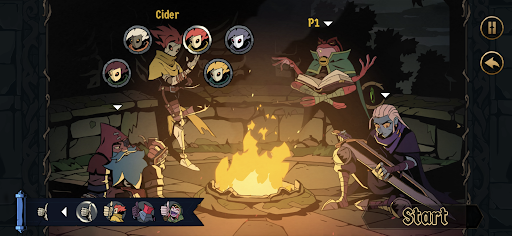
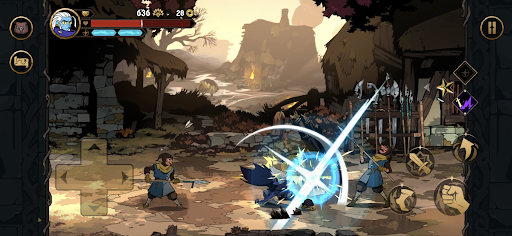
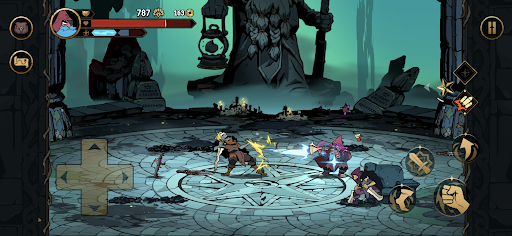
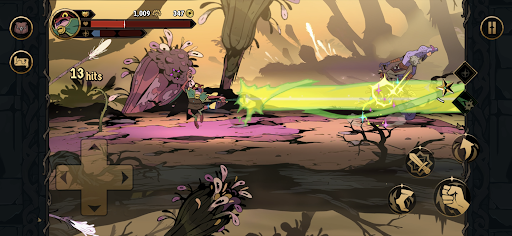
Crafted with passion by the team that redefined side-scrolling beat 'em ups, Absolum mixes top-of-the-class combat action with modern roguelite elements into an immersive adventure set in the original world of Talamh.
A magical cataclysm left magic mistrusted by the common folk and Sun King Azra took advantage of this panic, enslaving wizards through his Crimson Order and conquering more and more lands. With the help of high enchantress Uchawi, a small group of rebels rises from the shadows, wielding forbidden magic to challenge Azra’s oppressive regime and defy his absolute magic power.
Fight as the outcast heroes of Talamh in a fierce battle to retake magic from Sun King Azra’s grasp in Absolum, an original roguelite beat ‘em up by Dotemu.
FEATURES
Join the rebellion! With the help of the high enchantress Uchawi, wield forbidden magic to free the lands of Talamh from the iron grip of Sun King Azra.
Four heroes, each with their own fighting style: start playing as the calm but deadly Galandra or as Karl, the last free dwarf of Talamh, and discover the prodigious Brome and the enigmatic Cider as they join your journey.
Craft new strategies and get more powerful every run to defeat Azra’s elite guard through a gameplay that blends the best of arcade beat’em up action with modern roguelite mechanics.
-From the majestic mines of Grandery to the lush forests of Jaroba, delve into an original fantasy world that comes alive through gorgeous art, masterful animation and a magnificent soundtrack by composer Gareth Coker (Ori, Halo Infinite, Prince of Persia), featuring collaborations with other legendary composers.
Lead the uprising against Azra's regime as a lone hero, or team up with an ally through the two-player online coop mode. Combine your elemental powers and synchronize your attacks into incredible chained combos!
CAREFULLY REDESIGNED FOR MOBILE
- Revamped interface – exclusive mobile UI with complete touch control
- Google Play Games achievements
-Buy once, play anywhere: Enjoy cross-progression on mobile and PC with the same Google Play Games account
- Cloud Save – Share your progress between Android devices
-Compatible with controllers
แสดงเพิ่มเติม

1. ดาวน์โหลดตัวติดตั้ง MEmu และสิ้นสุดการติดตั้ง

2. เริ่ม MEmu จากนั้นเปิด Google Play บนหน้าแรก

3. ค้นหา Absolum ใน Google Play
Install
4. ดาวน์โหลดและติดตั้ง Absolum
5. เมื่อติดตั้งเสร็จให้คลิกที่ไอคอนเพื่อเริ่มใช้งาน

6. สนุกกับการเล่น Absolum บนพีซีด้วย MEmu
MEmu App Player เป็นอีมูเลเตอร์ Android ที่ดีที่สุดและผู้คนกว่า 50 ล้านคนเพลิดเพลินไปกับประสบการณ์การเล่นเกม Android ที่ยอดเยี่ยม เทคโนโลยีการจำลองเสมือนของ MEmu ช่วยให้คุณเล่นเกม Android หลายพันเกมได้อย่างราบรื่นบนพีซีของคุณแม้แต่เกมที่ต้องใช้กราฟิกมากที่สุด
จอใหญ่และกราฟฟิกสวยกว่า; เล่นได้นาน, ไม่ต้องใช้แบตเตอรี่โทรศัพท์หรือเน็ตโทรศัพท์.
ระบบปรับแต่งปุ่มคีย์บอร์ดและเม้าส์ตามที่คุณเลือก
เล่นมากกว่าหนึ่งเกมบน PC ในเวลาเดียวกันด้วยระบบหลายจอหรือ Multi-Instance manager.
Play Absolum on PC by following steps:






























![[ไกด์เกม] CookieRun Classic แนะนำ 5 คุกกี้น่าปั้น น่าลงทุน ที่มือใหม่ห้ามพลาด! (เล่นบน PC ผ่าน MEmu ให้ลื่นสุด ๆ) PC](https://www.memuplay.com/blog/wp-content/uploads/2026/08/579c01ab-a953-45b3-8115-9b6279b7d6f9.png)