
ColorSweeper
อัปเดตเมื่อ
เวอร์ชันปัจจุบัน
1.3.3
ให้บริการโดย

เวลาคุณเล่น ColorSweeper, คุณอาจรู้สึกว่ามือคุณอาจบังจอแล้วทำให้ไม่ได้เล่นแบบเต็มที่. เล่นแบบไร้ขีดจำกัดด้วยเม้าส์และคีย์บอร์ด. MEmu มีตัวเลือกหลายอย่างให้คุณใช้งานเกมที่คุณเล่นแบบที่คุณต้องการ. ดาวน์โหลดและเล่น ColorSweeper บน PC. เล่นนานแค่ไหนก็ได้, ไม่ต้องชาร์จแบตเตอรี่, หรือเจอคนโทรเข้ามาระหว่างเล่น. MEmu 9 เป็นตัวเลือกสำหรับการเล่น ColorSweeper บน PC. ทางทีมงานเราได้ปรับแต่งเกม, ปรับให้เล่นเกมบางเกมได้เหมือนเล่น ColorSweeper เป็นเกม PC เช่นเล็งด้วยเม้าส์หรือใช้คีย์บอร์ด. ระบบของเรายังทำให้คุณสามารถเปิดเล่นได้มากกว่า 2 เกมพร้อมๆกันในคอมของคุณ. และที่สำคัญที่สุด, ระบบโปรแกรมของเราสามารถทำให้คุณใช้ระบบของ PC ทำให้เกมลื่นเหมือนกับใช้โทรศัพท์รุ่นล่าสุด. เราไม่ได้ดูแลเรื่องการเล่นเกม, แต่เราดูแลถึงความสนุกสนานที่คุณได้จากการเล่นด้วย.
แสดงเพิ่มเติม
ดาวน์โหลด ColorSweeper บน PC ด้วย MEmu Android Emulator สนุกกับการเล่นบนหน้าจอขนาดใหญ่ พัซเซิลตรรกะรูปแบบใหม่ด้วยสี – ColorSweeper.
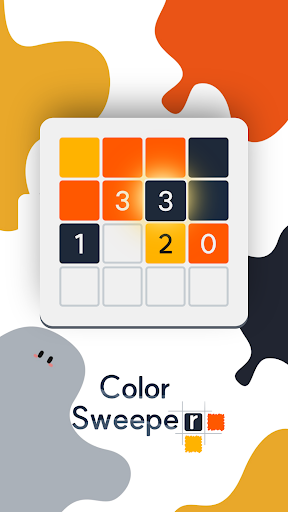
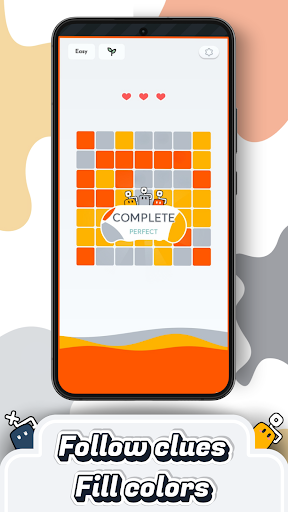
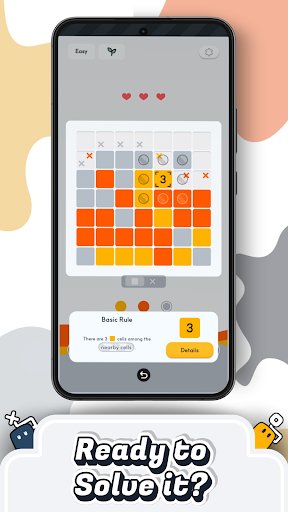
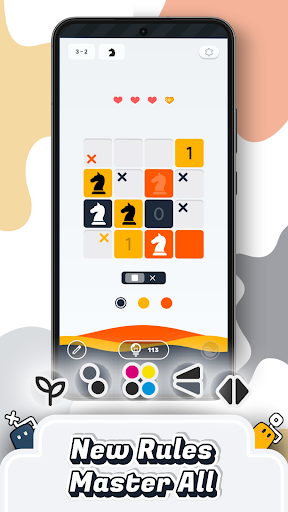
พัซเซิลตรรกะรูปแบบใหม่ด้วยสี – ColorSweeper
ใช้ตัวเลขเป็นคำใบ้ เติมสีลงในแต่ละช่อง และค้นหารูปแบบที่ซ่อนอยู่
หากคุณชอบเกมอย่าง Minesweeper, Picross หรือ Sudoku
คุณจะได้พบกับประสบการณ์พัซเซิลที่ทั้งผ่อนคลายและท้าทาย
วิธีเล่น
• ใช้ตัวเลขเป็นตัวช่วยในการวิเคราะห์สีของช่องรอบๆ
• ได้แรงบันดาลใจจากเกมคลาสสิกอย่าง Sudoku และ Minesweeper
• ไม่มีการจำกัดเวลา เล่นได้ตามจังหวะของคุณ
• โฟกัสกับการใช้ตรรกะและการคิดอย่างเต็มที่
ประสบการณ์พัซเซิลที่น่าพอใจ
• สีค่อยๆ เติมเต็มกระดาน สร้างความรู้สึกสำเร็จ
• อินเทอร์เฟซเรียบง่าย ช่วยให้มีสมาธิมากขึ้น
• ทุกครั้งที่แก้ได้ จะรู้สึกถึงความสำเร็จเล็กๆ
ความหลากหลายของด่าน
• กฎและรูปแบบใหม่ๆ ทำให้เกมไม่น่าเบื่อ
• มีทั้งด่านง่ายๆ และด่านที่ท้าทายมากขึ้น
• เหมาะสำหรับทั้งผู้เล่นทั่วไปและคนที่ชอบพัซเซิล
เหมาะสำหรับคุณถ้า…
• ชอบเกมแนวใช้ความคิด
• มองหาเกมเล่นสั้นๆ ได้ทุกเวลา
• อยากผ่อนคลายแต่ยังได้ใช้สมอง
ความก้าวหน้าและความสำเร็จ
• ผ่านด่านเพื่อปลดล็อกความสำเร็จ
• ดูพัฒนาการของตัวเองได้ตลอดเวลา
ชุมชน
Instagram: https://www.instagram.com/colorsweeper/
Discord: https://discord.gg/rTWG9nGQRf
ดาวน์โหลด ColorSweeper แล้วสนุกไปกับพัซเซิลสี
ที่ทั้งผ่อนคลายและช่วยให้คุณคิดได้อย่างชัดเจน
แสดงเพิ่มเติม

1. ดาวน์โหลดตัวติดตั้ง MEmu และสิ้นสุดการติดตั้ง

2. เริ่ม MEmu จากนั้นเปิด Google Play บนหน้าแรก

3. ค้นหา ColorSweeper ใน Google Play
Install
4. ดาวน์โหลดและติดตั้ง ColorSweeper
5. เมื่อติดตั้งเสร็จให้คลิกที่ไอคอนเพื่อเริ่มใช้งาน

6. สนุกกับการเล่น ColorSweeper บนพีซีด้วย MEmu
MEmu App Player เป็นอีมูเลเตอร์ Android ที่ดีที่สุดและผู้คนกว่า 50 ล้านคนเพลิดเพลินไปกับประสบการณ์การเล่นเกม Android ที่ยอดเยี่ยม เทคโนโลยีการจำลองเสมือนของ MEmu ช่วยให้คุณเล่นเกม Android หลายพันเกมได้อย่างราบรื่นบนพีซีของคุณแม้แต่เกมที่ต้องใช้กราฟิกมากที่สุด
จอใหญ่และกราฟฟิกสวยกว่า; เล่นได้นาน, ไม่ต้องใช้แบตเตอรี่โทรศัพท์หรือเน็ตโทรศัพท์.
ระบบปรับแต่งปุ่มคีย์บอร์ดและเม้าส์ตามที่คุณเลือก
เล่นมากกว่าหนึ่งเกมบน PC ในเวลาเดียวกันด้วยระบบหลายจอหรือ Multi-Instance manager.
Play ColorSweeper on PC by following steps: