
Kuroko's Basketball™: SR
อัปเดตเมื่อ
เวอร์ชันปัจจุบัน
ให้บริการโดย

เวลาคุณเล่น Kuroko's Basketball™: SR, คุณอาจรู้สึกว่ามือคุณอาจบังจอแล้วทำให้ไม่ได้เล่นแบบเต็มที่. เล่นแบบไร้ขีดจำกัดด้วยเม้าส์และคีย์บอร์ด. MEmu มีตัวเลือกหลายอย่างให้คุณใช้งานเกมที่คุณเล่นแบบที่คุณต้องการ. ดาวน์โหลดและเล่น Kuroko's Basketball™: SR บน PC. เล่นนานแค่ไหนก็ได้, ไม่ต้องชาร์จแบตเตอรี่, หรือเจอคนโทรเข้ามาระหว่างเล่น. MEmu 9 เป็นตัวเลือกสำหรับการเล่น Kuroko's Basketball™: SR บน PC. ทางทีมงานเราได้ปรับแต่งเกม, ปรับให้เล่นเกมบางเกมได้เหมือนเล่น Kuroko's Basketball™: SR เป็นเกม PC เช่นเล็งด้วยเม้าส์หรือใช้คีย์บอร์ด. ระบบของเรายังทำให้คุณสามารถเปิดเล่นได้มากกว่า 2 เกมพร้อมๆกันในคอมของคุณ. และที่สำคัญที่สุด, ระบบโปรแกรมของเราสามารถทำให้คุณใช้ระบบของ PC ทำให้เกมลื่นเหมือนกับใช้โทรศัพท์รุ่นล่าสุด. เราไม่ได้ดูแลเรื่องการเล่นเกม, แต่เราดูแลถึงความสนุกสนานที่คุณได้จากการเล่นด้วย.
แสดงเพิ่มเติม
ดาวน์โหลด Kuroko's Basketball™: SR บน PC ด้วย MEmu Android Emulator สนุกกับการเล่นบนหน้าจอขนาดใหญ่ This all-new, hotblooded basketball competitive mobile game, "Kuroko's Basketball: Street Rivals," is an instant head-to-head action game adapted from the popular Japanese basketball anime "Kuroko's Basketball.
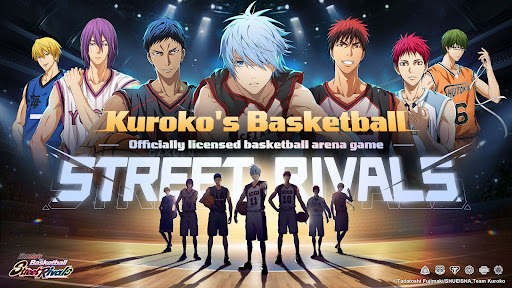
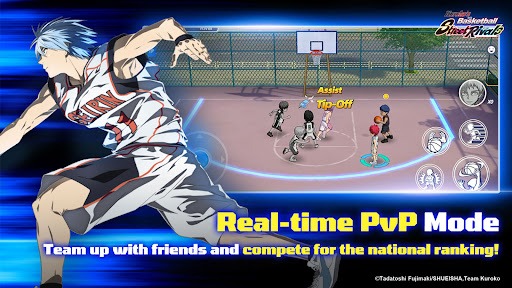

This all-new, hotblooded basketball competitive mobile game, "Kuroko's Basketball: Street Rivals," is an instant head-to-head action game adapted from the popular Japanese basketball anime "Kuroko's Basketball." It faithfully recreates the world of the original work. You can develop and train a wide array of iconic players like Kuroko Tetsuya and Kagami Taiga, and then take direct control to experience the anime's intense and thrilling basketball matches. With a variety of rich gameplay modes, get ready to reignite your passion and relive the excitement of "Kuroko's Basketball"!
[Breathtaking Skill Animations!]
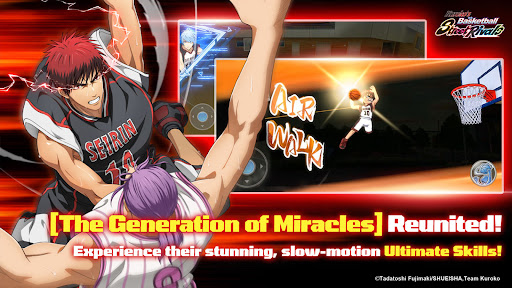
Perfectly recreate each character's signature skills, like Tetsuya Kuroko's "Misdirection" and Taiga Kagami's "Air Walk." Use your masterful controls to execute the most dazzling skill combos!
[Multiple Modes & Thrilling Multiplayer Online Battles!]
Beyond the core 3v3 match mode, enjoy a variety of other modes like 1v1, 2v2, and Ranked Matches. Dive into intense real-time competition against players from across the entire server!
[The Kings of Every Team Assemble!]
It's not just Seirin and Kaijo High-all the powerhouse schools from "Kuroko's Basketball" are gathered here! Freely develop your favorite players and bring them into the fray!
[100% Faithful Story, Featuring Original Voices!]
Dive into the distinctive Story Mode, which fully incorporates the original anime voice-overs and plot. Become a member of the team and personally experience every single match from the story!
แสดงเพิ่มเติม

1. ดาวน์โหลดตัวติดตั้ง MEmu และสิ้นสุดการติดตั้ง

2. เริ่ม MEmu จากนั้นเปิด Google Play บนหน้าแรก

3. ค้นหา Kuroko's Basketball™: SR ใน Google Play
Install
4. ดาวน์โหลดและติดตั้ง Kuroko's Basketball™: SR
5. เมื่อติดตั้งเสร็จให้คลิกที่ไอคอนเพื่อเริ่มใช้งาน

6. สนุกกับการเล่น Kuroko's Basketball™: SR บนพีซีด้วย MEmu
MEmu App Player เป็นอีมูเลเตอร์ Android ที่ดีที่สุดและผู้คนกว่า 50 ล้านคนเพลิดเพลินไปกับประสบการณ์การเล่นเกม Android ที่ยอดเยี่ยม เทคโนโลยีการจำลองเสมือนของ MEmu ช่วยให้คุณเล่นเกม Android หลายพันเกมได้อย่างราบรื่นบนพีซีของคุณแม้แต่เกมที่ต้องใช้กราฟิกมากที่สุด
จอใหญ่และกราฟฟิกสวยกว่า; เล่นได้นาน, ไม่ต้องใช้แบตเตอรี่โทรศัพท์หรือเน็ตโทรศัพท์.
ระบบปรับแต่งปุ่มคีย์บอร์ดและเม้าส์ตามที่คุณเลือก
เล่นมากกว่าหนึ่งเกมบน PC ในเวลาเดียวกันด้วยระบบหลายจอหรือ Multi-Instance manager.
Play Kuroko's Basketball™: SR on PC by following steps:

























![[ไกด์เกม] CookieRun Classic แนะนำ 5 คุกกี้น่าปั้น น่าลงทุน ที่มือใหม่ห้ามพลาด! (เล่นบน PC ผ่าน MEmu ให้ลื่นสุด ๆ) PC](https://www.memuplay.com/blog/wp-content/uploads/2026/08/579c01ab-a953-45b3-8115-9b6279b7d6f9.png)

















