Legends of Amberland - RPG
อัปเดตเมื่อ
เวอร์ชันปัจจุบัน
1.3.0
ให้บริการโดย

เวลาคุณเล่น Legends of Amberland - RPG, คุณอาจรู้สึกว่ามือคุณอาจบังจอแล้วทำให้ไม่ได้เล่นแบบเต็มที่. เล่นแบบไร้ขีดจำกัดด้วยเม้าส์และคีย์บอร์ด. MEmu มีตัวเลือกหลายอย่างให้คุณใช้งานเกมที่คุณเล่นแบบที่คุณต้องการ. ดาวน์โหลดและเล่น Legends of Amberland - RPG บน PC. เล่นนานแค่ไหนก็ได้, ไม่ต้องชาร์จแบตเตอรี่, หรือเจอคนโทรเข้ามาระหว่างเล่น. MEmu 9 เป็นตัวเลือกสำหรับการเล่น Legends of Amberland - RPG บน PC. ทางทีมงานเราได้ปรับแต่งเกม, ปรับให้เล่นเกมบางเกมได้เหมือนเล่น Legends of Amberland - RPG เป็นเกม PC เช่นเล็งด้วยเม้าส์หรือใช้คีย์บอร์ด. ระบบของเรายังทำให้คุณสามารถเปิดเล่นได้มากกว่า 2 เกมพร้อมๆกันในคอมของคุณ. และที่สำคัญที่สุด, ระบบโปรแกรมของเราสามารถทำให้คุณใช้ระบบของ PC ทำให้เกมลื่นเหมือนกับใช้โทรศัพท์รุ่นล่าสุด. เราไม่ได้ดูแลเรื่องการเล่นเกม, แต่เราดูแลถึงความสนุกสนานที่คุณได้จากการเล่นด้วย.
แสดงเพิ่มเติม
ดาวน์โหลด Legends of Amberland - RPG บน PC ด้วย MEmu Android Emulator สนุกกับการเล่นบนหน้าจอขนาดใหญ่ Legends of Amberland is a classic old-school RPG - a turn-based dungeon crawler you can play fully offline.
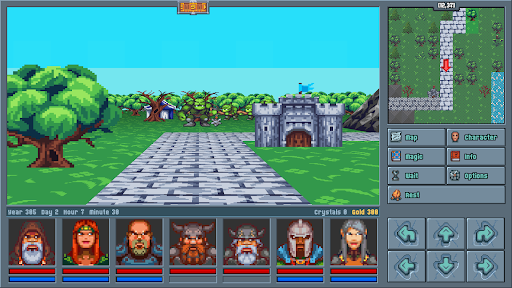
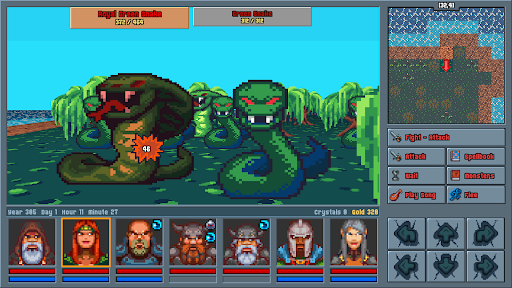
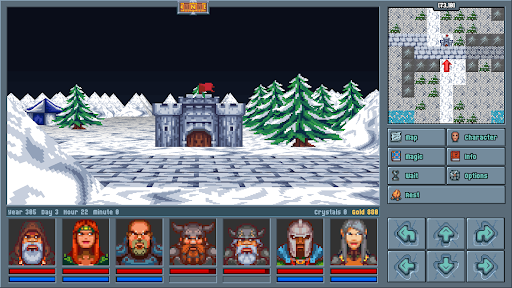
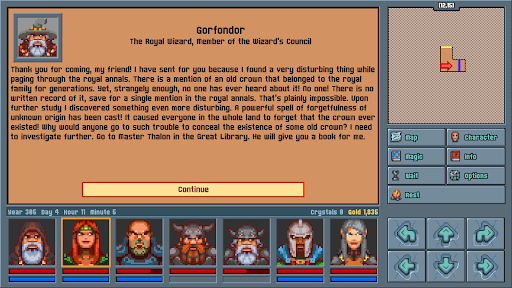
Legends of Amberland is a classic old-school RPG - a turn-based dungeon crawler you can play fully offline. With no ads, no in-app purchases, and no endless grind, this is a pure, premium RPG adventure built for true fans of role playing games.
YOUR EPIC QUEST
A royal wizard uncovers a forgotten crown, hidden from an entire kingdom by a mysterious spell of forgetfulness. He summons a party of seven heroes to find it and discover who erased it from memory. So begins a light, heroic, fairy-tale adventure across a living open world in this immersive single player journey.
A LOVE LETTER TO 90s CRPGs
Inspired by the golden age of PC gaming, Legends of Amberland brings first-person, grid-based movement and turn-based RPG combat straight to your phone. If you grew up on classic dungeon crawlers and party-based RPG mechanics, this game was made for you.
BUILD YOUR PARTY
Create and lead a squad of up to 7 heroes, hand-picked or pre-made. Choose your classes, explore a massive non-linear overworld, and tackle quests in any order you want - a traditional CRPG experience in the truest old-school tradition.
FAST, FAIR, NO GRIND
- Combat is 100% turn based, letting you play completely at your own pace.
- Travel is quick, inventory management is painless, and there is zero repetitive grinding.
- A rich, story driven adventure offering 25–40 hours of gameplay.
- Classic pixel art visuals with a light, heroic, and humorous tone.
100% OFFLINE ROLE PLAYING GAME
Play anytime, anywhere - Legends of Amberland runs entirely without an internet connection. It's a pay-once premium RPG with absolutely no microtransactions, no ads, no loot boxes, and no pay-to-win.
Originally created by Silver Lemur Games.
Your classic dungeon quest begins today.
แสดงเพิ่มเติม

1. ดาวน์โหลดตัวติดตั้ง MEmu และสิ้นสุดการติดตั้ง

2. เริ่ม MEmu จากนั้นเปิด Google Play บนหน้าแรก

3. ค้นหา Legends of Amberland - RPG ใน Google Play
Install
4. ดาวน์โหลดและติดตั้ง Legends of Amberland - RPG
5. เมื่อติดตั้งเสร็จให้คลิกที่ไอคอนเพื่อเริ่มใช้งาน

6. สนุกกับการเล่น Legends of Amberland - RPG บนพีซีด้วย MEmu
MEmu App Player เป็นอีมูเลเตอร์ Android ที่ดีที่สุดและผู้คนกว่า 50 ล้านคนเพลิดเพลินไปกับประสบการณ์การเล่นเกม Android ที่ยอดเยี่ยม เทคโนโลยีการจำลองเสมือนของ MEmu ช่วยให้คุณเล่นเกม Android หลายพันเกมได้อย่างราบรื่นบนพีซีของคุณแม้แต่เกมที่ต้องใช้กราฟิกมากที่สุด
จอใหญ่และกราฟฟิกสวยกว่า; เล่นได้นาน, ไม่ต้องใช้แบตเตอรี่โทรศัพท์หรือเน็ตโทรศัพท์.
ระบบปรับแต่งปุ่มคีย์บอร์ดและเม้าส์ตามที่คุณเลือก
เล่นมากกว่าหนึ่งเกมบน PC ในเวลาเดียวกันด้วยระบบหลายจอหรือ Multi-Instance manager.
Play Legends of Amberland - RPG on PC by following steps: