MA 2: President Simulator Lite
อัปเดตเมื่อ
เวอร์ชันปัจจุบัน
ให้บริการโดย

เวลาคุณเล่น MA 2: President Simulator Lite, คุณอาจรู้สึกว่ามือคุณอาจบังจอแล้วทำให้ไม่ได้เล่นแบบเต็มที่. เล่นแบบไร้ขีดจำกัดด้วยเม้าส์และคีย์บอร์ด. MEmu มีตัวเลือกหลายอย่างให้คุณใช้งานเกมที่คุณเล่นแบบที่คุณต้องการ. ดาวน์โหลดและเล่น MA 2: President Simulator Lite บน PC. เล่นนานแค่ไหนก็ได้, ไม่ต้องชาร์จแบตเตอรี่, หรือเจอคนโทรเข้ามาระหว่างเล่น. MEmu 9 เป็นตัวเลือกสำหรับการเล่น MA 2: President Simulator Lite บน PC. ทางทีมงานเราได้ปรับแต่งเกม, ปรับให้เล่นเกมบางเกมได้เหมือนเล่น MA 2: President Simulator Lite เป็นเกม PC เช่นเล็งด้วยเม้าส์หรือใช้คีย์บอร์ด. ระบบของเรายังทำให้คุณสามารถเปิดเล่นได้มากกว่า 2 เกมพร้อมๆกันในคอมของคุณ. และที่สำคัญที่สุด, ระบบโปรแกรมของเราสามารถทำให้คุณใช้ระบบของ PC ทำให้เกมลื่นเหมือนกับใช้โทรศัพท์รุ่นล่าสุด. เราไม่ได้ดูแลเรื่องการเล่นเกม, แต่เราดูแลถึงความสนุกสนานที่คุณได้จากการเล่นด้วย.
แสดงเพิ่มเติม
ดาวน์โหลด MA 2: President Simulator Lite บน PC ด้วย MEmu Android Emulator สนุกกับการเล่นบนหน้าจอขนาดใหญ่ Start with one of 181 modern countries and see how far you can take it.
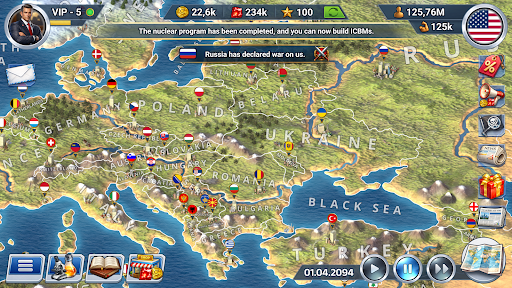
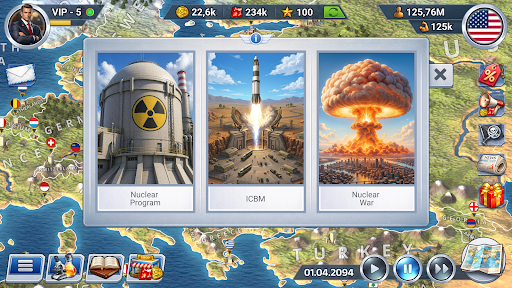
Start with one of 181 modern countries and see how far you can take it. Build a stronger economy, a more stable society and enough influence to matter on the world stage.
Play a realistic, offline, real-time president simulation game. Build your geopolitical strategy through trade, diplomacy, country development and military power. Invest in people, create alliances or prepare for war - the direction is yours.
BUILD THE ECONOMY
Turn taxes, production and trade into growth. Manage loans, produce resources and goods, build factories, mines, farms and power facilities, and use the budget to create the next stage of development.
DEVELOP THE COUNTRY
Make progress visible at home. Fund healthcare, education, science, infrastructure, culture, sports, tourism and justice. Appoint ministers and commanders and keep public mood from turning against you.
BUILD ALLIES (OR RIVALS)
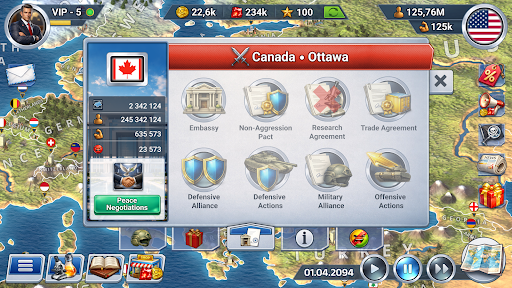
Decide who gets cooperation and who gets pressure. Open embassies, sign agreements, create alliances, vote in the UN, use sanctions and embargoes, and build a diplomatic network that supports your goals.
STRENGTHEN THE ARMY
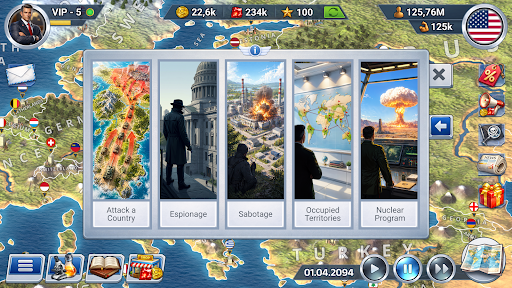
Diplomacy can fail. Prepare land, air and naval forces, research military technologies, use spies and saboteurs, defend your borders and fight turn-based 3D battles with infantry, artillery, tanks, aircraft, helicopters, submarines and warships.
PREPARE FOR CRISES
Growth means little if one crisis destroys it. Build reserves and react to epidemics, natural disasters, protests, economic crises, piracy and terrorism before they undo years of progress.
GROW YOUR INFLUENCE
Decide what your country stands for. Pass laws, choose ideology and state religion, develop tourism, build landmarks and host international cultural and sporting events. Use every system to grow your influence.
Choose your own grand strategy - economy, diplomacy, internal development, military power or a mix of everything. Build the country you want and see whether your plan can turn it into a global power.
The game is designed for entertainment purposes only. Any similarities to the real world, real people and geopolitical situations are coincidental.
Do you have questions or issues with the game? Email us at info@oxiwyle.com
Join the community on Discord, be the first to learn about all the news and updates: https://discord.com/invite/bNzwYDNstc
แสดงเพิ่มเติม

1. ดาวน์โหลดตัวติดตั้ง MEmu และสิ้นสุดการติดตั้ง

2. เริ่ม MEmu จากนั้นเปิด Google Play บนหน้าแรก

3. ค้นหา MA 2: President Simulator Lite ใน Google Play
Install
4. ดาวน์โหลดและติดตั้ง MA 2: President Simulator Lite
5. เมื่อติดตั้งเสร็จให้คลิกที่ไอคอนเพื่อเริ่มใช้งาน

6. สนุกกับการเล่น MA 2: President Simulator Lite บนพีซีด้วย MEmu
MEmu App Player เป็นอีมูเลเตอร์ Android ที่ดีที่สุดและผู้คนกว่า 50 ล้านคนเพลิดเพลินไปกับประสบการณ์การเล่นเกม Android ที่ยอดเยี่ยม เทคโนโลยีการจำลองเสมือนของ MEmu ช่วยให้คุณเล่นเกม Android หลายพันเกมได้อย่างราบรื่นบนพีซีของคุณแม้แต่เกมที่ต้องใช้กราฟิกมากที่สุด
จอใหญ่และกราฟฟิกสวยกว่า; เล่นได้นาน, ไม่ต้องใช้แบตเตอรี่โทรศัพท์หรือเน็ตโทรศัพท์.
ระบบปรับแต่งปุ่มคีย์บอร์ดและเม้าส์ตามที่คุณเลือก
เล่นมากกว่าหนึ่งเกมบน PC ในเวลาเดียวกันด้วยระบบหลายจอหรือ Multi-Instance manager.
Play MA 2: President Simulator Lite on PC by following steps:



























![[ไกด์เกม] CookieRun Classic แนะนำ 5 คุกกี้น่าปั้น น่าลงทุน ที่มือใหม่ห้ามพลาด! (เล่นบน PC ผ่าน MEmu ให้ลื่นสุด ๆ) PC](https://www.memuplay.com/blog/wp-content/uploads/2026/08/579c01ab-a953-45b3-8115-9b6279b7d6f9.png)


















