AI Video Generator - Vezo AI
อัปเดตเมื่อ
เวอร์ชันปัจจุบัน
5.6
ให้บริการโดย

เมื่อใช้ AI Video Generator - Vezo AI บนโทรศัพท์ของคุณไม่ต้องกังวลกับการชาร์จไฟมากเกินไปปลดปล่อยตัวคุณเองจากหน้าจอขนาดเล็กและสนุกกับการใช้แอพนี้บนหน้าจอขนาดใหญ่ จากนี้ไปรับประสบการณ์เต็มหน้าจอของแอปพลิเคชันของคุณด้วยคีย์บอร์ดและเมาส์ MEmu มีคุณสมบัติที่น่าแปลกใจที่คุณคาดหวัง: การติดตั้งที่รวดเร็วและการตั้งค่าที่ง่ายควบคุมได้ง่ายไม่ จำกัด แบตเตอรี่ข้อมูลมือถือและการโทรที่รบกวน MEmu 9 ใหม่ล่าสุดเป็นตัวเลือกที่ดีที่สุดสำหรับการใช้ Meitu – โปรแกรมแก้ไขภาพแนวธรรมชาติ บนคอมพิวเตอร์ของคุณ ด้วยรหัสการดูดซึมของเราผู้จัดการหลายอินสแตนซ์ทำให้สามารถเปิดบัญชี 2 บัญชีขึ้นไปในเวลาเดียวกันได้ และที่สำคัญที่สุดเอ็นจิ้นจำลองพิเศษของเราสามารถปลดปล่อยศักยภาพของPCของคุณและทำให้ทุกอย่างราบรื่นและสนุกสนาน
แสดงเพิ่มเติม
สัมผัสประสบการณ์สุดยอดการใช้งาน AI Video Generator - Vezo AI บนพีซีด้วย MEmu Play นี่คือโปรแกรมจำลอง Android ฟรีที่ทรงพลัง ให้คุณใช้งานแอป Android นับพันบนเดสก์ท็อป สนุกกับการเชื่อมต่อกับเพื่อนๆ และขัดเกลาผลงานของคุณอย่างมีประสิทธิภาพยิ่งขึ้น! ONE APP.
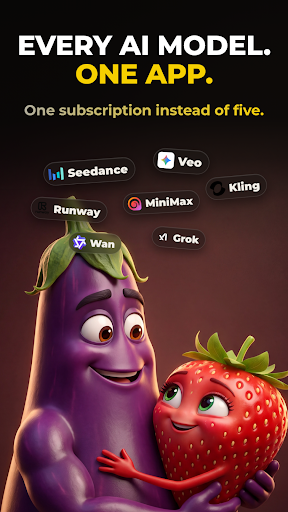

ONE APP. ALL THE AI.
Vezo brings the world's most powerful AI models together in a single app. Type an idea and watch it become a cinematic video, a stunning image, or a complete song with real vocals. There's nothing to learn — you describe, Vezo creates. Whether you're making content for TikTok, Reels and YouTube, designing visuals for your brand, or writing a song for someone you love, it all happens in one place, with one credit balance, in minutes.
Most AI apps lock you into a single model. Vezo gives you the full roster of today's leading AI engines — and when a new model drops, it lands in Vezo right away.
AI VIDEO — EVERY TOP MODEL
Turn plain text into cinematic video, or bring your photos to life:
• Seedance 2.5 — next-gen cinematic video with native audio, up to 15s
• Google Veo 3.1 — lifelike motion and rich sound
• OpenAI Sora 2 — hyper-realistic video with synced audio
• Kling 3 — fast, cinematic clips with lip-sync
• Wan 2.7 — Alibaba's model, up to 1080p
• Hailuo 2.3 — cinematic precision, emotional depth
• Grok Imagine — fast and creatively fearless
• P-Video — the quickest, most affordable way to test ideas
Choose your aspect ratio (9:16 for Shorts and Reels, 16:9 for YouTube, 1:1 for feeds), set the clip length, and in image-to-video mode decide how your photo is used: opening frame, first-and-last pair for seamless morphs, or a style reference the whole video follows.
AI IMAGE — ANY STYLE YOU CAN IMAGINE
Create images from text, or upload a photo and reshape it with a sentence:
• Nano Banana 2 — real-world knowledge, flawless multilingual text
• GPT Image 2 — near-perfect text and surgical edits
• Flux 2 Pro — uncompromising photorealism
• Reve v2 — layout-first design, beautiful typography
• Seedream 4.5 — cinematic detail, accurate text
• Grok Imagine — fast, stylized, less filtered
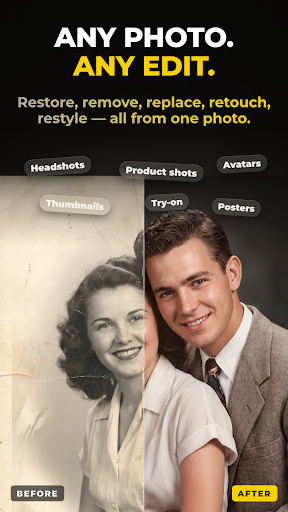
Restore old family photos. Remove strangers from the background. Turn a selfie into a professional headshot, or your pet into a 3D character. When an image turns out great, one tap animates it into video.
AI SONG — FROM A FEELING TO A FINISHED TRACK
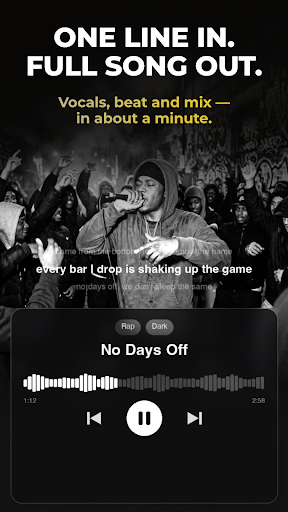
Describe what the song is about and Vezo does the rest — lyrics, vocals, instruments, production:
• AI-written lyrics in any language — English, Turkish, Spanish and beyond
• Review and edit every lyric line before the music is made
• 40+ genres, from Pop, Hip-Hop and R&B to EDM and Orchestral
• 18 moods, auto length or 1–3 minutes
• Unique AI cover artwork and title for every song
• Real files: download the MP3 or share it anywhere
Write a birthday anthem for a friend, a lullaby in your grandmother's language, or the breakup ballad you never knew you needed.
AI TOOLS — RESCUE ANY FOOTAGE
• Object Removal — erase photobombers, logos or clutter from any video; the scene rebuilds seamlessly
• AI Extend — describe what happens next and extend any clip up to 15 seconds
▶ SEE WHAT OTHERS MADE
Open the community feed and scroll real creations with the exact prompts behind them. Steal the recipe, tweak it, make it yours.
WHY CREATORS CHOOSE VEZO
• Always current — new models added as soon as they release
• One balance — the same credits work across video, image, song and tools
• Fair by design — credits only charged when your generation succeeds
• Built for focus — fast, dark, clutter-free
Download Vezo and turn your next idea into something you can watch, post and share — before your coffee gets cold.
แสดงเพิ่มเติม

1. ดาวน์โหลดตัวติดตั้ง MEmu และสิ้นสุดการติดตั้ง

2. เริ่ม MEmu จากนั้นเปิด Google Play บนหน้าแรก

3. ค้นหา AI Video Generator - Vezo AI ใน Google Play
Install
4. ดาวน์โหลดและติดตั้ง AI Video Generator - Vezo AI
5. เมื่อติดตั้งเสร็จให้คลิกที่ไอคอนเพื่อเริ่มใช้งาน

6. ใช้ MEmu เพื่อสัมผัสประสบการณ์ AI Video Generator - Vezo AI บนคอมพิวเตอร์ของคุณ
MEmu Play คือโปรแกรมจำลอง Android ที่ดีที่สุด มีผู้ใช้มากกว่า 50 ล้านคน มอบประสบการณ์การใช้งานแอป Android ขั้นสุดยอดให้กับคุณ เทคโนโลยีจำลองเสมือนของ MEmu ช่วยให้คุณรันแอป Android หลายพันแอปบนคอมพิวเตอร์ได้อย่างราบรื่น แม้แอปที่กินทรัพยากรเครื่องสูงที่สุด
จอใหญ่และกราฟฟิกสวยกว่า; เล่นได้นาน, ไม่ต้องใช้แบตเตอรี่โทรศัพท์หรือเน็ตโทรศัพท์.
ระบบปรับแต่งปุ่มคีย์บอร์ดและเม้าส์ตามที่คุณเลือก
เล่นมากกว่าหนึ่งเกมบน PC ในเวลาเดียวกันด้วยระบบหลายจอหรือ Multi-Instance manager.
Use AI Video Generator - Vezo AI on PC by following steps: