BinkBink:AI game maker&Play
อัปเดตเมื่อ
เวอร์ชันปัจจุบัน
1.0.571
ให้บริการโดย

เมื่อใช้ BinkBink:AI game maker&Play บนโทรศัพท์ของคุณไม่ต้องกังวลกับการชาร์จไฟมากเกินไปปลดปล่อยตัวคุณเองจากหน้าจอขนาดเล็กและสนุกกับการใช้แอพนี้บนหน้าจอขนาดใหญ่ จากนี้ไปรับประสบการณ์เต็มหน้าจอของแอปพลิเคชันของคุณด้วยคีย์บอร์ดและเมาส์ MEmu มีคุณสมบัติที่น่าแปลกใจที่คุณคาดหวัง: การติดตั้งที่รวดเร็วและการตั้งค่าที่ง่ายควบคุมได้ง่ายไม่ จำกัด แบตเตอรี่ข้อมูลมือถือและการโทรที่รบกวน MEmu 9 ใหม่ล่าสุดเป็นตัวเลือกที่ดีที่สุดสำหรับการใช้ Meitu – โปรแกรมแก้ไขภาพแนวธรรมชาติ บนคอมพิวเตอร์ของคุณ ด้วยรหัสการดูดซึมของเราผู้จัดการหลายอินสแตนซ์ทำให้สามารถเปิดบัญชี 2 บัญชีขึ้นไปในเวลาเดียวกันได้ และที่สำคัญที่สุดเอ็นจิ้นจำลองพิเศษของเราสามารถปลดปล่อยศักยภาพของPCของคุณและทำให้ทุกอย่างราบรื่นและสนุกสนาน
แสดงเพิ่มเติม
สัมผัสประสบการณ์สุดยอดการใช้งาน BinkBink:AI game maker&Play บนพีซีด้วย MEmu Play นี่คือโปรแกรมจำลอง Android ฟรีที่ทรงพลัง ให้คุณใช้งานแอป Android นับพันบนเดสก์ท็อป สนุกกับการเชื่อมต่อกับเพื่อนๆ และขัดเกลาผลงานของคุณอย่างมีประสิทธิภาพยิ่งขึ้น! BinkBink - AI Game Maker.
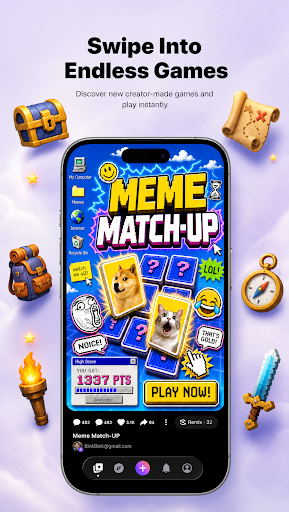
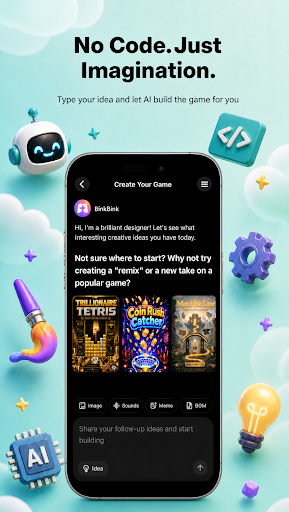
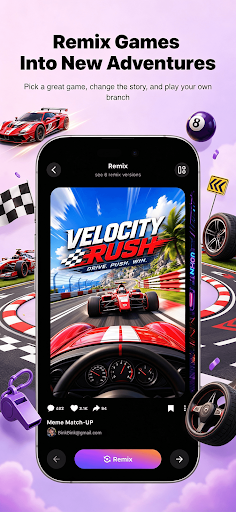
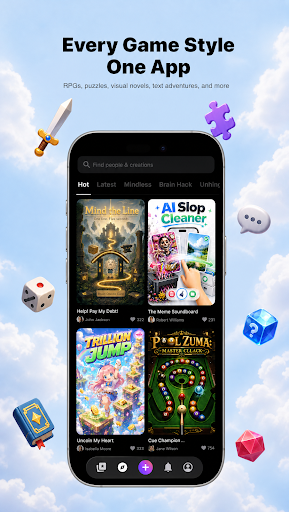
BinkBink - AI Game Maker. Turn any idea into a playable game.
No code. No art skills. No development team. BinkBink is an AI game maker and AI game generator that builds a complete, playable casual game from one sentence. This is not a demo, a prototype, or a concept render. It is a finished game you can open, play, and share right away.
Everything here works from plain language. There is no no-code setup, no engine, and nothing to install before you start.
HOW IT WORKS
Type it. Describe the game you want in a single sentence, a text to game prompt with no forms, no setup, and no technical terms.
Watch it build. BinkBink generates the art, rules, levels, and audio, then assembles them into a working game in minutes.Play and remix. Open your game, play it, then change one thing and remix it into a new version. Keep the parts you like, replace the rest.
WHAT YOU CAN MAKE
- Merge games, match-3 boards, and puzzle levels
- Tower defense, survival, and endless runners
- Simulation games, shop builders, and restaurant management sims
- Interactive story and visual novel style games with branching choices
- Sandbox play and indie game experiments you can remix
- Whatever else you describe, as long as it fits a casual play session
- Templates are one starting point out of many. The generator is the main way to build here, and it works from your description alone.
WHY PEOPLE KEEP PLAYING
- Fast to finish. Most games take under two minutes to play through, so you get to the fun part quickly.
- Worth replaying. Games are tuned for short repeat sessions, not one-and-done novelty.
- Easy to share. Send a link and your friends are playing in one tap. No install, no account, no waiting.
-Yours to keep. Every game you generate stays in your library and can be remixed as many times as you want.
BUILT FOR CREATORS
If you are an indie game developer or a first-time game creator, BinkBink removes the parts that slow you down. Skip the art pipeline, the level design, and the engine setup. Start from a playable build and spend your time on creating instead. Beginners get a finished game on the first try. Experienced creators get a fast first draft.
JOIN THE COMMUNITY
BinkBink is a place to share what you make, play what other people made, and remix anything that catches your eye. Every game you publish gives someone else a new starting point.
Start with one sentence. See what comes out.
The AI game maker and AI game generator behind BinkBink works from text to game prompts, turning a description into a game worth replaying.
Official website: https://www.binkbink.ai
แสดงเพิ่มเติม

1. ดาวน์โหลดตัวติดตั้ง MEmu และสิ้นสุดการติดตั้ง

2. เริ่ม MEmu จากนั้นเปิด Google Play บนหน้าแรก

3. ค้นหา BinkBink:AI game maker&Play ใน Google Play
Install
4. ดาวน์โหลดและติดตั้ง BinkBink:AI game maker&Play
5. เมื่อติดตั้งเสร็จให้คลิกที่ไอคอนเพื่อเริ่มใช้งาน

6. ใช้ MEmu เพื่อสัมผัสประสบการณ์ BinkBink:AI game maker&Play บนคอมพิวเตอร์ของคุณ
MEmu Play คือโปรแกรมจำลอง Android ที่ดีที่สุด มีผู้ใช้มากกว่า 50 ล้านคน มอบประสบการณ์การใช้งานแอป Android ขั้นสุดยอดให้กับคุณ เทคโนโลยีจำลองเสมือนของ MEmu ช่วยให้คุณรันแอป Android หลายพันแอปบนคอมพิวเตอร์ได้อย่างราบรื่น แม้แอปที่กินทรัพยากรเครื่องสูงที่สุด
จอใหญ่และกราฟฟิกสวยกว่า; เล่นได้นาน, ไม่ต้องใช้แบตเตอรี่โทรศัพท์หรือเน็ตโทรศัพท์.
ระบบปรับแต่งปุ่มคีย์บอร์ดและเม้าส์ตามที่คุณเลือก
เล่นมากกว่าหนึ่งเกมบน PC ในเวลาเดียวกันด้วยระบบหลายจอหรือ Multi-Instance manager.
Use BinkBink:AI game maker&Play on PC by following steps: