Kontakt: VKontakte, VK, ВК app
อัปเดตเมื่อ
เวอร์ชันปัจจุบัน
1.6.0
ให้บริการโดย

เมื่อใช้ Kontakt: VKontakte, VK, ВК app บนโทรศัพท์ของคุณไม่ต้องกังวลกับการชาร์จไฟมากเกินไปปลดปล่อยตัวคุณเองจากหน้าจอขนาดเล็กและสนุกกับการใช้แอพนี้บนหน้าจอขนาดใหญ่ จากนี้ไปรับประสบการณ์เต็มหน้าจอของแอปพลิเคชันของคุณด้วยคีย์บอร์ดและเมาส์ MEmu มีคุณสมบัติที่น่าแปลกใจที่คุณคาดหวัง: การติดตั้งที่รวดเร็วและการตั้งค่าที่ง่ายควบคุมได้ง่ายไม่ จำกัด แบตเตอรี่ข้อมูลมือถือและการโทรที่รบกวน MEmu 9 ใหม่ล่าสุดเป็นตัวเลือกที่ดีที่สุดสำหรับการใช้ Meitu – โปรแกรมแก้ไขภาพแนวธรรมชาติ บนคอมพิวเตอร์ของคุณ ด้วยรหัสการดูดซึมของเราผู้จัดการหลายอินสแตนซ์ทำให้สามารถเปิดบัญชี 2 บัญชีขึ้นไปในเวลาเดียวกันได้ และที่สำคัญที่สุดเอ็นจิ้นจำลองพิเศษของเราสามารถปลดปล่อยศักยภาพของPCของคุณและทำให้ทุกอย่างราบรื่นและสนุกสนาน
แสดงเพิ่มเติม
ดาวน์โหลด Kontakt: VKontakte, VK, ВК app บน PC ด้วย MEmu Android Emulator สนุกกับการเล่นบนหน้าจอขนาดใหญ่ Kontakt – is a new, fast and reliable client for VK.
Kontakt – is a new, fast and reliable client for VK.
At the core of our client are the latest trends in Material Design. This applies to both the appearance and building the application from scratch. "Kontakt" combines the convenience and advanced functionality compared with the variety of VK clients that we have today.
Deep optimization combined with the use of the fundamentals of the Android architecture has made it possible to achieve excellent speed and reliability of work. Our task is to make the most convenient, functional and optimized client for VKontakte.
"Kontakt" features:
- Fast and beautiful feed:
News, Journals, Recommendations, Friends, Communities, Photos.
- Be like a ninja!
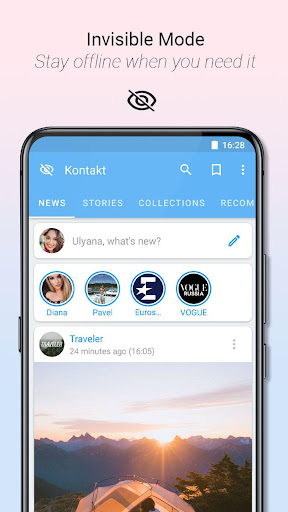
Invisible mode – If it’s possible – be online, unread messages – read messages and leave them unread, hide typing, browse stories anonymously.
- Powerful search:
Advanced search engine. Advanced video search filters. Documents and photos search!
- Messenger:
Full-featured chats, important messages and message search, editing + deleting messages.
- Customization:
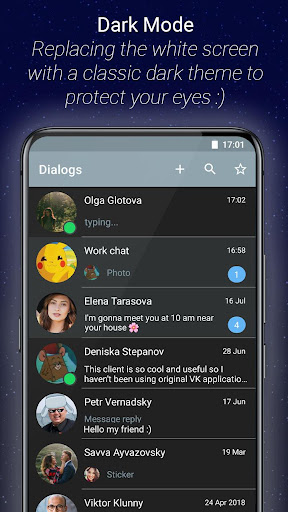
Light and dark mode with advanced customization in the Material Design color palette. Wallpapers in chat with a choice of blur level.
- Push-notifications:
Advanced notification settings. Get rid of the excess, not missing important.
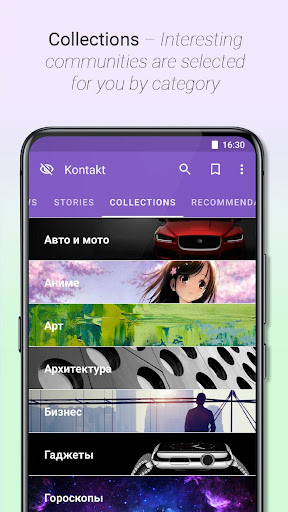
- Collections:
Interesting communities by category.
- Additional functions:
* Important messages - mark important messages to provide quick access to important information.
* Shows the user's device online (PC, Android, iPhone, iPad, Windows Mobile)
* Watching friends newsfeed
* And also, some other convenient features!
Feel free to share your opinions and suggestions on the work of Kontakt in Google Play reviews!
Let's make the best client for VK together.
แสดงเพิ่มเติม

1. ดาวน์โหลดตัวติดตั้ง MEmu และสิ้นสุดการติดตั้ง

2. เริ่ม MEmu จากนั้นเปิด Google Play บนหน้าแรก

3. ค้นหา Kontakt: VKontakte, VK, ВК app ใน Google Play
Install
4. ดาวน์โหลดและติดตั้ง Kontakt: VKontakte, VK, ВК app
5. เมื่อติดตั้งเสร็จให้คลิกที่ไอคอนเพื่อเริ่มใช้งาน

6. ใช้ MEmu เพื่อสัมผัสประสบการณ์ Kontakt: VKontakte, VK, ВК app บนคอมพิวเตอร์ของคุณ
MEmu Play คือโปรแกรมจำลอง Android ที่ดีที่สุด มีผู้ใช้มากกว่า 50 ล้านคน มอบประสบการณ์การใช้งานแอป Android ขั้นสุดยอดให้กับคุณ เทคโนโลยีจำลองเสมือนของ MEmu ช่วยให้คุณรันแอป Android หลายพันแอปบนคอมพิวเตอร์ได้อย่างราบรื่น แม้แอปที่กินทรัพยากรเครื่องสูงที่สุด
จอใหญ่และกราฟฟิกสวยกว่า; เล่นได้นาน, ไม่ต้องใช้แบตเตอรี่โทรศัพท์หรือเน็ตโทรศัพท์.
ระบบปรับแต่งปุ่มคีย์บอร์ดและเม้าส์ตามที่คุณเลือก
เล่นมากกว่าหนึ่งเกมบน PC ในเวลาเดียวกันด้วยระบบหลายจอหรือ Multi-Instance manager.
Use Kontakt: VKontakte, VK, ВК app on PC by following steps: