Mini Piano Lite
อัปเดตเมื่อ
เวอร์ชันปัจจุบัน
5.2.12
ให้บริการโดย

เมื่อใช้ Mini Piano Lite บนโทรศัพท์ของคุณไม่ต้องกังวลกับการชาร์จไฟมากเกินไปปลดปล่อยตัวคุณเองจากหน้าจอขนาดเล็กและสนุกกับการใช้แอพนี้บนหน้าจอขนาดใหญ่ จากนี้ไปรับประสบการณ์เต็มหน้าจอของแอปพลิเคชันของคุณด้วยคีย์บอร์ดและเมาส์ MEmu มีคุณสมบัติที่น่าแปลกใจที่คุณคาดหวัง: การติดตั้งที่รวดเร็วและการตั้งค่าที่ง่ายควบคุมได้ง่ายไม่ จำกัด แบตเตอรี่ข้อมูลมือถือและการโทรที่รบกวน MEmu 9 ใหม่ล่าสุดเป็นตัวเลือกที่ดีที่สุดสำหรับการใช้ Meitu – โปรแกรมแก้ไขภาพแนวธรรมชาติ บนคอมพิวเตอร์ของคุณ ด้วยรหัสการดูดซึมของเราผู้จัดการหลายอินสแตนซ์ทำให้สามารถเปิดบัญชี 2 บัญชีขึ้นไปในเวลาเดียวกันได้ และที่สำคัญที่สุดเอ็นจิ้นจำลองพิเศษของเราสามารถปลดปล่อยศักยภาพของPCของคุณและทำให้ทุกอย่างราบรื่นและสนุกสนาน
แสดงเพิ่มเติม
ดาวน์โหลด Mini Piano Lite บน PC ด้วย MEmu Android Emulator สนุกกับการเล่นบนหน้าจอขนาดใหญ่ Mini Piano Lite is a very responsive and realistic sounding piano for Android.
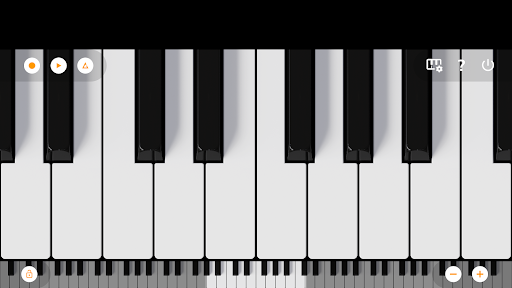
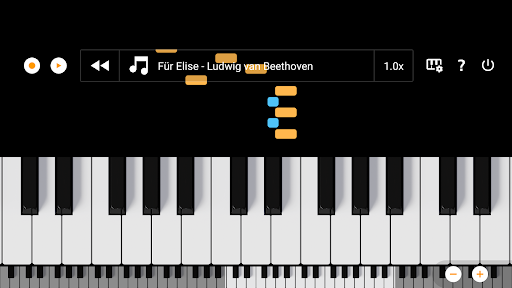
Mini Piano Lite is a very responsive and realistic sounding piano for Android. It has been thoroughly optimized, resulting in a very enjoyable playing experience while keeping the install size to a minimum.
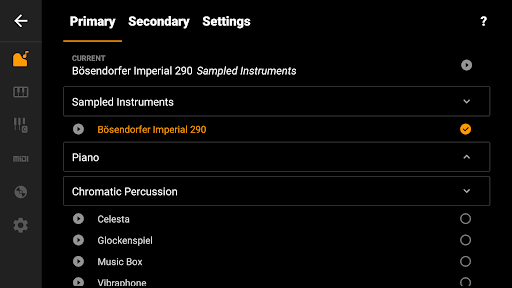
Don't let the name fool you, this is a top digital piano instrument for in your pocket. It features a full keyboard with 88 zoomable and scrollable keys, with various display modes. The default instrument is a beautiful sampled piano, that sounds like the real deal, but there are also 128 other instruments included that cover a wide range of instrument types.
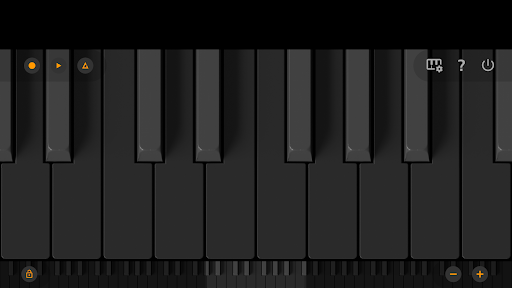
The app has a great minimalist design (with Dark Mode support), that stays out of your way. You can play chords or melodies and record your ideas or songs as MIDI files and export them (on a later moment if you want) to MP3, AAC or WAV. Or use the MIDI file in your favorite editor.
Also included is a song mode with falling blocks, where you can learn to play new songs.
We took great care to minimise ad disruption by using only a single banner. No popups, no videos, no nothing. A simple banner to support our work.
So there you have it, a small but very powerful piano app, loved by many many users. Why not give it a try?
The app is optimized for phone, tablet and Chromebook.
Let us know if you have a feature request or other feedback. You can email us at feedback@umito.nl
==Features==
★ Fast, responsive and beautiful virtual piano
★ 88 keys
★ Great sampled paino sound
★ 128 midi sounds
★ Learn to play songs
★ Dark mode support with full dark keyboard
★ Optimized for tablet, phone and Chromebook
★ Record songs and set them as ringtone
★ Export recordings to MP3, AAC or WAV
★ Multitouch support for using all your fingers
★ Easily zoom in and out to fit the keyboard to your screen
★ Label notes with their names and octaves
★ Use a metronome to keep a certain tempo
★ Transpose keyboard by note or tune it by Hz.
★ MIDI in support (use it with a external keyboard)
★ Option to disable white key touch area between black keys.
Want a ad-free experience? Purchase Mini Piano Pro or KeyChord.
If you are looking for an educational version without ads that can be bulk licensed with a large discount for use in schools: feel free to email us at edu@umito.nl .
แสดงเพิ่มเติม

1. ดาวน์โหลดตัวติดตั้ง MEmu และสิ้นสุดการติดตั้ง

2. เริ่ม MEmu จากนั้นเปิด Google Play บนหน้าแรก

3. ค้นหา Mini Piano Lite ใน Google Play
Install
4. ดาวน์โหลดและติดตั้ง Mini Piano Lite
5. เมื่อติดตั้งเสร็จให้คลิกที่ไอคอนเพื่อเริ่มใช้งาน

6. ใช้ MEmu เพื่อสัมผัสประสบการณ์ Mini Piano Lite บนคอมพิวเตอร์ของคุณ
MEmu Play คือโปรแกรมจำลอง Android ที่ดีที่สุด มีผู้ใช้มากกว่า 50 ล้านคน มอบประสบการณ์การใช้งานแอป Android ขั้นสุดยอดให้กับคุณ เทคโนโลยีจำลองเสมือนของ MEmu ช่วยให้คุณรันแอป Android หลายพันแอปบนคอมพิวเตอร์ได้อย่างราบรื่น แม้แอปที่กินทรัพยากรเครื่องสูงที่สุด
จอใหญ่และกราฟฟิกสวยกว่า; เล่นได้นาน, ไม่ต้องใช้แบตเตอรี่โทรศัพท์หรือเน็ตโทรศัพท์.
ระบบปรับแต่งปุ่มคีย์บอร์ดและเม้าส์ตามที่คุณเลือก
เล่นมากกว่าหนึ่งเกมบน PC ในเวลาเดียวกันด้วยระบบหลายจอหรือ Multi-Instance manager.
Use Mini Piano Lite on PC by following steps: