PLUS App (Official)
อัปเดตเมื่อ
เวอร์ชันปัจจุบัน
3.146.0
ให้บริการโดย

เมื่อใช้ PLUS App (Official) บนโทรศัพท์ของคุณไม่ต้องกังวลกับการชาร์จไฟมากเกินไปปลดปล่อยตัวคุณเองจากหน้าจอขนาดเล็กและสนุกกับการใช้แอพนี้บนหน้าจอขนาดใหญ่ จากนี้ไปรับประสบการณ์เต็มหน้าจอของแอปพลิเคชันของคุณด้วยคีย์บอร์ดและเมาส์ MEmu มีคุณสมบัติที่น่าแปลกใจที่คุณคาดหวัง: การติดตั้งที่รวดเร็วและการตั้งค่าที่ง่ายควบคุมได้ง่ายไม่ จำกัด แบตเตอรี่ข้อมูลมือถือและการโทรที่รบกวน MEmu 9 ใหม่ล่าสุดเป็นตัวเลือกที่ดีที่สุดสำหรับการใช้ Meitu – โปรแกรมแก้ไขภาพแนวธรรมชาติ บนคอมพิวเตอร์ของคุณ ด้วยรหัสการดูดซึมของเราผู้จัดการหลายอินสแตนซ์ทำให้สามารถเปิดบัญชี 2 บัญชีขึ้นไปในเวลาเดียวกันได้ และที่สำคัญที่สุดเอ็นจิ้นจำลองพิเศษของเราสามารถปลดปล่อยศักยภาพของPCของคุณและทำให้ทุกอย่างราบรื่นและสนุกสนาน
แสดงเพิ่มเติม
ดาวน์โหลด PLUS App (Official) บน PC ด้วย MEmu Android Emulator สนุกกับการเล่นบนหน้าจอขนาดใหญ่ The PLUS App from PLUS Malaysia Berhad puts you in control of your road trip along our highway.
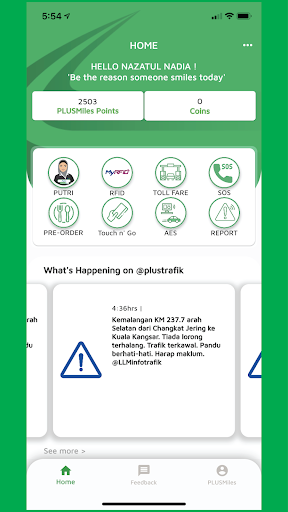
The PLUS App from PLUS Malaysia Berhad puts you in control of your road trip along our highway.
New and fresh look with the main home page for easy navigation.
Dynamic road updates
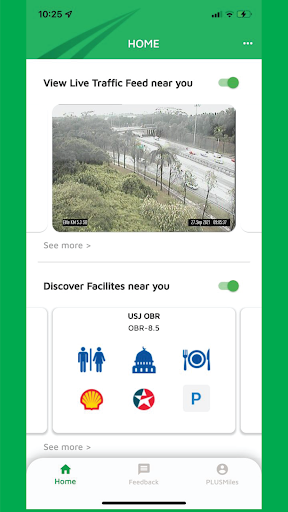
Our in-app incident feed via @PLUSTrafik keeps you informed about any unusual traffic conditions along your route on our highway while the CCTV camera views let you see what’s happening up ahead.
Plan your journey
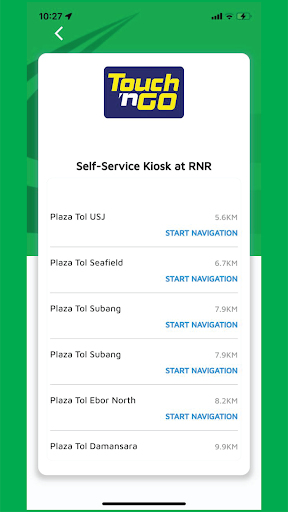
With our layout, you can easily check the nearby facilities of R&Rs/ Layby/ Overhead Bridge Restaurants along your journey that provide a unique dining experience, or where you can take a break. The app also calculates the toll rates for your trip so you know every detail of your highway traveling.
PLUSMiles privileges
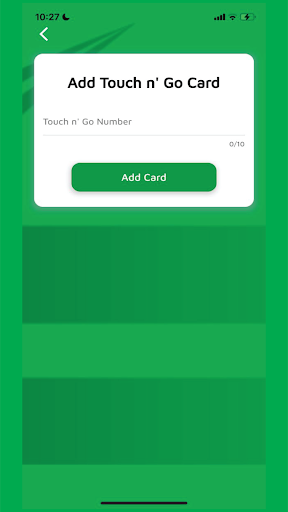
Now you can update your PLUSMiles account by adding a new Touch N Go card, checking PLUSMiles points balance, and redeeming them directly through your phone at selected vendors. What will you redeem today?
Download it now and see where it can take you.
Enjoy the new experience with PLUS Highway!
If you're facing any issues with your PLUSMiles account please contact us at customerfeedback@plus.com.my
แสดงเพิ่มเติม

1. ดาวน์โหลดตัวติดตั้ง MEmu และสิ้นสุดการติดตั้ง

2. เริ่ม MEmu จากนั้นเปิด Google Play บนหน้าแรก

3. ค้นหา PLUS App (Official) ใน Google Play
Install
4. ดาวน์โหลดและติดตั้ง PLUS App (Official)
5. เมื่อติดตั้งเสร็จให้คลิกที่ไอคอนเพื่อเริ่มใช้งาน

6. ใช้ MEmu เพื่อสัมผัสประสบการณ์ PLUS App (Official) บนคอมพิวเตอร์ของคุณ
MEmu Play คือโปรแกรมจำลอง Android ที่ดีที่สุด มีผู้ใช้มากกว่า 50 ล้านคน มอบประสบการณ์การใช้งานแอป Android ขั้นสุดยอดให้กับคุณ เทคโนโลยีจำลองเสมือนของ MEmu ช่วยให้คุณรันแอป Android หลายพันแอปบนคอมพิวเตอร์ได้อย่างราบรื่น แม้แอปที่กินทรัพยากรเครื่องสูงที่สุด
จอใหญ่และกราฟฟิกสวยกว่า; เล่นได้นาน, ไม่ต้องใช้แบตเตอรี่โทรศัพท์หรือเน็ตโทรศัพท์.
ระบบปรับแต่งปุ่มคีย์บอร์ดและเม้าส์ตามที่คุณเลือก
เล่นมากกว่าหนึ่งเกมบน PC ในเวลาเดียวกันด้วยระบบหลายจอหรือ Multi-Instance manager.
Use PLUS App (Official) on PC by following steps: