Swift PDF - Reader & Tools
อัปเดตเมื่อ
เวอร์ชันปัจจุบัน
1.0.1
ให้บริการโดย

เมื่อใช้ Swift PDF - Reader & Tools บนโทรศัพท์ของคุณไม่ต้องกังวลกับการชาร์จไฟมากเกินไปปลดปล่อยตัวคุณเองจากหน้าจอขนาดเล็กและสนุกกับการใช้แอพนี้บนหน้าจอขนาดใหญ่ จากนี้ไปรับประสบการณ์เต็มหน้าจอของแอปพลิเคชันของคุณด้วยคีย์บอร์ดและเมาส์ MEmu มีคุณสมบัติที่น่าแปลกใจที่คุณคาดหวัง: การติดตั้งที่รวดเร็วและการตั้งค่าที่ง่ายควบคุมได้ง่ายไม่ จำกัด แบตเตอรี่ข้อมูลมือถือและการโทรที่รบกวน MEmu 9 ใหม่ล่าสุดเป็นตัวเลือกที่ดีที่สุดสำหรับการใช้ Meitu – โปรแกรมแก้ไขภาพแนวธรรมชาติ บนคอมพิวเตอร์ของคุณ ด้วยรหัสการดูดซึมของเราผู้จัดการหลายอินสแตนซ์ทำให้สามารถเปิดบัญชี 2 บัญชีขึ้นไปในเวลาเดียวกันได้ และที่สำคัญที่สุดเอ็นจิ้นจำลองพิเศษของเราสามารถปลดปล่อยศักยภาพของPCของคุณและทำให้ทุกอย่างราบรื่นและสนุกสนาน
แสดงเพิ่มเติม
สัมผัสประสบการณ์สุดยอดการใช้งาน Swift PDF - Reader & Tools บนพีซีด้วย MEmu Play นี่คือโปรแกรมจำลอง Android ฟรีที่ทรงพลัง ให้คุณใช้งานแอป Android นับพันบนเดสก์ท็อป สนุกกับการเชื่อมต่อกับเพื่อนๆ และขัดเกลาผลงานของคุณอย่างมีประสิทธิภาพยิ่งขึ้น! PDF Reader and Document Tools.
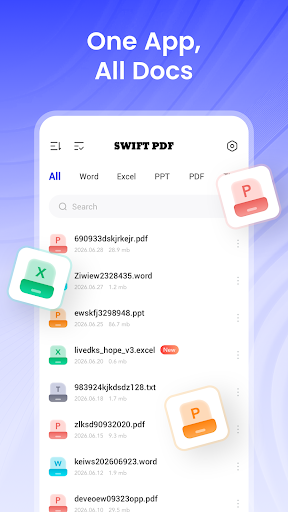
PDF Reader and Document Tools
Swift PDF brings document reading and PDF tools to your Android phone or tablet. Open PDF, Word, Excel, and PowerPoint files and organize documents for study, work, and everyday use.
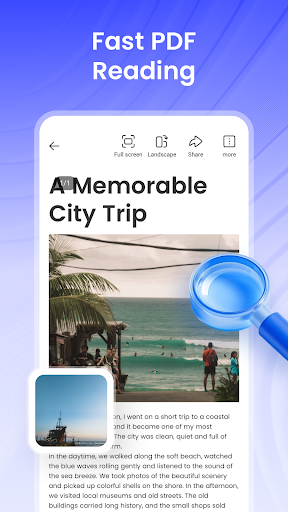
Read PDF and Office Documents
View supported files stored on your device and browse their contents. Find documents in the file list, return to recently opened files, and add frequently used documents to favorites.
Scan and Create PDFs
Capture paper documents with your device camera and save them as PDFs. Create PDF files from JPG and PNG images, including photos, receipts, notes, and study materials.
Convert Document Formats
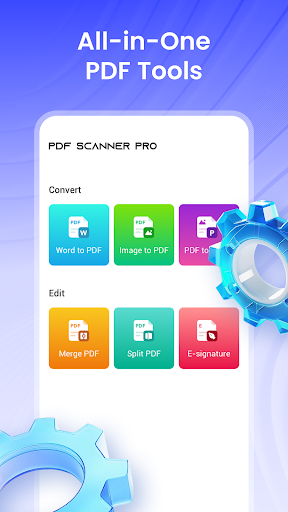
Use the available conversion tools to turn supported documents and images into PDF files. View and organize the converted files alongside your other documents.
Merge and Split PDF Files
Combine multiple PDFs into one document or divide a PDF into separate files. Select the documents you need and review your selection before starting the operation.
Document Read-Aloud
Listen to supported document text with the read-aloud feature. Narration can continue when the app moves to the background or the screen is locked. Pause or stop playback through the media notification.
Manage Local Documents
Find and organize compatible documents stored in different folders on your device. Access your files through the document list, recent files, and favorites.
For Everyday Document Tasks
Swift PDF combines reading, scanning, PDF creation, conversion, and file management in one app. Use it to review reports, read study materials, and manage your everyday documents.
แสดงเพิ่มเติม

1. ดาวน์โหลดตัวติดตั้ง MEmu และสิ้นสุดการติดตั้ง

2. เริ่ม MEmu จากนั้นเปิด Google Play บนหน้าแรก

3. ค้นหา Swift PDF - Reader & Tools ใน Google Play
Install
4. ดาวน์โหลดและติดตั้ง Swift PDF - Reader & Tools
5. เมื่อติดตั้งเสร็จให้คลิกที่ไอคอนเพื่อเริ่มใช้งาน

6. ใช้ MEmu เพื่อสัมผัสประสบการณ์ Swift PDF - Reader & Tools บนคอมพิวเตอร์ของคุณ
MEmu Play คือโปรแกรมจำลอง Android ที่ดีที่สุด มีผู้ใช้มากกว่า 50 ล้านคน มอบประสบการณ์การใช้งานแอป Android ขั้นสุดยอดให้กับคุณ เทคโนโลยีจำลองเสมือนของ MEmu ช่วยให้คุณรันแอป Android หลายพันแอปบนคอมพิวเตอร์ได้อย่างราบรื่น แม้แอปที่กินทรัพยากรเครื่องสูงที่สุด
จอใหญ่และกราฟฟิกสวยกว่า; เล่นได้นาน, ไม่ต้องใช้แบตเตอรี่โทรศัพท์หรือเน็ตโทรศัพท์.
ระบบปรับแต่งปุ่มคีย์บอร์ดและเม้าส์ตามที่คุณเลือก
เล่นมากกว่าหนึ่งเกมบน PC ในเวลาเดียวกันด้วยระบบหลายจอหรือ Multi-Instance manager.
Use Swift PDF - Reader & Tools on PC by following steps: