WebMD: Symptom Checker
อัปเดตเมื่อ
เวอร์ชันปัจจุบัน
11.17.4
ให้บริการโดย

เมื่อใช้ WebMD: Symptom Checker บนโทรศัพท์ของคุณไม่ต้องกังวลกับการชาร์จไฟมากเกินไปปลดปล่อยตัวคุณเองจากหน้าจอขนาดเล็กและสนุกกับการใช้แอพนี้บนหน้าจอขนาดใหญ่ จากนี้ไปรับประสบการณ์เต็มหน้าจอของแอปพลิเคชันของคุณด้วยคีย์บอร์ดและเมาส์ MEmu มีคุณสมบัติที่น่าแปลกใจที่คุณคาดหวัง: การติดตั้งที่รวดเร็วและการตั้งค่าที่ง่ายควบคุมได้ง่ายไม่ จำกัด แบตเตอรี่ข้อมูลมือถือและการโทรที่รบกวน MEmu 9 ใหม่ล่าสุดเป็นตัวเลือกที่ดีที่สุดสำหรับการใช้ Meitu – โปรแกรมแก้ไขภาพแนวธรรมชาติ บนคอมพิวเตอร์ของคุณ ด้วยรหัสการดูดซึมของเราผู้จัดการหลายอินสแตนซ์ทำให้สามารถเปิดบัญชี 2 บัญชีขึ้นไปในเวลาเดียวกันได้ และที่สำคัญที่สุดเอ็นจิ้นจำลองพิเศษของเราสามารถปลดปล่อยศักยภาพของPCของคุณและทำให้ทุกอย่างราบรื่นและสนุกสนาน
แสดงเพิ่มเติม
ดาวน์โหลด WebMD: Symptom Checker บน PC ด้วย MEmu Android Emulator สนุกกับการเล่นบนหน้าจอขนาดใหญ่ From WebMD, the one healthcare app you need to check symptoms; learn about conditions and drugs; research treatments and diagnoses; find doctors and specialists in your area; get prescription drug savings at your local pharmacy; and set medication reminders.
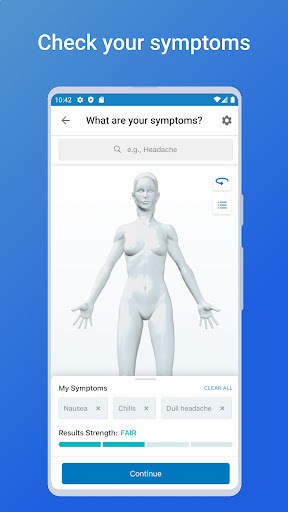
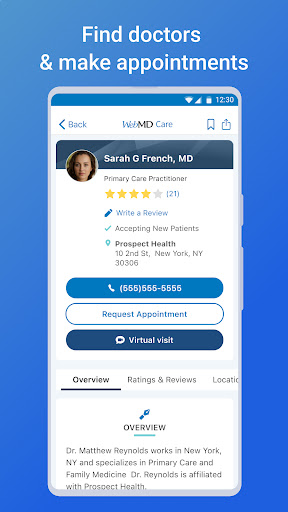
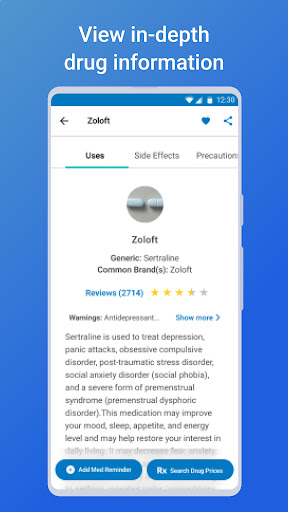
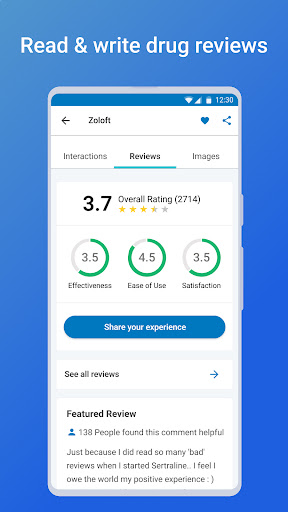
From WebMD, the one healthcare app you need to check symptoms; learn about conditions and drugs; research treatments and diagnoses; find doctors and specialists in your area; get prescription drug savings at your local pharmacy; and set medication reminders.
Key Features:
• Symptom Checker – Choose your symptoms, learn about potential conditions or issues, and lookup treatment and care options.
• Doctor Finder – Find the closest doctors and specialists based on your current location or search by city, state or zip.
• Medication Reminders – Never miss a dose. You’ll receive reminders when it’s time to take your medications. View daily prescription schedules and instructions, plus pill images with dosage and timing information for each drug.
• Conditions – Find medically-reviewed information about conditions relevant to you and learn more about causes, treatments, and related symptoms.
• WebMD Rx – We partner with major pharmacy chains to find the lowest prescription drug prices, which often beat insurance co-pays. It’s 100% free to use. No registration required.
• Customization and Saving Functionality – Save your conditions, drugs, doctors, hospitals, pharmacies, and healthy living articles for secure, easy access and reference.
• Symptom Tracker – Track ongoing symptoms & conditions over time.
• Drug Interaction Checker – Find and identify potentially harmful and unsafe combinations of prescription medications by entering two or more drugs in question.
About WebMD
WebMD Health Corp. is the leading provider of health information services, serving consumers, physicians, healthcare professionals, employers, and health plans through our public and private online portals, mobile platforms and health-focused publications. More than 95 million unique visitors access the WebMD Health Network each month.
If you are a California resident, California law may provide you with certain rights regarding our use of your personal information. For more information relevant to our users who are California residents, please review the "California Residents" section of our Privacy Policy linked on this download page or within our app.
The WebMD Health Network includes WebMD Health, Medscape, MedicineNet, emedicineHealth, RxList, theheart.org, drugs.com and Medscape Education.
SOURCE WebMD Health Corp.
WebMD. Better Information. Better Health.
WebMD does not provide medical advice, diagnosis or treatment. Always seek the advice of your physician or other qualified health provider with any questions you may have regarding a medical condition. Never disregard professional medical advice or delay in seeking it because of something you have read on the WebMD mobile application.
แสดงเพิ่มเติม

1. ดาวน์โหลดตัวติดตั้ง MEmu และสิ้นสุดการติดตั้ง

2. เริ่ม MEmu จากนั้นเปิด Google Play บนหน้าแรก

3. ค้นหา WebMD: Symptom Checker ใน Google Play
Install
4. ดาวน์โหลดและติดตั้ง WebMD: Symptom Checker
5. เมื่อติดตั้งเสร็จให้คลิกที่ไอคอนเพื่อเริ่มใช้งาน

6. ใช้ MEmu เพื่อสัมผัสประสบการณ์ WebMD: Symptom Checker บนคอมพิวเตอร์ของคุณ
MEmu Play คือโปรแกรมจำลอง Android ที่ดีที่สุด มีผู้ใช้มากกว่า 50 ล้านคน มอบประสบการณ์การใช้งานแอป Android ขั้นสุดยอดให้กับคุณ เทคโนโลยีจำลองเสมือนของ MEmu ช่วยให้คุณรันแอป Android หลายพันแอปบนคอมพิวเตอร์ได้อย่างราบรื่น แม้แอปที่กินทรัพยากรเครื่องสูงที่สุด
จอใหญ่และกราฟฟิกสวยกว่า; เล่นได้นาน, ไม่ต้องใช้แบตเตอรี่โทรศัพท์หรือเน็ตโทรศัพท์.
ระบบปรับแต่งปุ่มคีย์บอร์ดและเม้าส์ตามที่คุณเลือก
เล่นมากกว่าหนึ่งเกมบน PC ในเวลาเดียวกันด้วยระบบหลายจอหรือ Multi-Instance manager.
Use WebMD: Symptom Checker on PC by following steps: