
Zapya Go - Share File with Tho
อัปเดตเมื่อ
เวอร์ชันปัจจุบัน
2.6.6
ให้บริการโดย

เมื่อใช้ Zapya Go - Share File with Tho บนโทรศัพท์ของคุณไม่ต้องกังวลกับการชาร์จไฟมากเกินไปปลดปล่อยตัวคุณเองจากหน้าจอขนาดเล็กและสนุกกับการใช้แอพนี้บนหน้าจอขนาดใหญ่ จากนี้ไปรับประสบการณ์เต็มหน้าจอของแอปพลิเคชันของคุณด้วยคีย์บอร์ดและเมาส์ MEmu มีคุณสมบัติที่น่าแปลกใจที่คุณคาดหวัง: การติดตั้งที่รวดเร็วและการตั้งค่าที่ง่ายควบคุมได้ง่ายไม่ จำกัด แบตเตอรี่ข้อมูลมือถือและการโทรที่รบกวน MEmu 9 ใหม่ล่าสุดเป็นตัวเลือกที่ดีที่สุดสำหรับการใช้ Meitu – โปรแกรมแก้ไขภาพแนวธรรมชาติ บนคอมพิวเตอร์ของคุณ ด้วยรหัสการดูดซึมของเราผู้จัดการหลายอินสแตนซ์ทำให้สามารถเปิดบัญชี 2 บัญชีขึ้นไปในเวลาเดียวกันได้ และที่สำคัญที่สุดเอ็นจิ้นจำลองพิเศษของเราสามารถปลดปล่อยศักยภาพของPCของคุณและทำให้ทุกอย่างราบรื่นและสนุกสนาน
แสดงเพิ่มเติม
ดาวน์โหลด Zapya Go - Share File with Tho บน PC ด้วย MEmu Android Emulator สนุกกับการเล่นบนหน้าจอขนาดใหญ่ Stay connected and share with your close friends using Zapya Go.
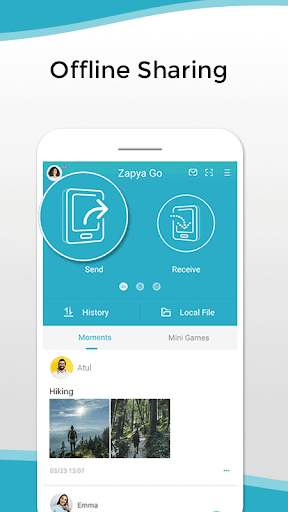
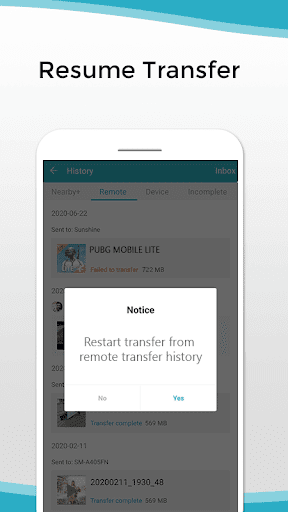
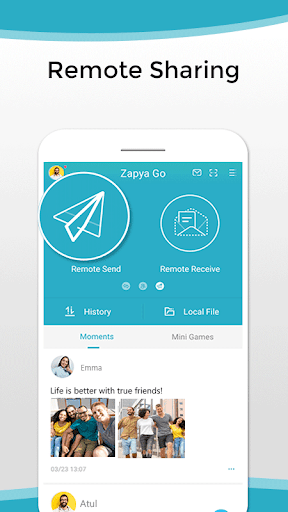
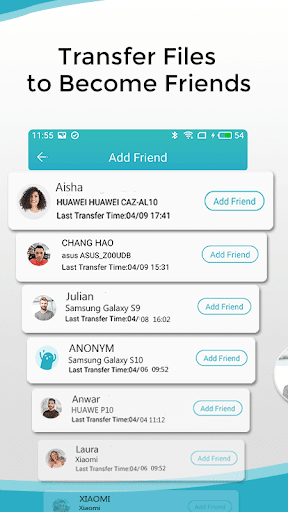
Stay connected and share with your close friends using Zapya Go. On top of being a convenient file sharing application, Zapya Go allows you to keep a low profile on its new completely private social platform. Zapya Go restricts strangers to send you messages or friend requests and does not generate friend recommendations to you. Only those who you have shared files with before can add you as a friend on this new social platform.
Whether it is posting funny photos or a status update, you can safely share with your private circle of friends on the Moments section on Zapya Go without strangers seeing your precious moments. You can also chat with them without worrying about a third party viewing your conversation history when using the encrypted chat feature on Zapya Go Now you can be social on the same app that you use to share files, manage phone contents, and play games!
Spotlight Features
⚡Encrypted Chat
Stay in touch with your close friends without compromising your privacy by using the encrypted chat feature. The chat history is cleared as soon as the receiver has finished reading the message to ensure that there are no screenshots of the conversation.
⚡No Login Required
No personal information or other social media account is required to login and interact with your close friends on Zapya Go. You can stay anonymous and be in control of your data!
⚡Offline Sharing
You do not need to have an Internet connection in order to share files using Zapya Go.
⚡QR Code Sharing
Share and receive files easily with QR codes.
⚡Group Sharing
Want to share files with more than one person? Zapya Go’s Create Group and Join Group features allow you to easily share with multiple people.
⚡Remote Send
Now you can send files to a remote friend. Just ask your friend to enter a 6-digit password and then you can send files via point-to-point direct connection. If connection gets interrupted, you can resume transfer easily.
✔ Certified by Android Go
✔ For the application’s complete policy and conditions, please visit: https://www.izapya.com/zapya_go_policy_en.html
✔ For the application’s complete terms of service, please visit:
https://www.izapya.com/Zapya_Go_Terms_of_Service.html
✔ For the latest news and updates, please visit:
http://blog.izapya.com/
แสดงเพิ่มเติม

1. ดาวน์โหลดตัวติดตั้ง MEmu และสิ้นสุดการติดตั้ง

2. เริ่ม MEmu จากนั้นเปิด Google Play บนหน้าแรก

3. ค้นหา Zapya Go - Share File with Tho ใน Google Play
Install
4. ดาวน์โหลดและติดตั้ง Zapya Go - Share File with Tho
5. เมื่อติดตั้งเสร็จให้คลิกที่ไอคอนเพื่อเริ่มใช้งาน

6. ใช้ MEmu เพื่อสัมผัสประสบการณ์ Zapya Go - Share File with Tho บนคอมพิวเตอร์ของคุณ
MEmu Play คือโปรแกรมจำลอง Android ที่ดีที่สุด มีผู้ใช้มากกว่า 50 ล้านคน มอบประสบการณ์การใช้งานแอป Android ขั้นสุดยอดให้กับคุณ เทคโนโลยีจำลองเสมือนของ MEmu ช่วยให้คุณรันแอป Android หลายพันแอปบนคอมพิวเตอร์ได้อย่างราบรื่น แม้แอปที่กินทรัพยากรเครื่องสูงที่สุด
จอใหญ่และกราฟฟิกสวยกว่า; เล่นได้นาน, ไม่ต้องใช้แบตเตอรี่โทรศัพท์หรือเน็ตโทรศัพท์.
ระบบปรับแต่งปุ่มคีย์บอร์ดและเม้าส์ตามที่คุณเลือก
เล่นมากกว่าหนึ่งเกมบน PC ในเวลาเดียวกันด้วยระบบหลายจอหรือ Multi-Instance manager.
Use Zapya Go - Share File with Tho on PC by following steps: