Zocdoc - Find and book doctors
อัปเดตเมื่อ
เวอร์ชันปัจจุบัน
3.174.2
ให้บริการโดย

เมื่อใช้ Zocdoc - Find and book doctors บนโทรศัพท์ของคุณไม่ต้องกังวลกับการชาร์จไฟมากเกินไปปลดปล่อยตัวคุณเองจากหน้าจอขนาดเล็กและสนุกกับการใช้แอพนี้บนหน้าจอขนาดใหญ่ จากนี้ไปรับประสบการณ์เต็มหน้าจอของแอปพลิเคชันของคุณด้วยคีย์บอร์ดและเมาส์ MEmu มีคุณสมบัติที่น่าแปลกใจที่คุณคาดหวัง: การติดตั้งที่รวดเร็วและการตั้งค่าที่ง่ายควบคุมได้ง่ายไม่ จำกัด แบตเตอรี่ข้อมูลมือถือและการโทรที่รบกวน MEmu 9 ใหม่ล่าสุดเป็นตัวเลือกที่ดีที่สุดสำหรับการใช้ Meitu – โปรแกรมแก้ไขภาพแนวธรรมชาติ บนคอมพิวเตอร์ของคุณ ด้วยรหัสการดูดซึมของเราผู้จัดการหลายอินสแตนซ์ทำให้สามารถเปิดบัญชี 2 บัญชีขึ้นไปในเวลาเดียวกันได้ และที่สำคัญที่สุดเอ็นจิ้นจำลองพิเศษของเราสามารถปลดปล่อยศักยภาพของPCของคุณและทำให้ทุกอย่างราบรื่นและสนุกสนาน
แสดงเพิ่มเติม
ดาวน์โหลด Zocdoc - Find and book doctors บน PC ด้วย MEmu Android Emulator สนุกกับการเล่นบนหน้าจอขนาดใหญ่ Zocdoc is the leading healthcare marketplace that makes it easy for patients to find and book the right doctors for them.

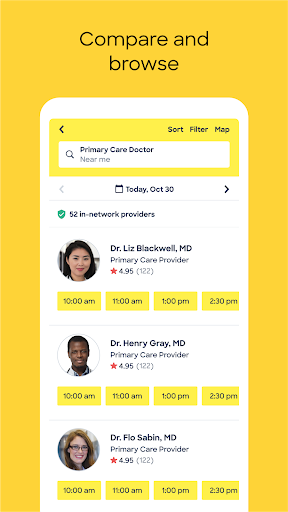
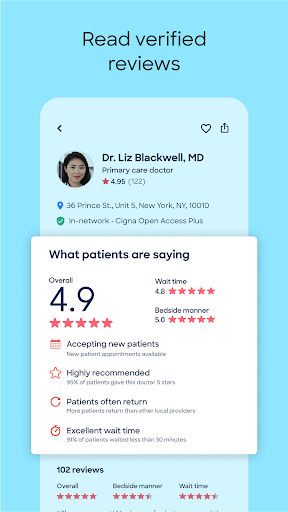
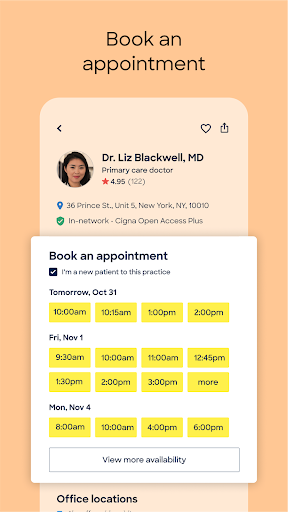
Zocdoc is the leading healthcare marketplace that makes it easy for patients to find and book the right doctors for them. Each month, millions of people use Zocdoc to search for in-network care and instantly book appointments online. Patients typically see a doctor within 24 to 72 hours of booking.
Download the free Zocdoc app to find and book a doctor today.
WHAT TYPE OF CARE IS AVAILABLE ON ZOCDOC
Zocdoc aims to help every patient find and book every type of care. There are nearly 100,000 providers across more than 250 specialities available on Zocdoc— primary care physicians, dentists, eye doctors, OB-GYNs, therapists, dermatologists, and more. This also includes urgent care, imaging services, and 24/7 on-demand virtual care. Providers on Zocdoc offer virtual and in-person visits, and they accept +18,000 different insurance plans, making it easy to find in-network care.
WHY DO PATIENTS LOVE ZOCDOC
- With the Zocdoc app, patients can easily find and book the right care:
- Search by insurance and location to find nearby in-network providers
- Add your location to find doctors near you
- Filter by speciality, procedure, availability, distance, gender, and more
- Read verified reviews from other patients
- See doctors’ real-time appointment availability
- Instantly book in-person or telehealth appointments online
- Get fast access to care, typically within 24 - 72 hours
- Receive personalized appointment reminders
- Fill out your intake forms digitally, ahead of your visit
HOW DOES ZOCDOC WORK
Search and compare the right doctors by what matters
Search by speciality or symptom along with location, availability, and insurance to see providers who are in-network. Research and compare providers by reviewing their profiles, which include professional statements, education background, photos, and verified reviews and ratings from other patients.
Instantly book any type of care
View providers’ real-time appointment availability, select a convenient time, and click to instantly book an appointment, 24/7.
Prepare for the appointment
Save time by filling out intake forms and insurance information on Zocdoc ahead of the visit.
Stay on top of care
Keep track of upcoming visits with appointment reminders and personalized recommendations for preventative care. View your care team and easily rebook.
แสดงเพิ่มเติม

1. ดาวน์โหลดตัวติดตั้ง MEmu และสิ้นสุดการติดตั้ง

2. เริ่ม MEmu จากนั้นเปิด Google Play บนหน้าแรก

3. ค้นหา Zocdoc - Find and book doctors ใน Google Play
Install
4. ดาวน์โหลดและติดตั้ง Zocdoc - Find and book doctors
5. เมื่อติดตั้งเสร็จให้คลิกที่ไอคอนเพื่อเริ่มใช้งาน

6. ใช้ MEmu เพื่อสัมผัสประสบการณ์ Zocdoc - Find and book doctors บนคอมพิวเตอร์ของคุณ
MEmu Play คือโปรแกรมจำลอง Android ที่ดีที่สุด มีผู้ใช้มากกว่า 50 ล้านคน มอบประสบการณ์การใช้งานแอป Android ขั้นสุดยอดให้กับคุณ เทคโนโลยีจำลองเสมือนของ MEmu ช่วยให้คุณรันแอป Android หลายพันแอปบนคอมพิวเตอร์ได้อย่างราบรื่น แม้แอปที่กินทรัพยากรเครื่องสูงที่สุด
จอใหญ่และกราฟฟิกสวยกว่า; เล่นได้นาน, ไม่ต้องใช้แบตเตอรี่โทรศัพท์หรือเน็ตโทรศัพท์.
ระบบปรับแต่งปุ่มคีย์บอร์ดและเม้าส์ตามที่คุณเลือก
เล่นมากกว่าหนึ่งเกมบน PC ในเวลาเดียวกันด้วยระบบหลายจอหรือ Multi-Instance manager.
Use Zocdoc - Find and book doctors on PC by following steps: