
Gauth: AI Study Companion
تازہ کاری
موجودہ ورژن
1.94.1
پیشکش بذریعہ

اپنے موبائل فون پر Gauth: AI Study Companion کا استعمال کرتے وقت زیادہ چارج ہونے کی فکر نہ کریں، خود کو چھوٹی اسکرین سے آزاد کریں اور ایپ کو زیادہ بڑے ڈسپلے پر استعمال کرنے کا لطف اٹھائیں۔ اس کے بعد سے کی بورڈ اور ماؤس کے ساتھ اپنے ایپ کا فل اسکرین کا تجربہ حاصل کریں۔ MEmu آپ کو وہ تمام حیران کن خصوصیات پیش کرتا ہے جن کی آپ کو توقع کرتے ہیں: فوری انسٹال اور آسان سیٹ اپ، وجدانی کنٹرول، مزید بیٹری، موبائل ڈیٹا کی کوئی حد نہیں اور اب مزید پریشان کن کالز نہیں۔ نئے برانڈ کا MEmu 9 آپ کے کمپیوٹر پر Gauth: AI Study Companion استعمال کرنے کے لیے بہترین اختیار ہے۔ MEmu کثیر نظیری منیجر بیک وقت 2 یا اس سے زیادہ اکاؤنٹس کھولنا ممکن بناتا ہے۔ اور سب اہم بات، ہمارا خصوصی ایمولیشن انجن آپ کے پی سی کی پوری طاقت ریلیز کرتے ہوئے ہر چیز ہموار اور قابل تفریح بناتا ہے۔
مزید دکھائیں
Download Gauth: AI Study Companion on PC with MEmu Android Emulator. Enjoy playing on big screen. Gauth جدید ترین AI ماڈل کے ذریعے تقویت یافتہ #1 AI مطالعہ کا ساتھی ہے!

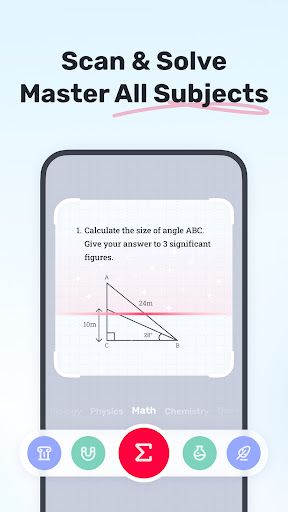
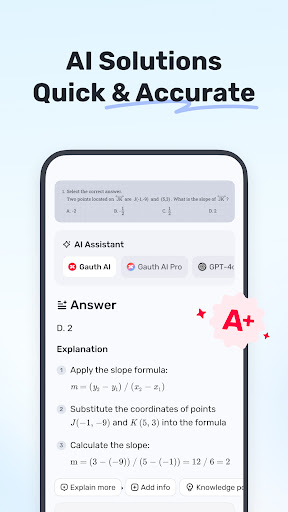
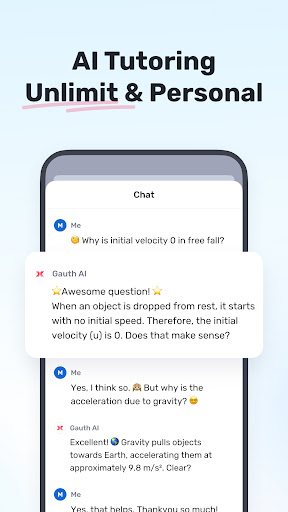
Gauth جدید ترین AI ماڈل کے ذریعے تقویت یافتہ #1 AI مطالعہ کا ساتھی ہے! لاکھوں صارفین کی طرف سے قابل اعتماد، Gauth تمام مضامین کے لیے لامحدود جوابات پیش کرتا ہے۔ اپنی تمام سیکھنے کی ضروریات کے لیے گوتھ کو آزمائیں!
اہم خصوصیات:
► درست جوابات، قدم بہ قدم
ہوم ورک کے دیگر مددگاروں کے مقابلے میں، Gauth ہوم ورک کے مسائل کو حل کرنے میں تیز اور زیادہ درست ہے، خاص طور پر Gauth AI Pro کے تعاون سے۔ مسائل کو فوری طور پر چند سیکنڈ میں حل کیا جا سکتا ہے، اور تمام جوابات متحرک ہدایات اور تفصیلی وضاحت کے ساتھ ہیں۔
► AI لائیو ٹیوٹر، آواز اور وائٹ بورڈ
ایک سوال پر پھنس گئے؟ AI لائیو ٹیوٹر کے ساتھ، کسی بھی وقت آواز کے ذریعے پوچھیں اور لائیو وائٹ بورڈ پر واضح طور پر بیان کردہ مسائل کو دیکھیں — جیسے کہ آپ کے ساتھ ذاتی ٹیوٹر ہو۔
► گہرائی سے سوچنا، اپنے سیکھنے کو متاثر کرنا
Gauth AI کے ذریعے تقویت یافتہ، متعدد AI ماڈلز کے فوائد کو مربوط کرتا ہے اور آپ کے مسائل کو بہتر اور گہرائی سے حل کرتا ہے۔ Gauth AI کے ساتھ، ہم امید کرتے ہیں کہ آپ متاثر ہو سکتے ہیں اور موثر طریقے سے سیکھ سکتے ہیں۔
► تمام مضامین، تمام درجات پر عبور حاصل کریں۔
نہ صرف ریاضی کے سوالات، گاؤتھ اب فزکس، کیمسٹری، بیالوجی وغیرہ میں تمام مختلف سطحوں کے مسائل حل کر سکتا ہے۔
► حقیقی ماہرین 24/7 مدد کے لیے تیار ہیں۔
ایک مضبوط اور وسائل سے بھرپور ہوم ورک حل کرنے والے کے طور پر، ہمارے پاس پیشہ ور ماہرین اور سرشار ماہرین ہیں جو ریاضی، طبیعیات، کیمسٹری اور حیاتیات سمیت متعدد مضامین میں آپ کی مدد کے لیے 24/7 تیار ہیں۔ تمام ماہرین آپ کے مسائل کو کسی بھی وقت اور کہیں بھی حل کرنے کے لیے دستیاب ہیں، قدم بہ قدم واضح وضاحتیں پیش کرتے ہیں۔ Gauth کے ساتھ، آپ آسانی سے سمجھ سکتے ہیں اور مختلف مضامین میں مہارت حاصل کر سکتے ہیں۔
► استعمال میں آسان، ہوم ورک ٹھنڈا ہے۔
بس اپنے مسئلے کی تصویر لیں، اور گوتھ اسے پہچان لے گا اور آپ کے سوال کو خود بخود تراش لے گا۔ اپ لوڈ کرنے کے بعد، ہمارے ماہرین چند سیکنڈوں میں اچھے فارمیٹ شدہ جوابات اور وضاحتوں کے ساتھ حل فراہم کریں گے۔ Gauth کے ساتھ، ہم امید کرتے ہیں کہ آپ ہوم ورک کو بھی مزے دار اور سمجھنے میں آسان تلاش کر سکتے ہیں!
► اسٹڈی ٹول باکس، آل ان ون ایپ
پڑھنا، لکھنا، فوکس موڈ، اور کیلکولیٹر جیسے ضروری ٹولز سے بھرا ہوا ہے۔ چاہے آپ سخت کتابوں، تحریر، خلفشار یا حساب کتاب کے ساتھ جدوجہد کر رہے ہوں، ایک ایپ میں متن کی آسانیاں، گرامر چیک اور ریاضی کا حساب کتاب حاصل کریں۔ گوتھ آپ کو اپنی تعلیمی کارکردگی کو سپرچارج کرنے میں مدد کرتا ہے۔
► زیر بحث مضامین
- ریاضی
- حیاتیات
- طبیعیات
- کیمسٹری
- دوسرے
► ریاضی کے موضوعات کا احاطہ کیا گیا ہے۔
- ریاضی کے الفاظ کے مسائل
- الجبرا (حقیقی نمبر؛ ریاضی؛ سیٹ تھیوری؛ اظہار؛ لوگارتھم؛ پیچیدہ نمبر)
- فنکشن (لکیری؛ چوکور؛ کثیر الجہتی؛ کفایتی؛ عقلی؛ لوگاریتھمک؛ الٹا فعل)
- جیومیٹری (ہوائی جہاز اور ٹھوس جیومیٹری؛ الجبرا اور لائنیں؛ خلا میں لائنیں اور طیارے؛ تبدیلی)
مثلثیات
- کیلکولس (ماخوذ؛ انٹیگرلز؛ حدود؛ ٹینجنٹ/علاقہ ریاضی کا مسئلہ)
- اعداد و شمار اور ڈیٹا کا تجزیہ (امکان؛ ڈیٹا کی نمائندگی؛ پوسن/عام تقسیم)
- میٹرکس (میٹرکس الجبرا؛ لکیری مساوات اور میٹرکس کا نظام)
- منطق (استدلال اور ثبوت)
► کیا آپ اپنی تعلیم کی سطح کو بڑھانا چاہتے ہیں؟ Gauth Plus کے ساتھ، آپ کو ملے گا:
- لامحدود جوابات اور وضاحتیں۔
- جوابات میں اعلی درستگی
- واضح لائیو وضاحتوں کے ساتھ ایڈوانسڈ AI ٹیوٹر
- 20M+ ٹیوٹوریل ویڈیوز تک رسائی
- 100M+ کا سوالیہ بینک
- 24/7 ٹیوٹر کی مدد
سروس کی شرائط https://h5.gauthmath.com/terms
رازداری کی پالیسی https://h5.gauthmath.com/policy
جڑے رہیں
- ٹکٹوک: www.tiktok.com/@gauthofficial
- ویب سائٹ: www.gauthmath.com
- ای میل: support@gauthmath.com
مزید دکھائیں

1. MEmu انسٹالر ڈاؤن لوڈ کریں اور سیٹ اپ مکمل کریں

2. MEmu شروع کریں اسکے بعد ڈیسکٹاپ پر Google Play کھولیں

3. Google Play میں Gauth: AI Study Companion تلاش کریں
Install
4. Gauth: AI Study Companion ڈاؤن لوڈ کریں اور انسٹال کریں
5. انسٹال مکمل ہونے کے بعد سٹارٹ کرنے کے لیے آئیکن پر کلک کریں

6. MEmu کے ساتھ پی سی پر Gauth: AI Study Companion کھیلنے کا لطف لیں
MEmu پلے بہترین اینڈرائڈ ایمولیٹر ہے اور 100 ملین لوگ اس کے زبردست اینڈرائڈ گیمنگ تجربہ سے لطف اندوز ہو رہے ہیں۔ MEmu کی ورچولائزیشن ٹیکنالوجی آپ کو اپنے PC پر ہزاروں اینڈرائڈ گیمز یہاں تک کہ انتہائی گرافک والے گیمز باسہولت کھیلنے کی طاقت دیتی ہے۔
بہتر گرافکس کے ساتھ بڑی اسکرین؛ طویل دورانیہ، بیٹری یا لامحدود موبائل ڈیٹا کے بغیر۔
کی بورڈ اور ماؤس یا گیم پیڈ کے عین مطابق کنٹرول کے لیے کی میپنگ کا پورا سپورٹ۔
کثیر مثالی منیجر کے ساتھ بیک وقت ایک پی سی پر متعدد گیم اکاؤنٹس یا ٹاسکس۔
پی سی پر درج ذیل مراحل پر عمل کرتے ہوئے پر Gauth: AI Study Companion استعمال کریں: u003c/p>