
Gauth: AI Study Companion
Zaktualizowano
Aktualna wersja
7
Sprzedawca

Przestań martwić się nadmiernymi opłatami podczas korzystania z Gauth: AI Study Companion na telefonie komórkowym, uwolnij się od małego ekranu i ciesz się korzystaniem z aplikacji na znacznie większym wyświetlaczu. Od teraz korzystaj z aplikacji na pełnym ekranie za pomocą klawiatury i myszy. MEmu oferuje wszystkie zaskakujące funkcje, których się spodziewałeś: szybką instalację i łatwą konfigurację, intuicyjne sterowanie, koniec z ograniczeniami baterii, danych mobilnych i niepokojących połączeń. Zupełnie nowy MEmu 9 to najlepszy wybór do używania Gauth: AI Study Companion na twoim komputerze. Zakodowany przez naszą absorpcję, menedżer wielu instancji umożliwia otwarcie 2 lub więcej kont w tym samym czasie. A co najważniejsze, nasz ekskluzywny emulator może uwolnić pełny potencjał twojego komputera, sprawić, że wszystko będzie płynne i przyjemne.
Pokaż więcej
Ciesz się wspaniałym doświadczeniem podczas grania w Gauth: AI Study Companion na komputerze z aplikacją MEMU App Player. Jest to potężny darmowy emulator Androida pozwalający grać w tysiące gier na Androida. Gauth is the #1 AI study companion empowered by the newest AI model!

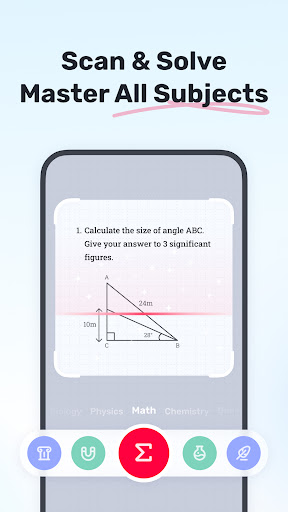
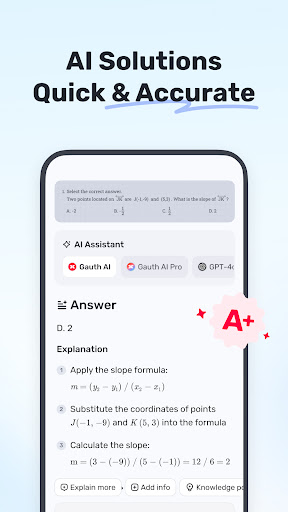
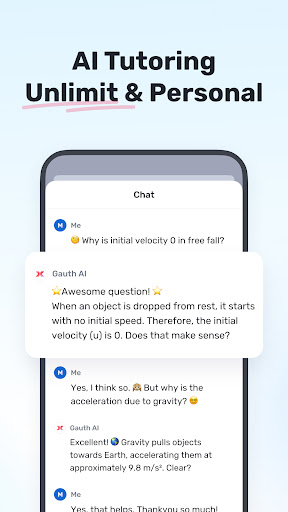
Gauth is the #1 AI study companion empowered by the newest AI model! Trusted by millions of users, Gauth offers unlimited answers for all subjects. Try Gauth for all your learning needs!
Key Features:
► ACCURATE ANSWERS, STEP-BY-STEP
Compared to other homework helpers, Gauth is faster and more accurate at solving homework problems, especially with the support of Gauth AI Pro. Problems could be solved quickly within a few seconds, and all answers are accompanied by animated instructions and detailed explanations.
► MASTER ALL SUBJECTS, ALL GRADES
Not only Math questions, Gauth could now solve all different levels of problems in Physics, Chemistry, Biology and more.
► REAL EXPERTS READY TO HELP 24/7
As a strong and resourceful homework solver, we have professional experts and dedicated experts ready to help you 24/7 with multiple subjects, including Math, Physics, Chemistry, and Biology. All experts are available to solve your problems anytime and anywhere, offering clear step-by-step explanations. With Gauth, you can easily understand and master different subjects.
► EASY TO USE, HOMEWORK IS COOL
Simply take a photo of your problem, and Gauth will recognize it and crop your question automatically. After uploading, our experts will provide solutions in a few seconds with well-formatted answers and explanations. With Gauth, we hope you can find homework is also fun and easy to understand!
► SUBJECTS COVERED
- Math
- Biology
- Physics
- Chemistry
- Others
► MATH TOPICS COVERED
- Math Word problems
- Algebra (Real Number; Arithmetic; Set theory; Expression; Logarithm; Complex Number)
- Function (Linear; Quadratic; Polynomial; Exponential; Rational; Logarithmic; Inverse Function)
- Geometry (Plane & Solid Geometry; Algebra & lines; Lines & Planes in Space; Transformation)
- Trigonometry (Trigonometric Ratios; Law of Sines; Law of Cosines; Reciprocal Properties)
- Calculus (Derivatives; Integrals; Limits; the Tangent/Area Math problem)
- Statistics and Data Analysis (Probability; Data Representation; Poisson/Normal Distribution)
- Matrix (Matrix Algebra; System of Linear Equations & Matrices)
- Logic (Reasoning & Proof)
► Want to level up your learning? With Gauth Plus, you will get:
- Unlimited answers and explanations
- High accuracy in answers
- Access to 20M+ tutorial videos
- A question bank of 100M+
- 24/7 tutor help
Terms of Service https://h5.gauthmath.com/terms
Privacy Policy https://h5.gauthmath.com/policy
Pokaż więcej

1. Pobierz instalator MEmu i zakończ instalację

2. Uruchom MEmu, a następnie otwórz Google Play na pulpicie

3. Wyszukaj Gauth: AI Study Companion w Google Play
Install
4. Pobierz i zainstaluj Gauth: AI Study Companion
5. Po zakończeniu instalacji kliknij ikonę, aby rozpocząć

6. Użyj MEmu, aby doświadczyć Gauth: AI Study Companion na swoim komputerze
MEmu Play to najlepszy emulator Androida, z którego korzysta ponad 100 milionów użytkowników, ciesząc się wyjątkowym doświadczeniem aplikacji na Androida. Technologia wirtualizacji MEmu pozwala na płynne uruchamianie tysięcy aplikacji Androida na komputerze, nawet tych najbardziej wymagających.
Większy ekran z lepszą grafiką; Długi czas, bez ograniczeń baterii lub danych mobilnych.
Pełna obsługa mapowania klawiszy dla precyzyjnego sterowania klawiaturą i myszą lub gamepadem.
Wiele kont gier lub zadań na jednym komputerze jednocześnie z menedżerem wielu instancji.
Use Gauth: AI Study Companion on PC by following steps: