
Gauthmath - Students Must Have
Updated
Current Version
2.9.0
Offered By

Stop worrying about high battery drain when using Gauthmath - Students Must Have on your phone. Free yourself from the tiny screen and enjoy the app on a much larger display. From now on, get a full-screen experience of your app with the convenience of a keyboard and mouse. MEmu offers you all the surprising features you’d expect: quick installation and easy setup, intuitive controls, and no more worries about battery life, mobile data, or unexpected calls. The all-new MEmu 9 is the choice for using Gauthmath - Students Must Have on your computer. With the MEmu multi-instance manager, you can run two or more accounts at the same time. Most importantly, our exclusive emulation engine unlocks your PC’s full potential, delivering smooth and enjoyable performance.
Show more
Enjoy superb experience of using Gauthmath - Students Must Have on PC with MEMU App Player. It's a powerful free Android emulator which provides you with thousands of android apps for their desktop version. Enjoy connecting with friends and polishing your work with higher efficiency! Gauth is the #1 AI study companion powered by newest AI model!

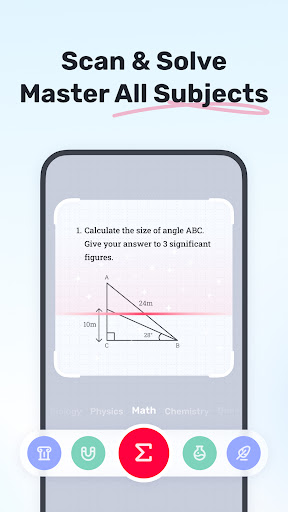

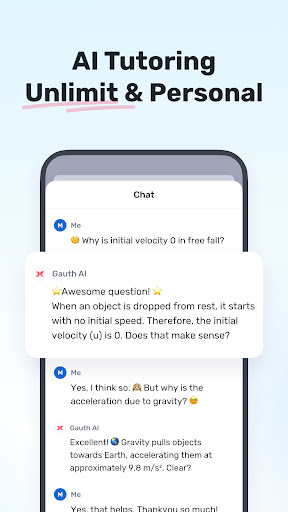
Gauth is the #1 AI study companion powered by newest AI model! Trusted by millions of users, Gauth offers unlimited answers for all subjects. Try Gauth for all your learning needs!
Key Features:
► ACCURATE ANSWERS, STEP-BY-STEP
Compared to other homework helpers, Gauth is faster and more accurate at solving homework problems, especially with the support of Gauth AI Pro. Problems could be solved quickly within a few seconds, and all answers are accompanied by animated instructions and detailed explanations.
► AI LIVE TUTOR, VOICE & WHITEBOARD
Stuck on a question? With AI Live Tutor, ask by voice anytime and see problems explained clearly on a live whiteboard—just like having a personal tutor by your side.
► DEEPTHINKING, INSPIRE YOUR LEARNING
Powered by Gauth AI, integrates the advantages of multiple AI models and solves your problems smarter and more deeply. With Gauth AI, we hope you can get inspired and learn efficiently.
► MASTER ALL SUBJECTS, ALL GRADES
Not only Math questions, Gauth could now solve all different levels of problems in Physics, Chemistry, Biology and more.
► REAL EXPERTS READY TO HELP 24/7
As a strong and resourceful homework solver, we have professional experts and dedicated experts ready to help you 24/7 with multiple subjects, including Math, Physics, Chemistry, and Biology. All experts are available to solve your problems anytime and anywhere, offering clear step-by-step explanations. With Gauth, you can easily understand and master different subjects.
► EASY TO USE, HOMEWORK IS COOL
Simply take a photo of your problem, and Gauth will recognize it and crop your question automatically. After uploading, our experts will provide solutions in a few seconds with well-formatted answers and explanations. With Gauth, we hope you can find homework is also fun and easy to understand!
► STUDY TOOLBOX, ALL-IN-ONE APP
Packed with essential tools like Reading, Writing, Focus Mode, and Calculator. Whether you are struggling with tough books, writing, distraction or calculation, get text simplification, grammar check and math calculation in one app. Gauth helps you to supercharge your academic performance.
► SUBJECTS COVERED
- Math
- Biology
- Physics
- Chemistry
- Others
► MATH TOPICS COVERED
- Math Word problems
- Algebra (Real Number; Arithmetic; Set theory; Expression; Logarithm; Complex Number)
- Function (Linear; Quadratic; Polynomial; Exponential; Rational; Logarithmic; Inverse Function)
- Geometry (Plane & Solid Geometry; Algebra & lines; Lines & Planes in Space; Transformation)
- Trigonometry (Trigonometric Ratios; Law of Sines; Law of Cosines; Reciprocal Properties)
- Calculus (Derivatives; Integrals; Limits; the Tangent/Area Math problem)
- Statistics and Data Analysis (Probability; Data Representation; Poisson/Normal Distribution)
- Matrix (Matrix Algebra; System of Linear Equations & Matrices)
- Logic (Reasoning & Proof)
► Want to level up your learning? With Gauth Plus, you will get:
- Unlimited answers and explanations
- High accuracy in answers
- Advanced AI tutor with clearer live explanations
- Access to 20M+ tutorial videos
- A question bank of 100M+
- 24/7 tutor help
Terms of Service https://h5.gauthmath.com/terms
Privacy Policy https://h5.gauthmath.com/policy
STAY CONNECTED
- Tiktok: www.tiktok.com/@gauthofficial
- Website: www.gauthmath.com
- Email: support@gauthmath.com
Show more

1. Download MEmu installer and finish the setup

2. Start MEmu then open Google Play on the desktop

3. Search Gauthmath - Students Must Have in Google Play
Install
4. Download and Install Gauthmath - Students Must Have
5. On install completion click the icon to start

6. Enjoy using Gauthmath - Students Must Have on PC with MEmu
MEmu Play is the best Android emulator, and 100 million users already enjoy its superb Android app experience. Powered by advanced virtualization technology, it lets you enjoy thousands of Android apps smoothly on your PC—including the most graphics-intensive ones.
Bigger screen with better graphics; Long duration, without limitation of battery or mobile data.
Full Keymapping support for precise control of keyboard and mouse or gamepad.
Multiple game accounts or tasks on single PC at one time with Multi-Instance manager.
Use Gauthmath - Students Must Have on PC by following steps: