Gauth: AI Study Companion
تم التحديث
الإصدار الحالي
1.94.1
تقديم

لا داعي للقلق بشأن الشحن الزائد عند استخدام Gauth: AI Study Companion على هاتفك. تحرر من قيود الشاشة الصغيرة واستمتع به على شاشة أكبر باستخدام لوحة المفاتيح والفأرة. يوفر MEmu جميع الميزات الرائعة التي تتوقعها: تثبيت سريع، إعداد سهل، أدوات تحكم بديهية، ودون قيود على عمر البطارية، أو استخدام البيانات، أو المكالمات الواردة. يُعد MEmu 9 الجديد الخيار الأمثل لتجربة Gauth: AI Study Companion على جهاز الكمبيوتر. بفضل تقنية التشفير الفريدة، يتيح لك مدير الحسابات المتعددة تشغيل حسابين أو أكثر في وقت واحد. والأهم من ذلك، أن محرك المحاكاة الفريد يستغل أداء جهاز الكمبيوتر بالكامل، مما يُحسّن تجربة التطبيق ويجعل كل شيء سلسًا للغاية.
أظهر المزيد
قم بتنزيل Gauth: AI Study Companion على الكمبيوتر بإستخدام جهاز مقلد أندروز MEmu.استمتع بمتعة اللعب على الشاشة الكبيرة. Gauth هو رفيق الدراسة الأول بتقنية الذكاء الاصطناعي، مدعوم بأحدث نماذج الذكاء الاصطناعي!

Gauth هو رفيق الدراسة الأول بتقنية الذكاء الاصطناعي، مدعوم بأحدث نماذج الذكاء الاصطناعي! يثق به ملايين المستخدمين، ويقدم Gauth إجابات غير محدودة لجميع المواد الدراسية. جرّب Gauth لتلبية جميع احتياجاتك التعليمية!
الميزات الرئيسية:
► إجابات دقيقة، خطوة بخطوة
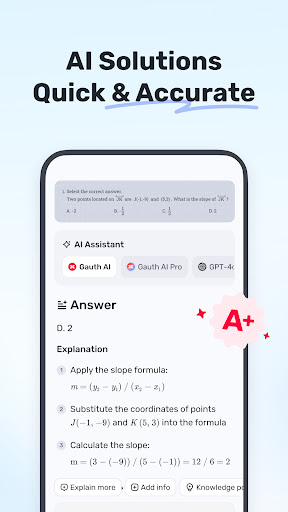
مقارنةً بغيره من أدوات مساعدة الواجبات المنزلية، يتميز Gauth بسرعة ودقة حل مسائل الواجبات المنزلية، خاصةً مع دعم Gauth AI Pro. يمكن حل المسائل بسرعة في ثوانٍ معدودة، وجميع الإجابات مصحوبة بتعليمات متحركة وشروحات مفصلة.
► مُعلّم مباشر بالذكاء الاصطناعي، صوت، ولوحة بيضاء
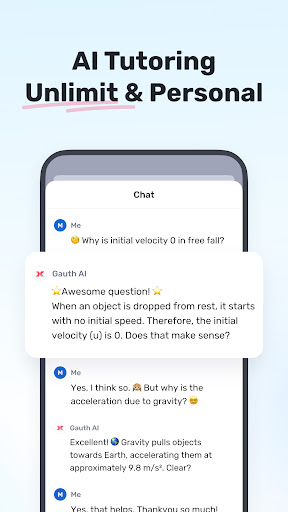
هل تواجه صعوبة في حل سؤال؟ مع مُعلّم مباشر بالذكاء الاصطناعي، اطرح سؤالك صوتيًا في أي وقت، وشاهد شرحًا واضحًا للمسائل على لوحة بيضاء مباشرة - تمامًا كما لو كان لديك مُعلّم شخصي بجانبك.
► التفكير المُعمّق، ألهم تعلّمك
مُدعّم بتقنية Gauth AI، يجمع مزايا نماذج الذكاء الاصطناعي المُتعددة، ويحل مسائلك بذكاء وعمق أكبر. مع Gauth AI، نأمل أن تُلهمك وتتعلم بكفاءة.
► إتقان جميع المواد الدراسية، جميع الصفوف الدراسية
لا يقتصر Gauth على حل مسائل الرياضيات فحسب، بل يُمكنك الآن حل جميع مستويات المسائل في الفيزياء والكيمياء والأحياء وغيرها.
► خبراء حقيقيون جاهزون للمساعدة على مدار الساعة
بصفتنا مُختصين في حل الواجبات المنزلية، لدينا خبراء محترفون وخبراء مُتخصصون مُستعدون لمساعدتك على مدار الساعة في العديد من المواد الدراسية، بما في ذلك الرياضيات والفيزياء والكيمياء والأحياء. جميع الخبراء مُتاحون لحل مسائلك في أي وقت وفي أي مكان، مُقدمين شروحات واضحة خطوة بخطوة. مع Gauth، يُمكنك بسهولة فهم وإتقان مختلف المواد الدراسية.
► سهل الاستخدام، واجب منزلي رائع
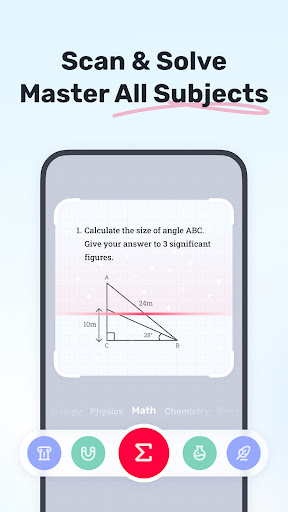
ما عليك سوى التقاط صورة لمسألتك، وسيتعرف Gauth عليها ويقص سؤالك تلقائيًا. بعد التحميل، سيُقدم خبراؤنا الحلول في ثوانٍ معدودة مع إجابات وشروحات مُنسقة جيدًا. مع Gauth، نأمل أن تجد واجباتك المدرسية ممتعة وسهلة الفهم!
► صندوق أدوات الدراسة، تطبيق شامل
يضم أدوات أساسية مثل القراءة والكتابة ووضع التركيز والآلة الحاسبة. سواء كنت تواجه صعوبة في قراءة الكتب أو الكتابة أو تشتيت الانتباه أو الحساب، احصل على تبسيط للنصوص وتدقيق لغوي وحسابات رياضية في تطبيق واحد. يساعدك Gauth على تعزيز أدائك الأكاديمي.
► المواد الدراسية
- الرياضيات
- الأحياء
- الفيزياء
- الكيمياء
- أخرى
► مواضيع الرياضيات الدراسية
- مسائل رياضية كلامية
- الجبر (الأعداد الحقيقية، الحساب، نظرية المجموعات، التعبيرات، اللوغاريتم، الأعداد المركبة)
- الدالة (الخطية، التربيعية، كثيرة الحدود، الأسية، الكسرية، اللوغاريتمية، الدالة العكسية)
- الهندسة (الهندسة المستوية والهندسة المجسمة، الجبر والمستقيمات، المستقيمات والمستويات في الفضاء، التحويلات)
- علم المثلثات (النسب المثلثية، قانون الجيب، قانون جيب التمام، الخواص العكسية)
- التفاضل والتكامل (المشتقات، التكاملات، النهايات، مسائل رياضيات الظل/المساحة)
- الإحصاء وتحليل البيانات (الاحتمالات، تمثيل البيانات، توزيع بواسون/التوزيع الطبيعي)
- المصفوفات (جبر المصفوفات، نظام المعادلات الخطية والمصفوفات
- المنطق (الاستدلال والبرهان)
► هل ترغب في الارتقاء بمستوى تعلمك؟ مع Gauth Plus، ستحصل على:
- إجابات وشروحات غير محدودة
- دقة عالية في الإجابات
- مُعلّم ذكاء اصطناعي مُتقدم مع شروحات مباشرة أوضح
- إمكانية الوصول إلى أكثر من 20 مليون فيديو تعليمي
- بنك أسئلة يضم أكثر من 100 مليون سؤال
- مساعدة مُعلّم على مدار الساعة
شروط الخدمة: https://h5.gauthmath.com/terms
سياسة الخصوصية: https://h5.gauthmath.com/policy
ابقَ على اتصال
- تيك توك: www.tiktok.com/@gauthofficial
- الموقع الإلكتروني: www.gauthmath.com
- البريد الإلكتروني: support@gauthmath.com
أظهر المزيد

1. قم بتنزيل برنامج MEmu واكمال تثبيته

2. قم بتشغيل برنامج MEmu وفتح Google Play على الصفحة الرئيسية

3. ابح Gauth: AI Study Companion في Google Play
Install
4. تنزيل وتثبيت Gauth: AI Study Companion
5. انقر على الرمز للتشغيل بعد اكتمال التثبيت

6. استخدم MEmu لتجربة Gauth: AI Study Companion على جهاز الكمبيوتر الخاص بك.
تطبيق MEmuهو افضل محاكى اندرويد مجانى وبالفعل 50 مليون شخص يستمتعون حاليا بتجربه اللعب عليه. تمكّنك تقنية MEmu الافتراضية من تشغيل آلاف ألعاب Android بسلاسة على الكمبيوتر الشخصي ، حتى أكثرها استخدامًا للرسومات.
شاشة أكبر وجرافيك افضل ووقت أطول بدون حدود البطارية وباقة التليفون
لوحة مفاتيح كاملة تدعم تحكم كامل عن طريق لوحة المفاتيح و الفأره وجيم باد
عدة العاب وحسابات ومهمات علي جهاز الكمبيوتر في وقت معين عن طريق Memu متعدد النوافذ
Use Gauth: AI Study Companion on PC by following steps: