
Gauth: AI Study Companion
Güncellendi
Mevcut Sürüm
1.93.1
Sunan

Cep telefonunda Gauth: AI Study Companion kullanırken fazla şarjlardan endişelenme, kendini küçük ekrandan kurtar ve uygulamayı çok daha büyük bir ekranda kullanmanın tadını çıkar. Şu andan itibaren, klavye ve fare ile uygulamayı tam ekran da kullanmayı dene. MEmu, beklediğin tüm şaşırtıcı özellikleri sunar: hızlı ve kolay kurulum, sezgisel kontroller, bunun dışında pil sınırı, mobil veri ve rahatsız edici aramalar artık yok. Yepyeni MEmu 9, bilgisayarında Gauth: AI Study Companion kullanmanın en iyi seçimidir. Emilimimizle kodlanan çok örnekli yönetici, aynı anda 2 veya daha fazla hesap açmayı mümkün kılar. Ve en önemlisi, özel emülasyon motorumuz PC'nin tüm potansiyelini serbest bırakabilir, her şeyi pürüzsüz ve eğlenceli hale getirebilir.
Daha fazla göster
Gauth: AI Study Companion’i MEmu Android Emülatör ile PC’ye indirin. Büyük ekranda oynamanın keyfini çıkarın. Gauth, en yeni yapay zeka modeliyle güçlendirilmiş #1 yapay zeka çalışma arkadaşınız!
Gauth, en yeni yapay zeka modeliyle güçlendirilmiş #1 yapay zeka çalışma arkadaşınız! Milyonlarca kullanıcı tarafından güvenilen Gauth, tüm konular için sınırsız cevap sunar. Tüm öğrenme ihtiyaçlarınız için Gauth’u deneyin!
Öne Çıkan Özellikler:
► Doğru Cevaplar, Adım Adım
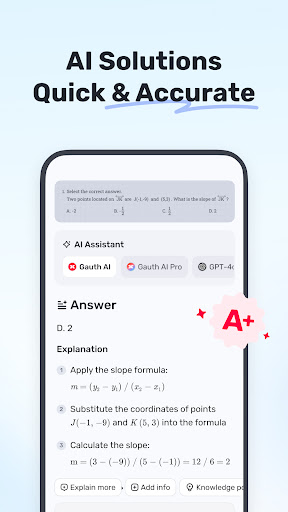
Diğer ödev yardımcılarına kıyasla Gauth, özellikle Gauth AI Pro desteğiyle, ödev problemlerini daha hızlı ve daha doğru çözer. Sorular saniyeler içinde çözülür ve tüm cevaplar animasyonlu talimatlar ve detaylı açıklamalarla desteklenir.
► Tüm Konuları, Tüm Seviyeleri Ustaca Öğrenin
Sadece Matematik soruları değil, Gauth artık Fizik, Kimya, Biyoloji ve daha fazlasının farklı seviyelerdeki problemlerini çözebilir.
► Gerçek Uzmanlar 7/24 Yardım İçin Hazır
Güçlü ve donanımlı bir ödev çözümcüsü olarak, Matematik, Fizik, Kimya ve Biyoloji dahil olmak üzere birçok konuda size 7/24 yardımcı olacak profesyonel ve adanmış uzmanlarımız var. Uzmanlarımız her zaman ve her yerde sorularınızı çözmek için hazırdır ve adım adım net açıklamalar sunar. Gauth ile farklı konuları kolayca anlayabilir ve ustalaşabilirsiniz.
► Kullanımı Kolay, Ödev Yapmak Çok Eğlenceli
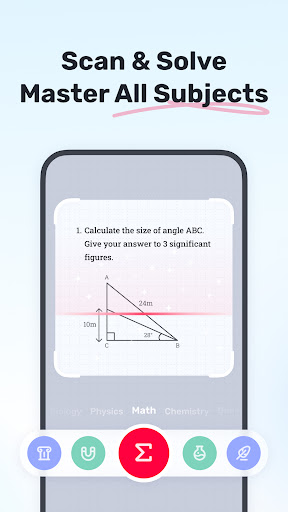
Sorunuzun fotoğrafını çekin, Gauth otomatik olarak tanıyıp kırpar. Yükledikten sonra uzmanlarımız saniyeler içinde iyi formatlanmış cevaplar ve açıklamalarla çözümler sunar. Gauth ile ödev yapmak da eğlenceli ve anlaşılır hale gelir!
Kapsanan Konular
- Matematik
- Biyoloji
- Fizik
- Kimya
- Diğerleri
Kapsanan Matematik Konuları
- Sözel Problemler
- Cebir (Gerçek Sayılar; Aritmetik; Küme Teorisi; İfadeler; Logaritma; Karmaşık Sayılar)
- Fonksiyonlar (Doğrusal; İkinci Dereceden; Polinom; Üssel; Rasyonel; Logaritmik; Ters Fonksiyon)
- Geometri (Düzlem ve Katı Geometri; Cebir ve Doğrular; Uzaydaki Doğrular ve Düzlemler; Dönüşümler)
- Trigonometri (Trigonometri Oranları; Sinüs Kanunu; Kosinüs Kanunu; Karşılıklı Özellikler)
- Kalkülüs (Türevler; İntegraller; Limitler; Teğet/Alan Problemleri)
- İstatistik ve Veri Analizi (Olasılık; Veri Temsili; Poisson/Normal Dağılım)
- Matris (Matris Cebiri; Lineer Denklem Sistemleri ve Matrisler)
- Mantık (Akıl Yürütme ve Kanıt)
Öğreniminizi bir üst seviyeye taşımak ister misiniz? Gauth Plus ile:
- Sınırsız cevap ve açıklama
- Yüksek doğruluk
- 20 milyondan fazla eğitim videosuna erişim
- 100 milyondan fazla soru bankası
- 7/24 öğretmen desteği
Hizmet Şartları: https://h5.gauthmath.com/terms
Gizlilik Politikası: https://h5.gauthmath.com/policy
Bağlantıda Kalın
TikTok: www.tiktok.com/@gauthofficial
Web sitesi: www.gauthmath.com
E-posta: support@gauthmath.com
Daha fazla göster

1. MEmu yükleyicisini indirin ve kurulumu tamamlayın

2. MEmu'yu başlatın ve ana sayfada Google Play'i açın

3. Google Play'de Gauth: AI Study Companion arayın
Install
4. Gauth: AI Study Companion indirin ve yükleyin
5. Kurulum tamamlandığında başlamak için simgeye tıklayın

6. Gauth: AI Study Companion'i PC'de için MEmu'yu kullanın
MEmu Play, 50 milyon kullanıcısıyla en iyi ücretsiz Android emülatörüdür ve en üst düzey Android uygulama deneyiminin keyfini çıkarır. MEmu'nun sanallaştırma teknolojisi, en zorlu uygulamalar da dahil olmak üzere binlerce uygulamayı bilgisayarınızda sorunsuz bir şekilde çalıştırmanızı sağlar.
Daha büyük ekranla daha iyi grafiklere sahip; Pil veya mobil veri sınırlaması olmaksızın uzun süre.
Keymapping klavye ve fare veya gamepad'in hassas kontrolü için destek verir.
Multi-Instance yöneticisi ile tek bir bilgisayarda aynı anda birden fazla oyun hesabı veya görev gerçekleşilebilir.
Use Gauth: AI Study Companion on PC by following steps: