
Gauth: AI Study Companion
อัปเดตเมื่อ
เวอร์ชันปัจจุบัน
1
ให้บริการโดย

เมื่อใช้ Gauth: AI Study Companion บนโทรศัพท์ของคุณไม่ต้องกังวลกับการชาร์จไฟมากเกินไปปลดปล่อยตัวคุณเองจากหน้าจอขนาดเล็กและสนุกกับการใช้แอพนี้บนหน้าจอขนาดใหญ่ จากนี้ไปรับประสบการณ์เต็มหน้าจอของแอปพลิเคชันของคุณด้วยคีย์บอร์ดและเมาส์ MEmu มีคุณสมบัติที่น่าแปลกใจที่คุณคาดหวัง: การติดตั้งที่รวดเร็วและการตั้งค่าที่ง่ายควบคุมได้ง่ายไม่ จำกัด แบตเตอรี่ข้อมูลมือถือและการโทรที่รบกวน MEmu 9 ใหม่ล่าสุดเป็นตัวเลือกที่ดีที่สุดสำหรับการใช้ Meitu – โปรแกรมแก้ไขภาพแนวธรรมชาติ บนคอมพิวเตอร์ของคุณ ด้วยรหัสการดูดซึมของเราผู้จัดการหลายอินสแตนซ์ทำให้สามารถเปิดบัญชี 2 บัญชีขึ้นไปในเวลาเดียวกันได้ และที่สำคัญที่สุดเอ็นจิ้นจำลองพิเศษของเราสามารถปลดปล่อยศักยภาพของPCของคุณและทำให้ทุกอย่างราบรื่นและสนุกสนาน
แสดงเพิ่มเติม
ดาวน์โหลด Gauth: AI Study Companion บน PC ด้วย MEmu Android Emulator สนุกกับการเล่นบนหน้าจอขนาดใหญ่ Gauth is the #1 AI study companion presented by Bytedance (Tiktok's parent company)!

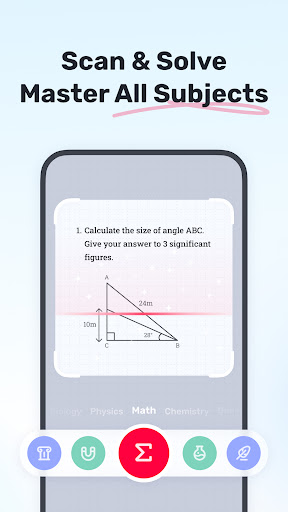
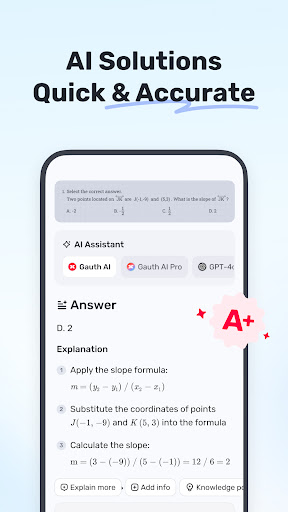
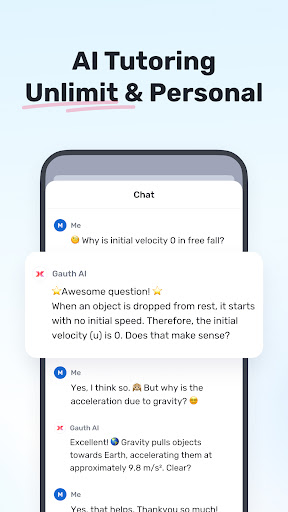
Gauth is the #1 AI study companion presented by Bytedance (Tiktok's parent company)! Trusted by millions of users, Gauth offers unlimited answers for all subjects. Try Gauth for all your learning needs!
Key Features:
► ACCURATE ANSWERS, STEP-BY-STEP
Compared to other homework helpers, Gauth is faster and more accurate at solving homework problems, especially with the support of Gauth AI Pro. Problems could be solved quickly within a few seconds, and all answers are accompanied by animated instructions and detailed explanations.
► MASTER ALL SUBJECTS, ALL GRADES
Not only Math questions, Gauth could now solve all different levels of problems in Physics, Chemistry, Biology and more.
► REAL EXPERTS READY TO HELP 24/7
As a strong and resourceful homework solver, we have professional experts and dedicated experts ready to help you 24/7 with multiple subjects, including Math, Physics, Chemistry, and Biology. All experts are available to solve your problems anytime and anywhere, offering clear step-by-step explanations. With Gauth, you can easily understand and master different subjects.
► EASY TO USE, HOMEWORK IS COOL
Simply take a photo of your problem, and Gauth will recognize it and crop your question automatically. After uploading, our experts will provide solutions in a few seconds with well-formatted answers and explanations. With Gauth, we hope you can find homework is also fun and easy to understand!
► SUBJECTS COVERED
- Math
- Biology
- Physics
- Chemistry
- Others
► MATH TOPICS COVERED
- Math Word problems
- Algebra (Real Number; Arithmetic; Set theory; Expression; Logarithm; Complex Number)
- Function (Linear; Quadratic; Polynomial; Exponential; Rational; Logarithmic; Inverse Function)
- Geometry (Plane & Solid Geometry; Algebra & lines; Lines & Planes in Space; Transformation)
- Trigonometry (Trigonometric Ratios; Law of Sines; Law of Cosines; Reciprocal Properties)
- Calculus (Derivatives; Integrals; Limits; the Tangent/Area Math problem)
- Statistics and Data Analysis (Probability; Data Representation; Poisson/Normal Distribution)
- Matrix (Matrix Algebra; System of Linear Equations & Matrices)
- Logic (Reasoning & Proof)
► Want to level up your learning? With Gauth Plus, you will get:
- Unlimited answers and explanations
- High accuracy in answers
- Access to 20M+ tutorial videos
- A question bank of 100M+
- 24/7 tutor help
Terms of Service https://h5.gauthmath.com/terms
Privacy Policy https://h5.gauthmath.com/policy
แสดงเพิ่มเติม

1. ดาวน์โหลดตัวติดตั้ง MEmu และสิ้นสุดการติดตั้ง

2. เริ่ม MEmu จากนั้นเปิด Google Play บนหน้าแรก

3. ค้นหา Gauth: AI Study Companion ใน Google Play
Install
4. ดาวน์โหลดและติดตั้ง Gauth: AI Study Companion
5. เมื่อติดตั้งเสร็จให้คลิกที่ไอคอนเพื่อเริ่มใช้งาน

6. ใช้ MEmu เพื่อสัมผัสประสบการณ์ Gauth: AI Study Companion บนคอมพิวเตอร์ของคุณ
MEmu Play คือโปรแกรมจำลอง Android ที่ดีที่สุด มีผู้ใช้มากกว่า 50 ล้านคน มอบประสบการณ์การใช้งานแอป Android ขั้นสุดยอดให้กับคุณ เทคโนโลยีจำลองเสมือนของ MEmu ช่วยให้คุณรันแอป Android หลายพันแอปบนคอมพิวเตอร์ได้อย่างราบรื่น แม้แอปที่กินทรัพยากรเครื่องสูงที่สุด
จอใหญ่และกราฟฟิกสวยกว่า; เล่นได้นาน, ไม่ต้องใช้แบตเตอรี่โทรศัพท์หรือเน็ตโทรศัพท์.
ระบบปรับแต่งปุ่มคีย์บอร์ดและเม้าส์ตามที่คุณเลือก
เล่นมากกว่าหนึ่งเกมบน PC ในเวลาเดียวกันด้วยระบบหลายจอหรือ Multi-Instance manager.
Use Gauth: AI Study Companion on PC by following steps: