How to Fix Game Stuttering on MEmu Emulator
 |
|
How to Fix Game Stuttering on MEmu Emulator
If your game runs but stutters or freezes, these fixes can help smooth it out:
🚀 1. Enable VT (Virtualization)
- Turn on Intel VT-x / AMD-V in BIOS
- This greatly improves stability and reduces stutter
⚙️ 2. Optimize Engine Settings
- Go to Settings → Engine
- CPU: 2–4 cores
- RAM: 4–8 GB
- Performance: High
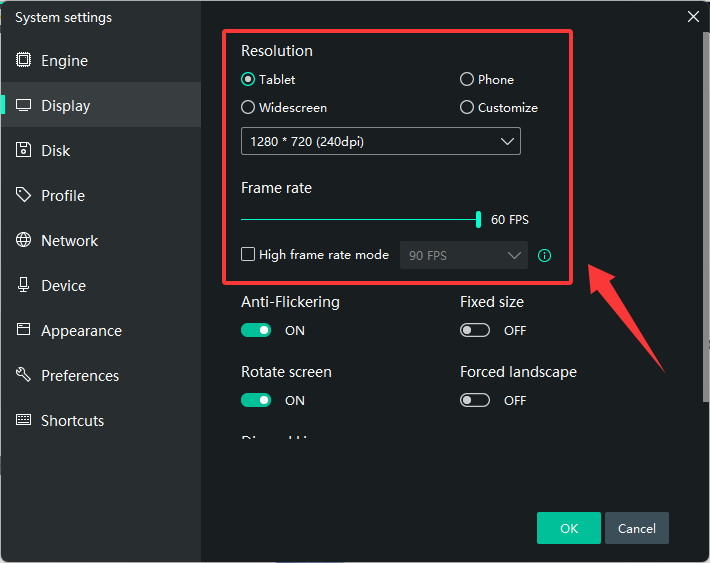
🎮 3. Adjust FPS & Resolution
- Set FPS to 60 (or 30 for low-end PCs)
- Lower resolution to 1280×720 or below
- Reduce DPI (160–240)
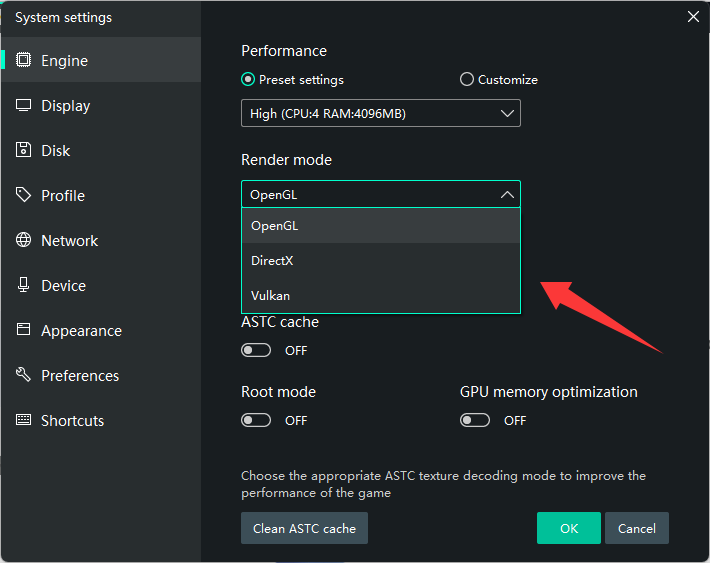
🖥️ 4. Switch Graphics Mode
- Try:
- DirectX (more stable)
- OpenGL (better FPS on some setups)
🧠 5. Use Dedicated GPU
- Set MEmu to High Performance GPU (NVIDIA/AMD settings)
🔄 6. Update Graphics Drivers
- Install the latest GPU drivers
- Avoid outdated or default Windows drivers
🧹 7. Close Background Apps
- Free up CPU/RAM (close browser, Discord, etc.)
🔋 8. Set Windows to High Performance
- Power Options → High Performance
🛠️ 9. Disable Conflicts
- Turn off Hyper-V
- Close other emulators or virtual machines
🎯 10. Lower In-Game Settings
- Reduce graphics quality, shadows, effects
- Enable “performance mode” if available
⚠️ Extra Tips
- Install MEmu on SSD
- Avoid running multiple instances
- Keep your PC cool (overheating causes stutter)