Hoverboard Party
Actualizada
Versión actual
1.0.1
Ofrecida por

Con toda tu pasión para jugar Hoverboard Party, no se supone que tus manos estén limitadas en una pequeña pantalla de tu teléfono. Juega como un profesional y obtén el control total de tu juego con el teclado y el mouse. MEmu le ofrece todas las cosas que espera. Descargar y jugar Hoverboard Party en PC. Juega todo el tiempo que quieras, sin más limitaciones de batería, datos móviles y llamadas molestas. El nuevo MEmu 9 es la mejor opción para jugar Hoverboard Party en PC. Preparado con nuestra experiencia, el exquisito sistema de keymapping preestablecido convierte a Hoverboard Party en un verdadero juego de PC. Codificado con nuestra absorción, el administrador de instancias múltiples hace posible jugar 2 o más cuentas en el mismo dispositivo. Y lo más importante, nuestro exclusivo motor de emulación puede liberar todo el potencial de su PC, hacer que todo sea más fluido. Nos importa no solo cómo juegas, sino también todo el proceso de disfrutar de la felicidad de los juegos.
Más detalles
Descargar Hoverboard Party en PC con MEmu Android Emulador. Disfruta jugando en la pentalla grande. Ready to roll?
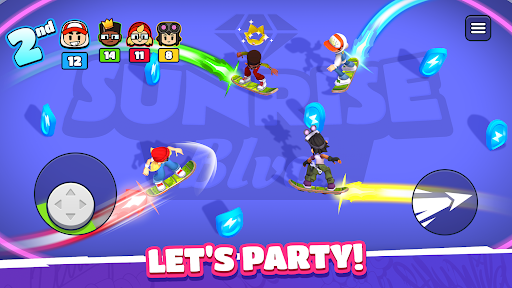
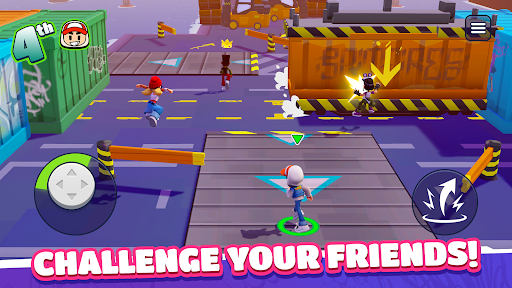
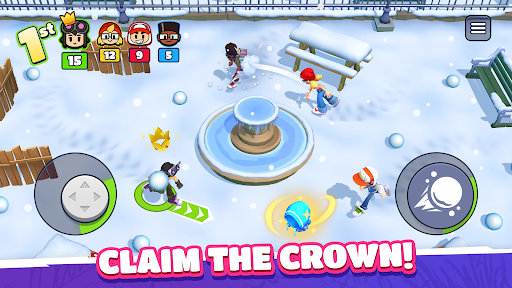
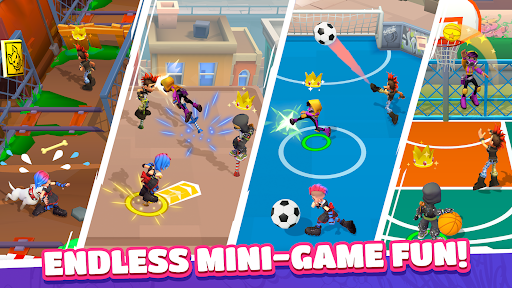
Ready to roll? Challenge your friends anywhere and anytime in Hoverboard Party! Whether you're looking to prove your skills to the world or settle a score with your pals, this is the ultimate party-game experience. Get ready for fun, competition, and a little bit of chaos!
Gather the Squad & Compete!
Experience a quick-fire multiplayer competition format built for fast fun. Create a private party to play with your friends or jump into instant online PvP matchmaking to find new rivals in seconds. Face off in three back-to-back rounds where every second counts. Score points, climb the podium, and show them who is the boss!
Action-Packed Mini-Games
Every round brings a new challenge. You’ll need more than just luck to win:
Cage Football: A 4-way arena match where shutting goals and a rain of balls turn the pitch into a scoring frenzy.
Crossy Rails: Dodge speeding trains while hunting for coins. Don't get hit, or your loot is up for grabs!
Hoverboard Mayhem: Light up the arena! Trace and grow your energy trail to zap your rivals and take the lead.
Snowball Fight: Get tactical. Take cover to dodge incoming attacks and unleash a storm of snowballs to steal the show!
...and many more! From jetpack battles to obstacle races, there's always a new way to win.
Why You’ll Love It:
Play Together: Easily invite friends to your party for private matches.
Own the Streets: Show your true colors! Win big, unlock new characters and stand out with the freshest skins!
Infinite Variety: A huge rotation of racing, brawling, and survival minigames!
Do you have what it takes to outlast the competition? Grab your board and join the party!
Más detalles

1. Descargar el instalador de MEmu y finalice la instalación

2. Iniciar MEmu y abrir Google Play en la página de inicio

3. Buscar Hoverboard Party en Google Play
Install
4. Descargar y instalar Hoverboard Party
5. Hacer click al icono para iniciar

6. Disfruta jugando Hoverboard Party en PC con MEmu
MEmu App Player es el mejor emulador de Android gratuito y 50 millones de personas ya están disfrutando su magnífica experiencia jugando en Android. La tecnología de virtualización de MEmu te permite jugar a miles de juegos Android suavemente en tu PC, incluso los más intensivos gráficamente.
Pantalla más grande con mejores gráficos; Larga duración, sin limitación de batería o datos móviles.
Soporte completo de keymapping para un control preciso del teclado y el mouse o gamepad.
Múltiples cuentas de juegos o tareas en una sola PC a la vez con el administrador de instancias múltiples.
Play Hoverboard Party on PC by following steps: