KARLSON
Actualizada
Versión actual
Ofrecida por

Con toda tu pasión para jugar KARLSON, no se supone que tus manos estén limitadas en una pequeña pantalla de tu teléfono. Juega como un profesional y obtén el control total de tu juego con el teclado y el mouse. MEmu le ofrece todas las cosas que espera. Descargar y jugar KARLSON en PC. Juega todo el tiempo que quieras, sin más limitaciones de batería, datos móviles y llamadas molestas. El nuevo MEmu 9 es la mejor opción para jugar KARLSON en PC. Preparado con nuestra experiencia, el exquisito sistema de keymapping preestablecido convierte a KARLSON en un verdadero juego de PC. Codificado con nuestra absorción, el administrador de instancias múltiples hace posible jugar 2 o más cuentas en el mismo dispositivo. Y lo más importante, nuestro exclusivo motor de emulación puede liberar todo el potencial de su PC, hacer que todo sea más fluido. Nos importa no solo cómo juegas, sino también todo el proceso de disfrutar de la felicidad de los juegos.
Más detalles
Descargar KARLSON en PC con MEmu Android Emulador. Disfruta jugando en la pentalla grande. KARLSON is a unique and exhilarating first-person shooter (FPS) game that combines fast-paced action, fluid parkour mechanics, stylish slow-motion sequences, and an unusual obsession with milk.
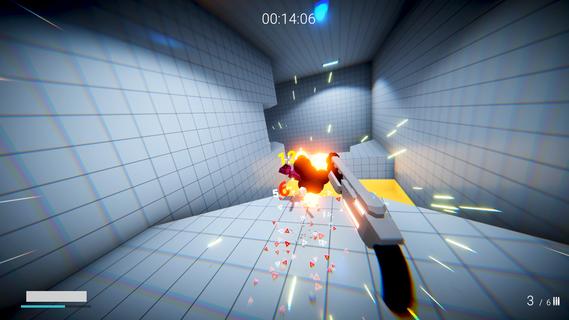
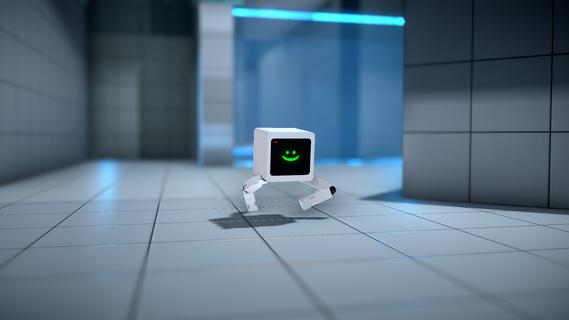
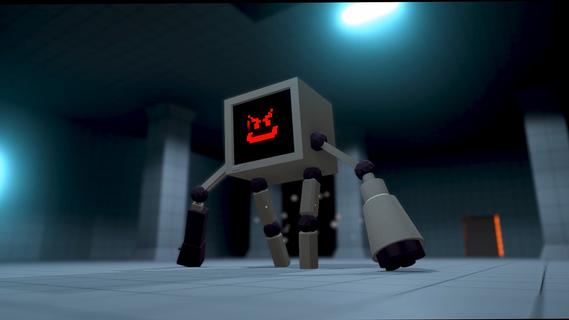
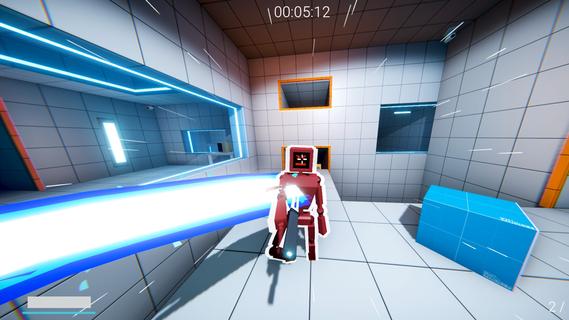
KARLSON is a unique and exhilarating first-person shooter (FPS) game that combines fast-paced action, fluid parkour mechanics, stylish slow-motion sequences, and an unusual obsession with milk. Developed by Dani, an indie game creator known for his creative and engaging projects, KARLSON offers players a fresh and entertaining experience that stands out in the crowded FPS genre. At its core, KARLSON is about a quirky protagonist named Karlson, a milk-loving man on a relentless quest to find and drink his favorite beverage. This seemingly simple premise is elevated by the game's dynamic gameplay, which blends intense shooting mechanics with agile movement and cinematic slow-motion effects. The result is an adrenaline-fueled adventure where players must navigate complex environments, outsmart enemies, and maintain their thirst for milk. One of the standout features of KARLSON is its parkour system. Unlike traditional shooters where movement can feel clunky or limited, KARLSON emphasizes fluidity and speed. Players can run, jump, wall-run, and slide through levels with ease, allowing for creative approaches to combat and exploration. This parkour element not only adds depth to the gameplay but also keeps the pace fast and exciting, encouraging players to think on their feet and master the environment. The slow-motion mechanic is another highlight that adds a cinematic flair to the game. At key moments, players can trigger slow motion to dodge bullets, line up perfect shots, or execute stylish kills. This feature enhances the visual spectacle and strategic depth, giving players a satisfying sense of control and coolness during chaotic firefights. KARLSON’s levels are designed with verticality and complexity in mind, featuring a variety of urban and industrial settings filled with platforms, obstacles, and hidden paths. This design encourages exploration and rewards players who master the parkour skills to reach advantageous positions or secret areas. The game also includes a range of weapons and gadgets that complement the fast-paced movement, from pistols and shotguns to more inventive tools that suit the game's quirky tone. The narrative, while minimalistic, adds charm and humor to the experience. Karlson’s obsession with milk drives the story forward, leading to absurd and entertaining scenarios. This lighthearted approach contrasts with the intense gameplay, creating a unique balance that appeals to players looking for both action and personality. KARLSON also benefits from its indie roots, showcasing a distinctive art style that blends simple yet effective visuals with smooth animations. The game's soundtrack and sound effects contribute to the energetic atmosphere, keeping players engaged and immersed throughout their milk-fueled journey. In addition to its single-player campaign, KARLSON has garnered attention for its modding community. Players have created custom levels, challenges, and even multiplayer modes, expanding the game's replayability and fostering a passionate fanbase. Overall, KARLSON is a refreshing take on the FPS genre, combining parkour, slow-motion, and a quirky narrative into a cohesive and thrilling package. Its emphasis on movement and style, paired with a humorous storyline centered around milk, makes it a memorable and enjoyable experience for players seeking something different from traditional shooters. Whether you’re a fan of fast-paced action, creative level design, or just looking for a fun and offbeat game, KARLSON delivers a unique blend of excitement and charm that’s hard to find elsewhere.
Más detalles

1. Descargar el instalador de MEmu y finalice la instalación

2. Iniciar MEmu y abrir Google Play en la página de inicio

3. Buscar KARLSON en Google Play
Install
4. Descargar y instalar KARLSON
5. Hacer click al icono para iniciar

6. Disfruta jugando KARLSON en PC con MEmu
MEmu App Player es el mejor emulador de Android gratuito y 50 millones de personas ya están disfrutando su magnífica experiencia jugando en Android. La tecnología de virtualización de MEmu te permite jugar a miles de juegos Android suavemente en tu PC, incluso los más intensivos gráficamente.
Pantalla más grande con mejores gráficos; Larga duración, sin limitación de batería o datos móviles.
Soporte completo de keymapping para un control preciso del teclado y el mouse o gamepad.
Múltiples cuentas de juegos o tareas en una sola PC a la vez con el administrador de instancias múltiples.
Play KARLSON on PC by following steps: