Disney Epic Mickey: Rebrushed
Mise à jour
Version actuelle
1.779.1 (Shipping)
Proposée par

Avec toute la passion que vous avez à jouer Disney Epic Mickey: Rebrushed, vos mains ne sont pas sensées se limiter à l’infime écran de votre téléphone. Jouez comme un pro et ayez le contrôle total de votre jeu à l’aide du clavier et de la souris. MEmu satisfait toutes vos attentes. Téléchargez et jouez Disney Epic Mickey: Rebrushed sur PC. Jouez aussi longtemps que vous souhaitez sans aucune limitation de batterie, de données mobiles et d’appels embêtants. La toute nouvelle version de MEmu 9 est la meilleure option de jouer Disney Epic Mickey: Rebrushed sur PC. Réalisé par nos experts, l’e magnifique système d’affectation de touches prédéfini fait de Disney Epic Mickey: Rebrushed un jeu réaliste sur PC. Le gestionnaire multi-instances de MEmu permet 2 ou plusieurs comptes de jeu sur le même appareil. Et le plus important, le moteur d’émulation exclusif peut libérer le plein potentiel de votre PC, ce qui facilite tout.
Afficher plus
Téléchargez Disney Epic Mickey: Rebrushed avec le simulateur d’Android MEmu sur votre PC. Profitez de jouer sur un grand écran. Disney Epic Mickey: Rebrushed donne vie à la magie Disney dans un jeu de plateforme 3D vibrant.
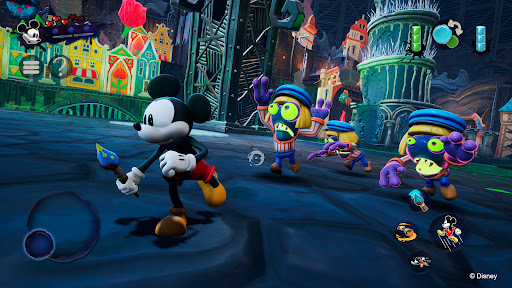
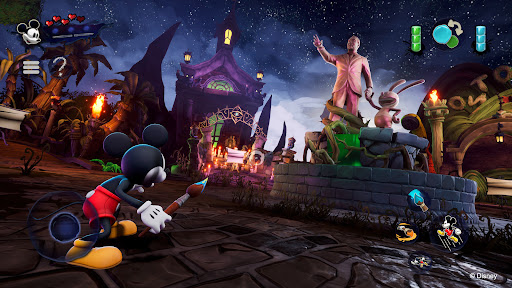
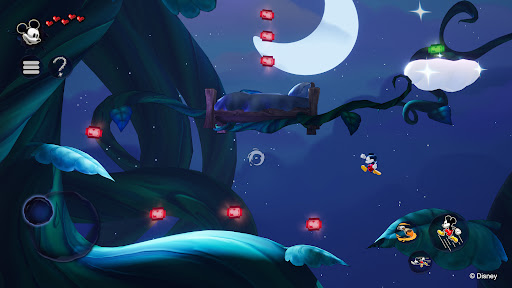
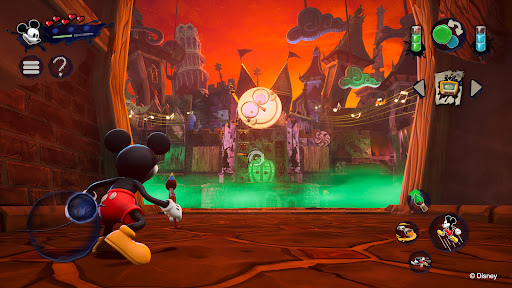
Disney Epic Mickey: Rebrushed donne vie à la magie Disney dans un jeu de plateforme 3D vibrant. Ce magnifique remake entraîne Mickey Mouse dans une aventure épique à travers le Wasteland, un royaume peuplé de personnages Disney oubliés. Incarnez Mickey et plongez dans un monde fantastique. Armé de peinture et de diluant, façonnez votre aventure et le destin de ce monde parallèle.
Chaque coup de pinceau compte ! Utilisez la peinture pour restaurer la beauté et l'harmonie, ou le diluant pour modifier votre environnement et percer des secrets cachés. Vos choix influencent le destin de Mickey et changent l'issue de cette odyssée artistique. Deviendrez-vous le héros épique dont le Wasteland a besoin ?
Rencontrez des personnages emblématiques comme Oswald le lapin chanceux, la première création de Walt Disney, en voyageant entre les différents royaumes du Wasteland. Collectionnez des pins Disney virtuels, relevez des défis créatifs et découvrez des secrets, tout en explorant des niveaux de plateforme classiques inspirés des films et courts métrages d'animation.
Initialement imaginé par Warren Spector, puis réinventé par Purple Lamp, Disney Epic Mickey: Rebrushed offre des graphismes de pointe et des commandes améliorées pour donner un nouveau souffle à un grand classique. Découvrez de nouvelles capacités de déplacement pour Mickey, comme la course, l'attaque au sol et le sprint. Son histoire captivante promet une aventure inoubliable aux fans de longue date comme aux nouveaux venus. Rejoignez Mickey et percez les mystères du Wasteland dans cet hommage à l'héritage Disney.
Explorez un Wasteland réinventé, peuplé des personnages et des histoires intemporelles de Disney.
Maniez le pinceau magique : peignez pour créer, diluez pour modifier. Chaque choix influence votre histoire.
Rencontrez Oswald le lapin chanceux, la star originale de Disney, dans un monde riche et narratif.
Profitez d'un gameplay enrichi de nouvelles capacités et de graphismes améliorés dans un décor classique. Mickey dispose de nouveaux mouvements comme la charge, l'attaque au sol et le sprint.
Grande rejouabilité grâce à de multiples fins qui dépendent de votre style de jeu et de vos choix.
© 2026 THQ Nordic Mobile
Afficher plus

1. Téléchargez l'installateur MEmu et terminez l'installation

2. Démarrez MEmu puis ouvrez Google Play sur la page d'accueil

3. Recherchez Disney Epic Mickey: Rebrushed dans Google Play
Install
4. Téléchargez et installez Disney Epic Mickey: Rebrushed
5. Une fois l'installation terminée, cliquez sur l'icône pour démarrer

6. Profitez de jouer Disney Epic Mickey: Rebrushed sur PC avec MEmu
Le lecteur d'application MEmu est le meilleur émulateur Android gratuit, et 50 millions de personnes profitent déjà de sa fantastique expérience de jeu Android. La technologie de virtualisation MEmu vous donne la possibilité de jouer à des milliers de jeux Android sur votre PC sans aucune difficulté, même aux plus gourmands.
L’écran plus grand avec de meilleurs graphismes; Une longue durée, sans limitation de batterie ou de données mobiles.
Soutien du Keymapping pour un contrôle précis du clavier et de la souris ou de la manette de jeu
Plusieurs comptes de jeu ou tâches sur un seul PC en même temps avec le gestionnaire de multi-instance.
Play Disney Epic Mickey: Rebrushed on PC by following steps: