Disney Epic Mickey: Rebrushed
อัปเดตเมื่อ
เวอร์ชันปัจจุบัน
1.779.1 (Shipping)
ให้บริการโดย

เวลาคุณเล่น Disney Epic Mickey: Rebrushed, คุณอาจรู้สึกว่ามือคุณอาจบังจอแล้วทำให้ไม่ได้เล่นแบบเต็มที่. เล่นแบบไร้ขีดจำกัดด้วยเม้าส์และคีย์บอร์ด. MEmu มีตัวเลือกหลายอย่างให้คุณใช้งานเกมที่คุณเล่นแบบที่คุณต้องการ. ดาวน์โหลดและเล่น Disney Epic Mickey: Rebrushed บน PC. เล่นนานแค่ไหนก็ได้, ไม่ต้องชาร์จแบตเตอรี่, หรือเจอคนโทรเข้ามาระหว่างเล่น. MEmu 9 เป็นตัวเลือกสำหรับการเล่น Disney Epic Mickey: Rebrushed บน PC. ทางทีมงานเราได้ปรับแต่งเกม, ปรับให้เล่นเกมบางเกมได้เหมือนเล่น Disney Epic Mickey: Rebrushed เป็นเกม PC เช่นเล็งด้วยเม้าส์หรือใช้คีย์บอร์ด. ระบบของเรายังทำให้คุณสามารถเปิดเล่นได้มากกว่า 2 เกมพร้อมๆกันในคอมของคุณ. และที่สำคัญที่สุด, ระบบโปรแกรมของเราสามารถทำให้คุณใช้ระบบของ PC ทำให้เกมลื่นเหมือนกับใช้โทรศัพท์รุ่นล่าสุด. เราไม่ได้ดูแลเรื่องการเล่นเกม, แต่เราดูแลถึงความสนุกสนานที่คุณได้จากการเล่นด้วย.
แสดงเพิ่มเติม
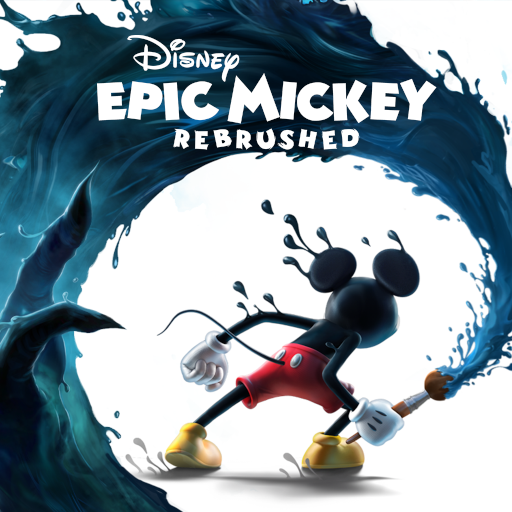
ดาวน์โหลด Disney Epic Mickey: Rebrushed บน PC ด้วย MEmu Android Emulator สนุกกับการเล่นบนหน้าจอขนาดใหญ่ Disney Epic Mickey: Rebrushed นำความมหัศจรรย์ของดิสนีย์มาสู่ชีวิตในรูปแบบเกมแพลตฟอร์ม 3 มิติที่สดใส เกมรีเมคที่สวยงามนี้จะส่งมิกกี้เมาส์ออกเดินทางครั้งยิ่งใหญ่ผ่านดินแดนรกร้าง (Wasteland) ดินแดนแห่งตัวละครดิสนีย์ที่ถูกลืม ในฐานะมิกกี้ คุณจะได้ดำดิ่งสู่โลกแฟนตาซี และใช้สีและทินเนอร์เพื่อกำหนดการผจญภัยและชะตากรรมของโลกอีกมิตินี้.
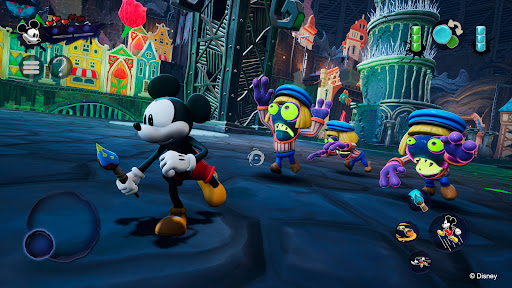
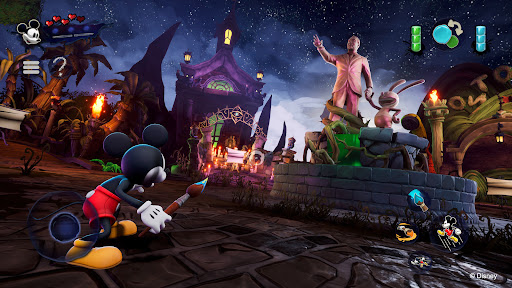
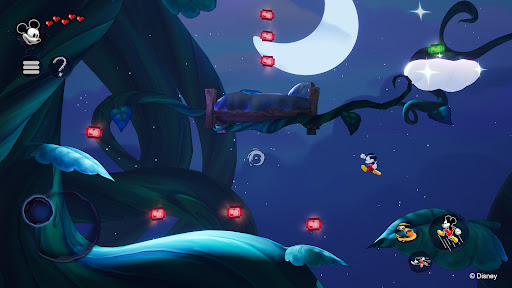
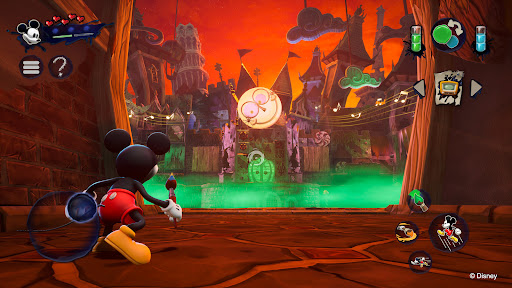
Disney Epic Mickey: Rebrushed นำความมหัศจรรย์ของดิสนีย์มาสู่ชีวิตในรูปแบบเกมแพลตฟอร์ม 3 มิติที่สดใส เกมรีเมคที่สวยงามนี้จะส่งมิกกี้เมาส์ออกเดินทางครั้งยิ่งใหญ่ผ่านดินแดนรกร้าง (Wasteland) ดินแดนแห่งตัวละครดิสนีย์ที่ถูกลืม ในฐานะมิกกี้ คุณจะได้ดำดิ่งสู่โลกแฟนตาซี และใช้สีและทินเนอร์เพื่อกำหนดการผจญภัยและชะตากรรมของโลกอีกมิตินี้
ทุกจังหวะการลงสีของคุณมีความสำคัญ! ใช้สีเพื่อฟื้นฟูความสวยงามและความกลมกลืน หรือใช้ทินเนอร์เพื่อเปลี่ยนแปลงสภาพแวดล้อมและค้นพบความลับที่ซ่อนอยู่ ทางเลือกของคุณจะส่งผลต่อชะตากรรมของมิกกี้และเปลี่ยนแปลงผลลัพธ์ของการผจญภัยทางศิลปะครั้งนี้ คุณจะกลายเป็นวีรบุรุษผู้ยิ่งใหญ่ที่ดินแดนรกร้างต้องการหรือไม่?
พบกับตัวละครอันเป็นเอกลักษณ์มากมาย เช่น ออสวาลด์ กระต่ายนำโชค ตัวละครตัวแรกที่วอลต์ ดิสนีย์สร้างขึ้น ในขณะที่คุณเดินทางระหว่างดินแดนต่างๆ ในดินแดนรกร้าง สะสมเข็มกลัดดิสนีย์เสมือนจริง รับมือกับความท้าทายเชิงสร้างสรรค์ และค้นพบความลับต่างๆ ทั้งหมดนี้ในขณะที่สำรวจด่านแพลตฟอร์มสุดคลาสสิกที่ได้รับแรงบันดาลใจจากภาพยนตร์แอนิเมชั่นและภาพยนตร์สั้น
เกม Disney Epic Mickey: Rebrushed ที่สร้างสรรค์โดย Warren Spector และได้รับการปรับปรุงใหม่โดย Purple Lamp มาพร้อมภาพกราฟิกสุดล้ำและระบบควบคุมที่พัฒนาขึ้น เพื่อเติมชีวิตชีวาให้กับเกมคลาสสิกที่ทุกคนรัก สัมผัสทักษะการเคลื่อนไหวใหม่ๆ ของมิกกี้ เช่น การพุ่งตัว การกระแทกพื้น และการวิ่ง เกมนี้มีเนื้อเรื่องที่น่าติดตาม ทำให้เป็นการผจญภัยที่น่าจดจำสำหรับทั้งแฟนๆ เกมรุ่นเก่าและผู้เล่นใหม่ ร่วมผจญภัยไปกับมิกกี้เมาส์และไขปริศนาแห่งดินแดนรกร้าง ในเกมที่สร้างขึ้นเพื่อเป็นการยกย่องมรดกของดิสนีย์
สำรวจดินแดนรกร้างที่ได้รับการสร้างสรรค์ใหม่ เต็มไปด้วยตัวละครและเรื่องราวอมตะของดิสนีย์
ใช้พู่กันวิเศษ: ระบายสีเพื่อสร้างสรรค์ ใช้ทินเนอร์เพื่อเปลี่ยนแปลง ทุกการตัดสินใจจะกำหนดเรื่องราวของคุณ
พบกับออสวาลด์ กระต่ายนำโชค ดาวเด่นดั้งเดิมของดิสนีย์ ในโลกที่เต็มไปด้วยเรื่องราว
สนุกกับเกมเพลย์ขั้นสูง พร้อมความสามารถใหม่ๆ และภาพกราฟิกที่ได้รับการปรับปรุงในฉากคลาสสิก
มิกกี้มีการเคลื่อนไหวใหม่ๆ เช่น การพุ่งตัว การกระแทกพื้น และการวิ่ง
เล่นซ้ำได้หลายรอบด้วยฉากจบหลากหลายแบบ ขึ้นอยู่กับสไตล์การเล่นและการตัดสินใจเฉพาะตัวของคุณ
© 2026 THQ Nordic Mobile
แสดงเพิ่มเติม

1. ดาวน์โหลดตัวติดตั้ง MEmu และสิ้นสุดการติดตั้ง

2. เริ่ม MEmu จากนั้นเปิด Google Play บนหน้าแรก

3. ค้นหา Disney Epic Mickey: Rebrushed ใน Google Play
Install
4. ดาวน์โหลดและติดตั้ง Disney Epic Mickey: Rebrushed
5. เมื่อติดตั้งเสร็จให้คลิกที่ไอคอนเพื่อเริ่มใช้งาน

6. สนุกกับการเล่น Disney Epic Mickey: Rebrushed บนพีซีด้วย MEmu
MEmu App Player เป็นอีมูเลเตอร์ Android ที่ดีที่สุดและผู้คนกว่า 50 ล้านคนเพลิดเพลินไปกับประสบการณ์การเล่นเกม Android ที่ยอดเยี่ยม เทคโนโลยีการจำลองเสมือนของ MEmu ช่วยให้คุณเล่นเกม Android หลายพันเกมได้อย่างราบรื่นบนพีซีของคุณแม้แต่เกมที่ต้องใช้กราฟิกมากที่สุด
จอใหญ่และกราฟฟิกสวยกว่า; เล่นได้นาน, ไม่ต้องใช้แบตเตอรี่โทรศัพท์หรือเน็ตโทรศัพท์.
ระบบปรับแต่งปุ่มคีย์บอร์ดและเม้าส์ตามที่คุณเลือก
เล่นมากกว่าหนึ่งเกมบน PC ในเวลาเดียวกันด้วยระบบหลายจอหรือ Multi-Instance manager.
Play Disney Epic Mickey: Rebrushed on PC by following steps: