Decolore
Updated
Current Version
1.0.27
Offered By

With your passion for Decolore, you shouldn’t have to limit yourself to the small screen of a phone. Play like a pro and take full control of the game using a keyboard and mouse. MEmu gives you everything you’re looking for. Download and play Decolore on PC. Play as long as you want — no more worries about battery life, mobile data, or unexpected calls. The all-new MEmu 9 is the best way to play Decolore on PC. With our expertly designed keymapping system, Decolore feels just like a real PC game. The MEmu multi-instance manager lets you run two or more accounts on the same device at the same time. Most importantly, our exclusive emulation engine unlocks your PC’s full potential, delivering smooth and seamless performance.
Show more
Download Decolore on PC with MEmu Android Emulator. Enjoy playing on big screen. COLORFUL CALM .
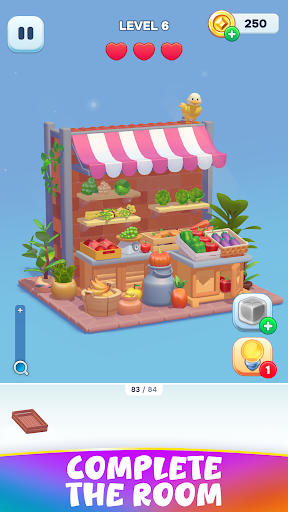
COLORFUL CALM
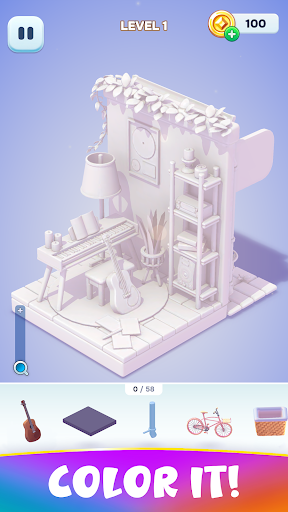
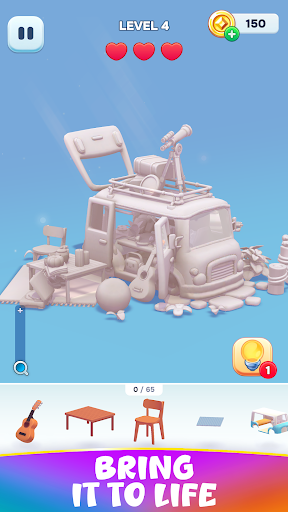
Life sure can be stressful, so why not treat yourself to a coloring book game with 3D objects, fun room and home design, and lots of aesthetic puzzles? Decolore is the stress relief you didn’t know you needed, so hop in and get to decorating all the different pages and rooms. Along the way work on your pattern recognition skills and train your brain as you work through which piece goes where.
PLACE IT
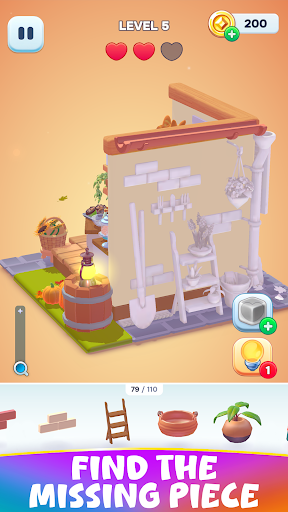
Levels consist of a cute coloring page type puzzle, and it’s up to you to figure out where all the objects go and place them accordingly, thus filling in the color and completing the page. As you progress the puzzles increase in difficulty, becoming more intricate and difficult to solve. Worry not though, lots of boosters are available to keep you full steam ahead!
Fantastic features:
Lots of levels: There are already tons of exciting puzzle levels in the game, and more are being added so you never have to worry about running out of pages! Each one tells a little story, and as you progress they rapidly get more detailed and fun to solve. From greenhouses to sewing rooms, mischievous kitties and more, explore this aesthetic world as you place each décor item right where it belongs.
3D fun: While most puzzle games involve just placing the image in its spot, with this one you can, and in fact should, spin the page around every which way! Rooms contain back parts and hidden objects that you’ll need to find, all of which makes it way more fun. Explore the design first to get an idea of where décor might be hidden or jump straight into the room – the choice is yours.
Calming gameplay: Get your stress relief on as you color and place decor! While you do have a limited number of lives each level, there are also lots of useful boosters that you can tap into to keep going. On top of that, there’s no limit for how long you can take to solve a level, so step away as needed and come back when you’re ready. In case you didn’t think it could get any more relaxing, the joyful music will really get you in the mood.
Secret brain training: That’s right, not only are you slowing down and having a peaceful moment to yourself as you place items, you’re also giving your mind a mini workout too. The more you play the better you’ll get at spotting objects and picking out shapes in the design, both of which can be quite useful skills in real life too. Whether you play fast or slow, a level here and there or a whole bunch at once, you can benefit from your time gaming in so many ways.
ADORABLE DESIGN MADE EASY
Boatloads of 3D rooms with cute designs in an adorable home combine with delightful music and stress-free game play to create the perfect game! Try Decolore today and feel your stress evaporate as you color in each page and explore this perfect little world. On top of being fun and chill, your brain can get some training in, leaving you both smarter and more relaxed at the end of your gaming session, be in 5 or 35 minutes.
Privacy Policy: https://say.games/privacy-policy
Terms of Use: https://say.games/terms-of-use
Show more

1. Download MEmu installer and finish the setup

2. Start MEmu then open Google Play on the desktop

3. Search Decolore in Google Play
Install
4. Download and Install Decolore
5. On install completion click the icon to start

6. Enjoy playing Decolore on PC with MEmu
MEmu Play is the best Android emulator and 100 million people already enjoy its superb Android gaming experience. The MEmu virtualization technology empowers you to play thousands of Android games smoothly on your PC, even the most graphic-intensive ones.
Bigger screen with better graphics; Long duration, without limitation of battery or mobile data.
Full Keymapping support for precise control of keyboard and mouse or gamepad.
Multiple game accounts or tasks on single PC at one time with Multi-Instance manager.
Play Decolore on PC by following steps: