
Plants on Fire: Clash & Defend
Updated
Current Version
1791515895
Offered By

With your passion for Plants on Fire: Clash & Defend, you shouldn’t have to limit yourself to the small screen of a phone. Play like a pro and take full control of the game using a keyboard and mouse. MEmu gives you everything you’re looking for. Download and play Plants on Fire: Clash & Defend on PC. Play as long as you want — no more worries about battery life, mobile data, or unexpected calls. The all-new MEmu 9 is the best way to play Plants on Fire: Clash & Defend on PC. With our expertly designed keymapping system, Plants on Fire: Clash & Defend feels just like a real PC game. The MEmu multi-instance manager lets you run two or more accounts on the same device at the same time. Most importantly, our exclusive emulation engine unlocks your PC’s full potential, delivering smooth and seamless performance.
Show more
Download Plants on Fire: Clash & Defend on PC with MEmu Android Emulator. Enjoy playing on big screen. READY TO GO CRAZY, CAPTAIN?

READY TO GO CRAZY, CAPTAIN?
Welcome to Plants on Fire, a fast-paced 3-Min Plant Mania PvP Tower Defense where quirky plants, clever strategy, and chaotic battles collide!
Merge powerful plants, discover delicious combos, build your ultimate squad, and outsmart your rivals. Easy to pick up, hard to put down—every 3-minute battle brings a new chance to squeeze out the power and claim victory!
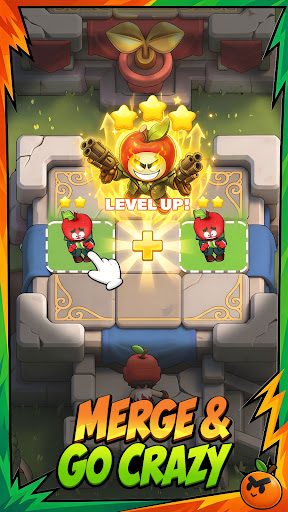
〓 MERGE & GO CRAZY 〓
Jump straight into fast-paced 3-minute battles! Merge your plants to power them up, build clever combinations, and adapt your strategy on the fly. Simple controls make it easy to play, while endless combos keep every battle fresh.
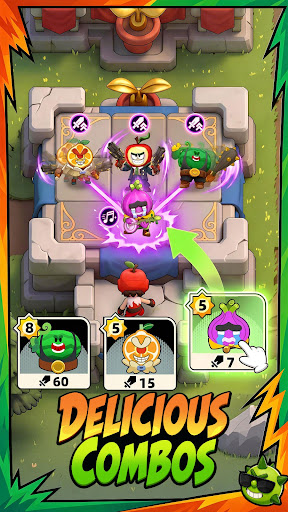
〓 HARVEST YOUR JUICY SQUAD 〓
Build your perfect squad from a wild roster of quirky plants, each with unique abilities and strengths. Mix, match, and merge your plants to discover powerful synergies and delicious combos. Experiment with different decks, adapt your strategy, and squeeze out the power of every plant to create your ultimate winning combination!
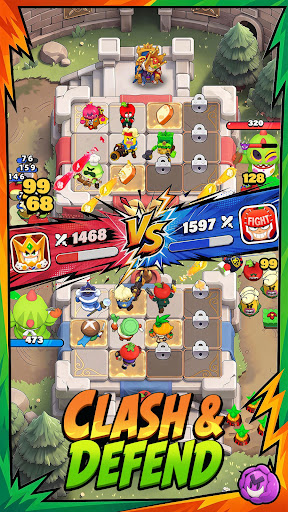
〓 CLASH & DEFEND 〓
Think fast, defend your side, and push back your opponent! Outsmart rivals with smart positioning, clever combos, and well-timed plays. Whether you're chasing the perfect victory or just jumping in for a quick match, every clash is packed with surprises.
〓 MORE WAYS TO PLAY, EVERY SEASON 〓
The madness goes far beyond PvP! Jump into Auto Chess, team up with friends in Co-op, take on challenging Boss Fights and PvE challenges, or compete with your Club in exciting Point Races. With fresh plants, new abilities, battlefields, and game modes added every season, there’s always a new way to play—and a new challenge to conquer!
Merge. Combo. Clash. Grow.
Are you ready to go crazy with your plants?
Looking for the latest news?
- Discord: https://discord.gg/AEfDBbjZcE
- Facebook: https://www.facebook.com/profile.php?id=61580942256700
Having problems?
- Official Email: support@plantsonfire.com
Show more

1. Download MEmu installer and finish the setup

2. Start MEmu then open Google Play on the desktop

3. Search Plants on Fire: Clash & Defend in Google Play
Install
4. Download and Install Plants on Fire: Clash & Defend
5. On install completion click the icon to start

6. Enjoy playing Plants on Fire: Clash & Defend on PC with MEmu
MEmu Play is the best Android emulator and 100 million people already enjoy its superb Android gaming experience. The MEmu virtualization technology empowers you to play thousands of Android games smoothly on your PC, even the most graphic-intensive ones.
Bigger screen with better graphics; Long duration, without limitation of battery or mobile data.
Full Keymapping support for precise control of keyboard and mouse or gamepad.
Multiple game accounts or tasks on single PC at one time with Multi-Instance manager.
Play Plants on Fire: Clash & Defend on PC by following steps: