Zombie Block Defense: Wall TD
Updated
Current Version
1.1.0
Offered By

With your passion for Zombie Block Defense: Wall TD, you shouldn’t have to limit yourself to the small screen of a phone. Play like a pro and take full control of the game using a keyboard and mouse. MEmu gives you everything you’re looking for. Download and play Zombie Block Defense: Wall TD on PC. Play as long as you want — no more worries about battery life, mobile data, or unexpected calls. The all-new MEmu 9 is the best way to play Zombie Block Defense: Wall TD on PC. With our expertly designed keymapping system, Zombie Block Defense: Wall TD feels just like a real PC game. The MEmu multi-instance manager lets you run two or more accounts on the same device at the same time. Most importantly, our exclusive emulation engine unlocks your PC’s full potential, delivering smooth and seamless performance.
Show more
Download Zombie Block Defense: Wall TD on PC with MEmu Android Emulator. Enjoy playing on big screen. Build a wall.
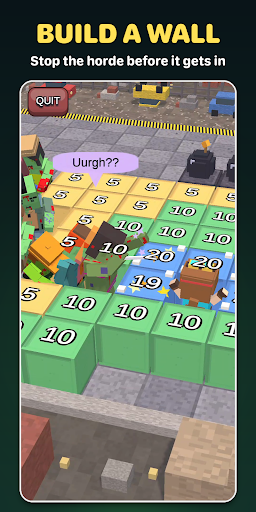
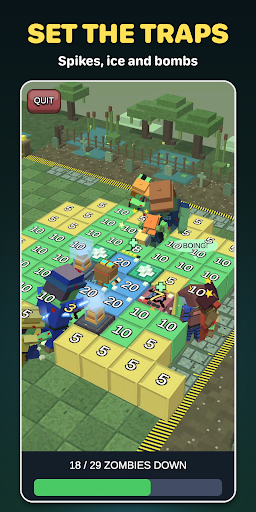
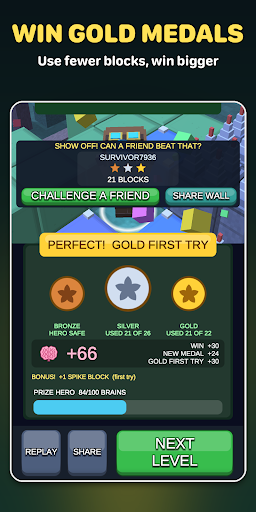
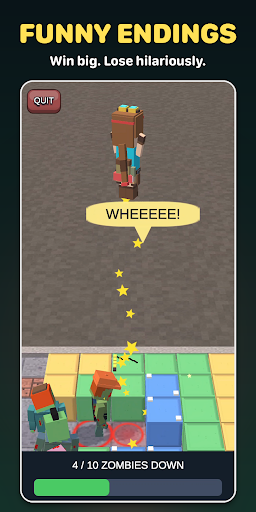
Build a wall. Press start. Watch up to 200 zombies hunt for a way in!
ZOMBIE BLOCK DEFENSE is a bright, blocky wall-building tower defense puzzle. Build a wall around your hero, press Start, and watch the zombie horde hunt for a way in. Your wall plays out live: zombies chew through weak blocks, squeeze through gaps and swarm the corners. Did your defense hold?
HOW IT PLAYS
- Place blocks on the grid, tap Start and watch the wave.
- Zombies take the cheapest way in, so a smart layout beats a big one.
- From a handful of zombies to hordes of 200 from up to four sides.
- No-build squares, stronger blocks and new threats keep each level different.
- A level takes about a minute, ideal for short breaks.
50 LEVELS
Fight across a winding map of zones, each with its own look and twist. Replay levels to win a gold medal for using fewer blocks.
SPECIAL BLOCKS
Unlock spikes, bombs, ice, brain bait, pits, tesla coils and menders. Freeze the horde, drop zombies in a pit, chain-zap them, blow a hole in the line, lure them with a brain or mend your wall mid-wave.
COLLECT HEROES
Win brains, try the prize machine and collect 29 heroes, from Adventurer to Wizard, Astronaut and Witch.
FUNNY ENDINGS
Celebrate a win with a happy hero. Lose, and the zombies get creative. Share the best ones with friends.
PLAY WITH FRIENDS
Send your result as a challenge or share your exact wall so a friend can watch it play out.
DAILY WAVE
A fresh level every day, with bonus brains for your streak.
FREE TO PLAY
Every level is free. Optional rewarded videos give bonus brains. Brain packs are optional purchases that buy heroes and prize-machine spins; the prize machine shows its odds before every spin. A one-off purchase removes ads.
If you like zombie defense, wall building, tower defense and puzzle strategy games, build your wall and see how long it holds. Download Zombie Block Defense now!
Show more

1. Download MEmu installer and finish the setup

2. Start MEmu then open Google Play on the desktop

3. Search Zombie Block Defense: Wall TD in Google Play
Install
4. Download and Install Zombie Block Defense: Wall TD
5. On install completion click the icon to start

6. Enjoy playing Zombie Block Defense: Wall TD on PC with MEmu
MEmu Play is the best Android emulator and 100 million people already enjoy its superb Android gaming experience. The MEmu virtualization technology empowers you to play thousands of Android games smoothly on your PC, even the most graphic-intensive ones.
Bigger screen with better graphics; Long duration, without limitation of battery or mobile data.
Full Keymapping support for precise control of keyboard and mouse or gamepad.
Multiple game accounts or tasks on single PC at one time with Multi-Instance manager.
Play Zombie Block Defense: Wall TD on PC by following steps: