
BPER
Updated
Current Version
D
Offered By

Stop worrying about high battery drain when using BPER on your phone. Free yourself from the tiny screen and enjoy the app on a much larger display. From now on, get a full-screen experience of your app with the convenience of a keyboard and mouse. MEmu offers you all the surprising features you’d expect: quick installation and easy setup, intuitive controls, and no more worries about battery life, mobile data, or unexpected calls. The all-new MEmu 9 is the choice for using BPER on your computer. With the MEmu multi-instance manager, you can run two or more accounts at the same time. Most importantly, our exclusive emulation engine unlocks your PC’s full potential, delivering smooth and enjoyable performance.
Show more
Enjoy superb experience of using BPER on PC with MEMU App Player. It's a powerful free Android emulator which provides you with thousands of android apps for their desktop version. Enjoy connecting with friends and polishing your work with higher efficiency! With the Smart Banking - BPER Banca app your banking experience is enriched with new features, designed starting from your needs, to give you what you need every day.
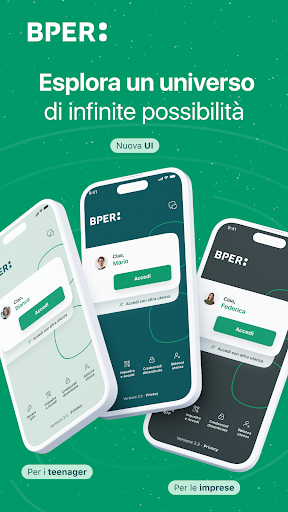
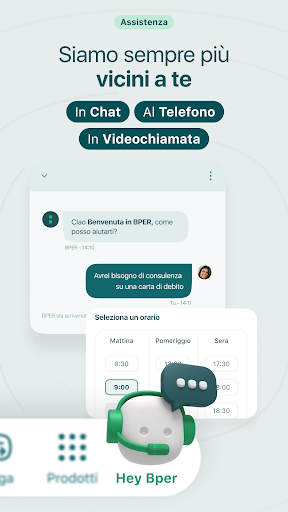
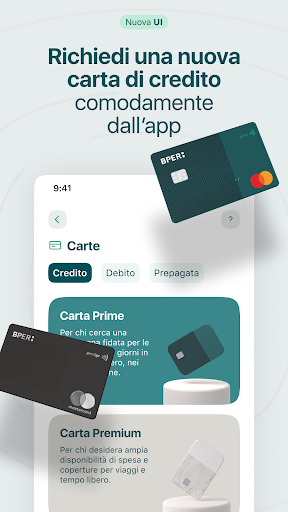
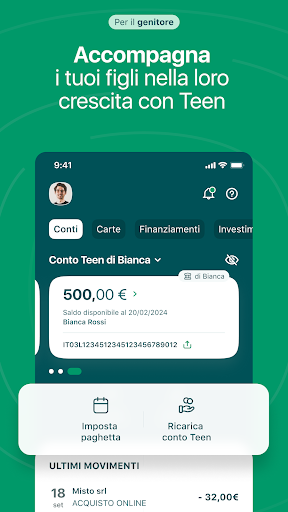
With the Smart Banking - BPER Banca app your banking experience is enriched with new features, designed starting from your needs, to give you what you need every day.
For you, within reach of your smartphone, accounts, cards, loans, mortgages and investments. It only takes a few seconds for you to make bank transfers, even instant ones, and top up your prepaid cards and telephone. You also pay for postal bills, PagoPa and F24 proxies, which you can frame with the camera.
Furthermore, with the Smart Desk virtual desk you can consult, sign your paperwork and send new documents without going to the branch.
Among the features:
Bank transfers
Car and motorbike tax
Refills
Bulletins and F24
PagaPoi, for paying expenses into your current account in installments
Hey BPER functionality to make an appointment or talk in real time with our online consultants in chat, on the phone, in video call, even in screen sharing
Virtual assistant to support you in using the SmartConto and Teen card digital services for children aged 13 to 17
UniSalute 4Zampe veterinary policy
UniSalute Smile dental policy
Personal loan
Request for debit and prepaid cards
Control, activation and management of the security of your cards (Key6 code)
Investments section with the possibility of subscribing to accumulation plans
Features dedicated to businesses Authentication on Smart Checkouts via app
Financing
MiFID questionnaire
Updating your photo ID
Smart Desk virtual desk
Donations for charity
Purchase Amazon vouchers
You will be able to authorize all your operations quickly and securely thanks to Smart PIN, fingerprint or face recognition.
ⓘ The app is free and available to customers of the BPER Banca Group banks.
If you want to initiate payments, make sure you have a device profile. For more information contact your branch.
Show more

1. Download MEmu installer and finish the setup

2. Start MEmu then open Google Play on the desktop

3. Search BPER in Google Play
Install
4. Download and Install BPER
5. On install completion click the icon to start

6. Enjoy using BPER on PC with MEmu
MEmu Play is the best Android emulator, and 100 million users already enjoy its superb Android app experience. Powered by advanced virtualization technology, it lets you enjoy thousands of Android apps smoothly on your PC—including the most graphics-intensive ones.
Bigger screen with better graphics; Long duration, without limitation of battery or mobile data.
Full Keymapping support for precise control of keyboard and mouse or gamepad.
Multiple game accounts or tasks on single PC at one time with Multi-Instance manager.
Use BPER on PC by following steps:
































