
WhaleFin: Buy Crypto & Bitcoin
Updated
Current Version
2.4.0
Offered By

Stop worrying about high battery drain when using WhaleFin: Buy Crypto & Bitcoin on your phone. Free yourself from the tiny screen and enjoy the app on a much larger display. From now on, get a full-screen experience of your app with the convenience of a keyboard and mouse. MEmu offers you all the surprising features you’d expect: quick installation and easy setup, intuitive controls, and no more worries about battery life, mobile data, or unexpected calls. The all-new MEmu 9 is the choice for using WhaleFin: Buy Crypto & Bitcoin on your computer. With the MEmu multi-instance manager, you can run two or more accounts at the same time. Most importantly, our exclusive emulation engine unlocks your PC’s full potential, delivering smooth and enjoyable performance.
Show more
Enjoy superb experience of using WhaleFin: Buy Crypto & Bitcoin on PC with MEMU App Player. It's a powerful free Android emulator which provides you with thousands of android apps for their desktop version. Enjoy connecting with friends and polishing your work with higher efficiency! Welcome to WhaleFin, the all-in-one platform to buy, sell, trade, and invest in crypto.
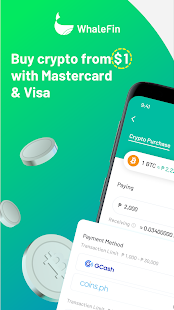
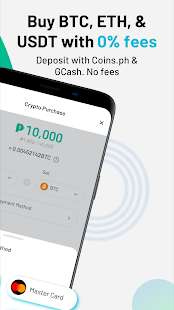
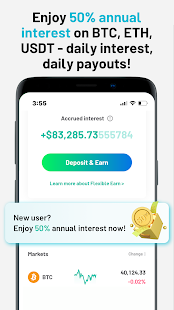
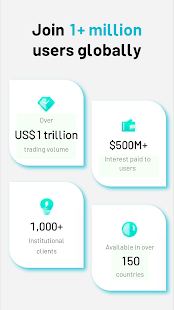
Welcome to WhaleFin, the all-in-one platform to buy, sell, trade, and invest in crypto. You can buy coins with as little as US$1 and 0 transaction fees, including Bitcoin, Ethereum and Tether. Store your crypto safely! Trusted by over 1M people worldwide.
INVEST INTELLIGENTLY
• Buy coins with as little as US$1: Anyone can start investing with only US$1 on WhaleFin. Buy crypto through Visa and Mastercard with 0% purchase fees!
• 0 purchase fees: Managing digital assets doesn’t have to be costly and discouraging. WhaleFin offers 0% fees on every single purchase!
• Competitive crypto prices: Not only 0 purchase fees, but also competitive coin prices! Buy and swap BTC, ETH, USDT and many other tokens at competitive, real-time prices.
• Buy with fiat: On WhaleFin, you can buy crypto with debit / credit card, including Visa and Mastercard at more competitive prices than Binance, Huobi, Bitfinex, and Okex. Manage your crypto assets in one single wallet.
• Special welcome offer: Enjoy your exclusive reward of US$5 in Bitcoin.
TRADE SECURITY
• Institutional custody: The highest security standards are ensured by leading institutional-grade custodians, including FireBlocks, to turn your crypto wallet into a crypto vault. WhaleFin is insured for custodial assets.
• Highest security standards: Military-grade safety standards to secure your account, including 2FA settings.
• Certified privacy and security levels: WhaleFin is certified by third-party privacy and security leaders for providing the safest data management and privacy protection. It is SOC 2 certified by Deloitte.
EASY TO USE AND BEGINNER FRIENDLY
• LITE version for beginners: Switch between WhaleFin Lite and Pro to meet your needs. Beginners can buy and earn coins easily on WhaleFin Lite, while sophisticated traders can access advanced trading options and functionalities on WhaleFin Pro.
• Mobile-first: Trade cryptocurrency anytime, anywhere, with a user-friendly interface that adapts well to mobile and desktop devices.
WHY WHALEFIN?
WhaleFin is a product of Amber Group, a global FinTech company backed by world-class investors including Sequoia Capital, Temasek, Paradigm, Tiger Global Management, Dragonfly Capital, Pantera Capital, Coinbase Ventures, and Blockchain.com, achieving US$1 trillion in trading volume.
SUPPORTED COINS
Easily swap multiple coins including BTC, ETH, DAI, ATOM, LINK, EOS, BAT, USDT, HUSD and many more!
DISCLAIMER
* Please note that the availability of the products and services on the WhaleFin App is subject to jurisdictional limitations. WhaleFin may not offer certain products, features, and/or services on the WhaleFin app in certain jurisdictions due to potential or actual regulatory restrictions.
CONTACT US
Website: https://www.whalefin.com
Email: service@whalefin.com
Telegram: @WhaleFinSupportBot
Show more

1. Download MEmu installer and finish the setup

2. Start MEmu then open Google Play on the desktop

3. Search WhaleFin: Buy Crypto & Bitcoin in Google Play
Install
4. Download and Install WhaleFin: Buy Crypto & Bitcoin
5. On install completion click the icon to start

6. Enjoy using WhaleFin: Buy Crypto & Bitcoin on PC with MEmu
MEmu Play is the best Android emulator, and 100 million users already enjoy its superb Android app experience. Powered by advanced virtualization technology, it lets you enjoy thousands of Android apps smoothly on your PC—including the most graphics-intensive ones.
Bigger screen with better graphics; Long duration, without limitation of battery or mobile data.
Full Keymapping support for precise control of keyboard and mouse or gamepad.
Multiple game accounts or tasks on single PC at one time with Multi-Instance manager.
Use WhaleFin: Buy Crypto & Bitcoin on PC by following steps:
































