
K PLUS
Updated
Current Version
J
Offered By

Stop worrying about high battery drain when using K PLUS on your phone. Free yourself from the tiny screen and enjoy the app on a much larger display. From now on, get a full-screen experience of your app with the convenience of a keyboard and mouse. MEmu offers you all the surprising features you’d expect: quick installation and easy setup, intuitive controls, and no more worries about battery life, mobile data, or unexpected calls. The all-new MEmu 9 is the choice for using K PLUS on your computer. With the MEmu multi-instance manager, you can run two or more accounts at the same time. Most importantly, our exclusive emulation engine unlocks your PC’s full potential, delivering smooth and enjoyable performance.
Show more
Enjoy superb experience of using K PLUS on PC with MEMU App Player. It's a powerful free Android emulator which provides you with thousands of android apps for their desktop version. Enjoy connecting with friends and polishing your work with higher efficiency! K PLUS แพลตฟอร์มที่ให้มากกว่าบริการทางการเงิน สำหรับออนไลน์ไลฟ์สไตล์ ใช้ง่าย ปลอดภัย พร้อมให้บริการสำหรับผู้ใช้อายุ 12 ปีขึ้นไป สามารถเปิด K-eSavings ผ่านแอปได้ด้วยตัวเอง หรือเข้าใช้งาน K PLUS Lobby ได้แม้ไม่มีบัญชีหรือบัตรธนาคารกสิกรไทย .
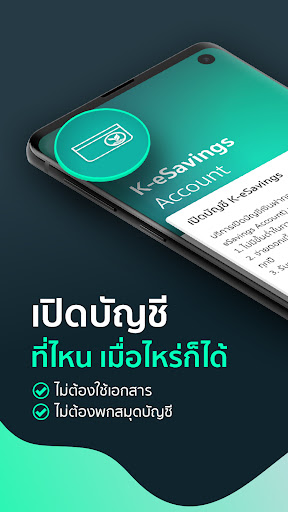
K PLUS แพลตฟอร์มที่ให้มากกว่าบริการทางการเงิน สำหรับออนไลน์ไลฟ์สไตล์ ใช้ง่าย ปลอดภัย พร้อมให้บริการสำหรับผู้ใช้อายุ 12 ปีขึ้นไป สามารถเปิด K-eSavings ผ่านแอปได้ด้วยตัวเอง หรือเข้าใช้งาน K PLUS Lobby ได้แม้ไม่มีบัญชีหรือบัตรธนาคารกสิกรไทย
- ง่ายทุกธุรกรรม
- โอนผ่านเบอร์มือถือ พร้อมเพย์หรือ สแกน QR
- จ่ายบิล ตั้งชำระล่วงหน้า หรือตั้งเตือนก็ได้
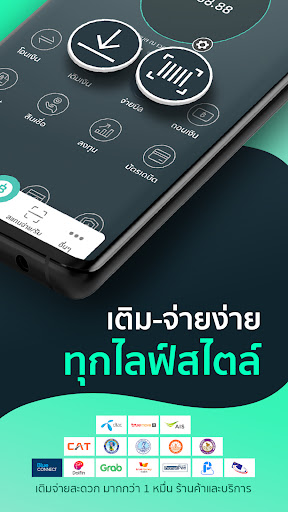
- เติมเงินได้ทุกที่
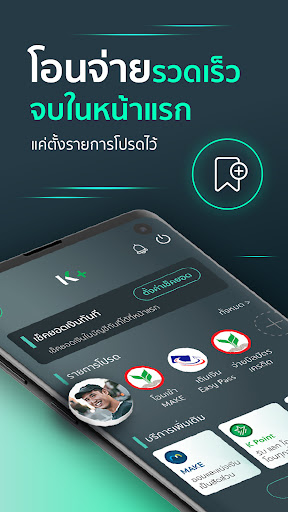
- ธุรกรรมรวดเร็วจบจากหน้าแรก แค่ตั้งรายการโปรด
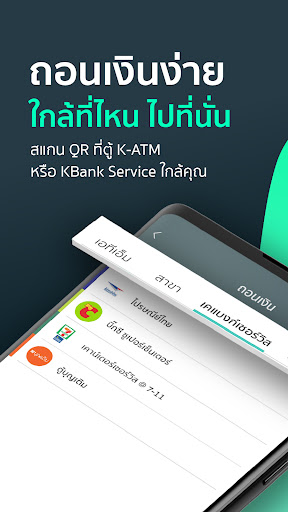
- ถอนเงินไม่ใช้บัตรผ่านตู้ K-ATM หรือ เคแบงก์เซอร์วิสใกล้คุณ
- ดูสรุปภาพรวมบัญชี รู้ทันทุกรายรับ รายจ่าย
- รับ Statement ผ่านทางอีเมลล์ ย้อนหลังสูงสุด 12 เดือน
จัดการบัตรเครดิตกสิกรไทย และสินเชื่อง่ายๆด้วยตัวเอง
- ถอนเงินไม่ใช้บัตรจากบัตรเครดิตหรือบัตรเงินด่วนกสิกรไทย
- เปลี่ยนวงเงินบัตรกสิกรไทยเป็นเงินสดเข้าบัญชี ผ่านบริการ K-Smart Cash แบ่งชำระสูงสุด 10 เดือน
- เลือกแบ่งชำระรายการใช้จ่ายบัตรกสิกรไทยแบบรายเดือนผ่านบริการ K-Smart Pay
- ล็อคและปลดล็อคบัตรเครดิตได้เองยามฉุกเฉิน
มั่นใจทุกการลงทุน
- เปิดบัญชีซื้อ-ขายกองทุน พร้อมดูรายการเคลื่อนไหว
- ดูสรุปภาพรวมสินทรัพย์ในหน้าเดียว
- ลงทุนให้ถึงเป้าหมายด้วย Wealth PLUS ที่พร้อมช่วยเริ่มต้นวางแผนและดูแลปรับเปลี่ยนพอร์ทตลอดระยะเวลาลงทุน
K Point พ้อยท์พันธ์ใหม่ ใช้เติมเงิน จ่ายบิล ช้อปปิ้งแทนเงินสด
- สะสมได้ง่ายๆ แม้ไม่มีบัตรกสิกรไทยผ่านการร่วมภารกิจบน K PLUS
- จ่ายบิล/เติมเงิน แลกของรางวัล หรือแลกเครดิตเงินคืน
- ช้อปปิ้งสินค้าและดีลหลากหลายบน K+ market
- โอน K Point ไปเป็นคะแนนสะสม The 1, AIS Points, Blue Point หรือ TruePoint
เชื่อมต่อหลากแพลตฟอร์ม
- บริการครบวงจร สะดวกทุกที่ ยืนยันตัวตน ฝาก-ถอน ได้ที่ร้านค้าพันธมิตรเคแบงก์เซอร์วิสทั่วประเทศ
- เพิ่มบัตรสมาชิกแบรนด์ชั้นนำ พร้อมตรวจสอบคะแนนได้ทุกที่
- เติม จ่าย สะดวกครบ ไม่ต้องกรอกเลข เพียงเลือกจ่ายด้วย K PLUS
K PLUS – the leading digital banking from KASIKORNBANK. The platform that offers variety services to enhance your online lifestyle. Ready to use for all users age 12 and above. Open K-savings by yourself on the application or simply join K PLUS Lobby, no need to be a KBank account or card holders.
Make your daily banking transactions easy.
- Faster transfer via mobile number, Prompt Pay, or scan QR code.
- Pay your bills conveniently. Schedule payments in advance or create payment reminders.
- Top up your daily use services on the go.
- Make faster transactions from home page, just set up your favorite list.
- Cardless cash withdrawal from K-ATM or KBank Service nearby
- Display income and expenses summaries of all your accounts.
- Request your statement up to previous 12 months and receive it instantly.
Conveniently manage your KBank Credit Cards and Loans.
- Cardless cash withdraw from your KBank credit cards or Xpress Cash card.
- Transfer your KBank Credit Card limit to your deposit account via K-Smart Cash service. Repay in installments of up to 10 months.
- Turn any unbilled KBank Credit Card or Xpress Cash spending into monthly installments via K-Smart Pay service.
- Instantly block and unblock your credit card anytime. for your own safety.
Secure your investments.
- Open account, purchase mutual funds, and monitor portfolio movements.
- See the overview of your assets in one stop.
- Optimize your investment towards selected goals with Wealth PLUS. Help building your plan and automatically manage your portfolio.
K Point—the new reward points—redeemable for top up, bill payments, or shopping.
- Enjoy fun missions on K PLUS to collect your points. No need to be a credit card holder.
- Make bill payments, top ups, or simply get cash rebates.
- Redeem your favorite items and deals on K+ market.
- Transfer K Point to partnered membership —The 1, AIS Points, Blue Point or TruePoint
Connected across platforms, enhance every lifestyles.
- Conveniently verify your identity, make deposits or withdraw money from KBank Service partners.
- Add member cards and check your points on the go.
- Seamlessly top up or pay bills just select K PLUS as your payment option.
Head office
400/22 Phahon Yothin Road,
Sam Sen Nai Sub-district, Phaya Thai District, Bangkok 10400, Thailand
Show more

1. Download MEmu installer and finish the setup

2. Start MEmu then open Google Play on the desktop

3. Search K PLUS in Google Play
Install
4. Download and Install K PLUS
5. On install completion click the icon to start

6. Enjoy using K PLUS on PC with MEmu
MEmu Play is the best Android emulator, and 100 million users already enjoy its superb Android app experience. Powered by advanced virtualization technology, it lets you enjoy thousands of Android apps smoothly on your PC—including the most graphics-intensive ones.
Bigger screen with better graphics; Long duration, without limitation of battery or mobile data.
Full Keymapping support for precise control of keyboard and mouse or gamepad.
Multiple game accounts or tasks on single PC at one time with Multi-Instance manager.
Use K PLUS on PC by following steps:
































