
PostFinance App
Updated
Current Version
5.15.0
Offered By

Stop worrying about high battery drain when using PostFinance App on your phone. Free yourself from the tiny screen and enjoy the app on a much larger display. From now on, get a full-screen experience of your app with the convenience of a keyboard and mouse. MEmu offers you all the surprising features you’d expect: quick installation and easy setup, intuitive controls, and no more worries about battery life, mobile data, or unexpected calls. The all-new MEmu 9 is the choice for using PostFinance App on your computer. With the MEmu multi-instance manager, you can run two or more accounts at the same time. Most importantly, our exclusive emulation engine unlocks your PC’s full potential, delivering smooth and enjoyable performance.
Show more
Enjoy superb experience of using PostFinance App on PC with MEMU App Player. It's a powerful free Android emulator which provides you with thousands of android apps for their desktop version. Enjoy connecting with friends and polishing your work with higher efficiency! Your finances, always under control.
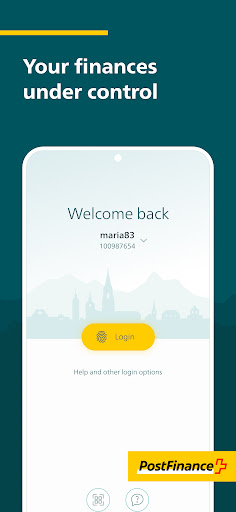
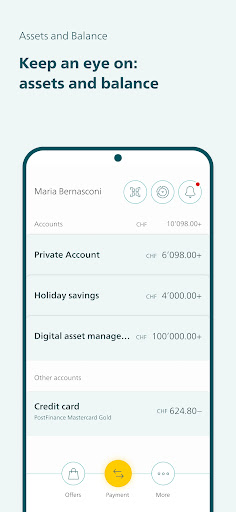
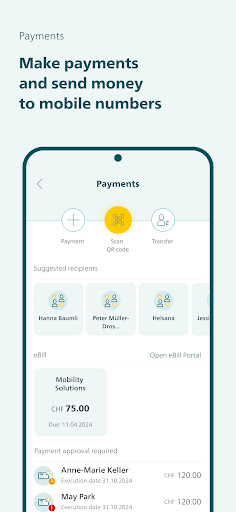
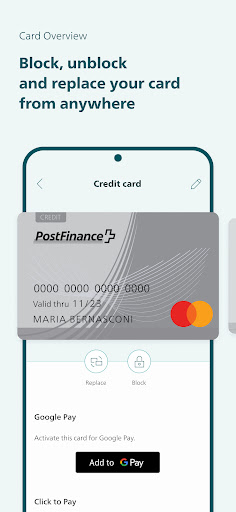
Your finances, always under control
Manage your finances when and where you like with the PostFinance App. Mobile access to digital banking and e-trading – quickly and easily via fingerprint or face unlock.
Payments and transactions
• Keep a close eye on your account balance, details and transactions
• Analyse your income and expenses and keep track of what you spend your money on
• Scan or upload and pay QR-bills
• Process and approve eBills directly using the eBill platform
• Send money to mobile phone numbers
• View and share documents as PDFs
• Share account information via SMS, e-mail, etc.
• Google Pay: add PostFinance credit cards directly via the PostFinance App or Google Wallet to use Google Pay
• Samsung Pay: add PostFinance credit cards directly via the PostFinance App or Samsung Wallet to use Samsung Pay
• PostFinance Pay: pay conveniently in online shops via the PostFinance App
Settings and support
• Change limits, block or unblock PostFinance cards or order replacements
• Set up push notifications: e.g. for credits/debits, incoming invoices (eBill), credit card transactions or e-trading
• Change address
• Set up login via the app (fingerprint or face unlock) or reset password directly in the app
• App settings: dark mode, screenshot option
• Consult PostFinance ChatBot for questions and queries
Become a customer
Open a private, savings, retirement planning or foreign currency account or order a credit card in the PostFinance App.
Investments and retirement planning
• View price information from the world’s leading stock exchanges
• Access your custody account
• View and manage investment products such as electronic asset management and investment advice (fund con-sulting basic or investment consulting plus)
• Invest independently (fund self-service, retirement funds, e-trading and other investment products)
Digital vouchers
• Purchase digital vouchers for Google Play, paysafecard and much more, or give them as a gift
• Purchase or give as a gift credit for mobile phones
With some simple measures, you can protect your devices from data misuse:
• Keep your operating system and the apps you have installed up to date at all times
• Always log out of the app – quickly and easily by shaking your smartphone (can be set up in the app settings)
More information: https://www.postfinance.ch/en/support/security/e-finance-security.html
General information on security:
• Keeping your data secure is our top priority. A multistage encryption and identification process ensures that only you have access to your accounts.
• Google Play Store must be preinstalled on your device. Manual installation of the Store and installation of the PostFinance App via this channel or downloading the PostFinance App via a third-party provider are not permit-ted.
• PostFinance observes the provisions of Swiss data protection legislation when collecting and processing personal data. In all areas of its online product range, comprehensive technical tools and organizational measures are used to protect against unauthorized access, manipulations and data loss.
• If you lose your phone and/or your SIM card or if there is reason to suspect that the service is being misused, please call our Customer Center immediately on 0848 888 700.
For regulatory reasons, the app is only available in the Swiss Google Play Store.
More information: postfinance.ch/app
Show more

1. Download MEmu installer and finish the setup

2. Start MEmu then open Google Play on the desktop

3. Search PostFinance App in Google Play
Install
4. Download and Install PostFinance App
5. On install completion click the icon to start

6. Enjoy using PostFinance App on PC with MEmu
MEmu Play is the best Android emulator, and 100 million users already enjoy its superb Android app experience. Powered by advanced virtualization technology, it lets you enjoy thousands of Android apps smoothly on your PC—including the most graphics-intensive ones.
Bigger screen with better graphics; Long duration, without limitation of battery or mobile data.
Full Keymapping support for precise control of keyboard and mouse or gamepad.
Multiple game accounts or tasks on single PC at one time with Multi-Instance manager.
Use PostFinance App on PC by following steps:
































