Monkey Battle: Swing Shot
Aggiornata
Versione corrente
Offerta da

Vista tutta la passione dimostrata nel giocare a Monkey Battle: Swing Shot, le tue mani non dovrebbero essere limitate al minuscolo schermo di un telefono. Gioca come un professionista e ottieni il pieno controllo del gioco con tastiera e mouse. MEmu ti offre tutto ciò che ti aspetti. Scarica e gioca a Monkey Battle: Swing Shot su PC. Gioca quanto vuoi, niente più limitazioni di batteria, dati mobili e chiamate inquietanti. Il nuovissimo MEmu 9 è la scelta migliore per giocare a Monkey Battle: Swing Shot su PC. Realizzato sulla base della nostra esperienza, lo squisito sistema di mappatura dei tasti preimpostati rende Monkey Battle: Swing Shot un vero e proprio gioco per PC. MEmu è un gestore multi-instanza che permette di giocare con 2 o più account sullo stesso dispositivo. E la cosa più importante, il nostro esclusivo motore di emulazione può liberare tutto il potenziale del tuo PC, rendendo tutto fluido.
Mostra altro
Scarica Monkey Battle: Swing Shot su PC con MEmu Android Emulator. Divertiti giocando sul grande schermo. A desperate yet hilarious survival war of animals hanging from trees!
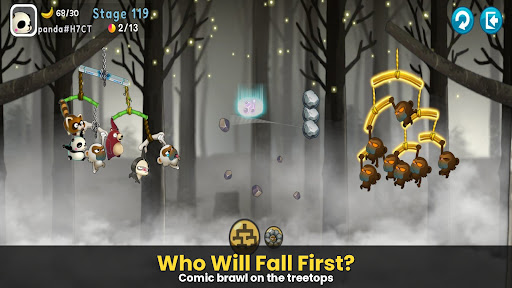
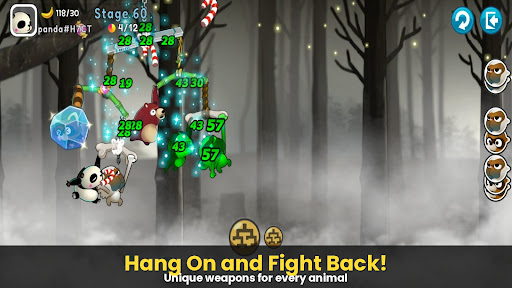
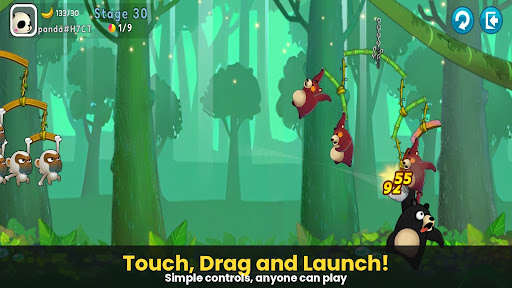
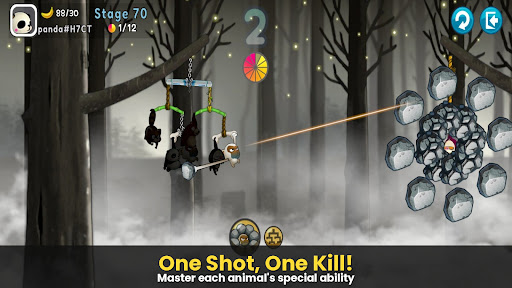
A desperate yet hilarious survival war of animals hanging from trees!
The pinnacle of slingshot action that took the world by storm, [Monkey Battle: Swing Shot] is back.
Hop onto the branches and launch the perfect shot using the power of gravity!
▣ Game Features
■ Tap, Pull, and Pop! Ultimate Physics-Based Action
Master the sophisticated physics engine with simple touch-and-drag controls.
Calculate the sway of branches—both yours and the enemy's—to strike the weak spot.
Enjoy the realistic and comical reactions of animals the moment they get hit!
■ Strategic Squad: Build Your Own Animal Army
Collect characters with unique abilities, including Monkeys, Raccoons, Brown Bears, Sloths, and Pandas.
Victory depends on your strategy! The placement and composition of your squad are key.
Upgrade to sturdy branches to build an ironclad defense that withstands any attack.
■ Non-Stop Action Across Various Modes
Arcade Mode: Overcome diverse terrains and gimmicks to test your limits in this training ground.
Item Mode: Traditional slingshot battles where strategic item use turns the tide.
Sniper Mode: Precision is everything—don't miss a single shot.
Crazy Mode: Experience extreme speed and overwhelming firepower.
***
Device App Access Permission Notice
Access permissions are requested in order for us to provide you with the following service when you use the app.
[Required]
None
[Optional]
· NOTIFICATION: The permission is required to receive info sent from the game app and advertisement push notifications.
[How to Remove Permissions]
You can reset or remove permissions after allowing them as shown below.
1. Android 6.0 or above: Settings > Apps > Select App > Permissions > Allow or Remove Permissions
2. Android 6.0 or below: Upgrade the operating system to remove permissions or delete the app
※ If you are using Android 6.0 or below, we recommend that you upgrade to 6.0 or above as you can't change the optional permissions individually.
***
• Supported Languages: 한국어, English, 简体中文, 繁體中文, Français, Deutsch
• Unsupported devices: iPhone 3GS, 3rd/4th Gen iPod Touch, iPad 1
• This app is free-to-play and offers in-app purchases. Purchasing paid items may incur additional fees, and payment cancelation may not be available depending on the type of the item.
• Conditions regarding the usage of this game (contract termination/payment cancelation, etc.) can be viewed in the game or the Com2uS mobile game Terms of Service (available on the website, https://terms.withhive.com/terms/policy/view/M121/T1 ).
• For game-related inquiries, please contact the Com2uS Customer Support (https://customer.withhive.com/com2us).
Mostra altro

1. Scarica il programma di installazione di MEmu e completa l'installazione

2. Avvia il Memu e apri il Google Play sulla homepage

3. Cerca Monkey Battle: Swing Shot in Google Play
Install
4. Scarica e installa Monkey Battle: Swing Shot
5. Al termine dell'installazione, fai clic sull'icona per avviar

6. Divertiti giocando a Monkey Battle: Swing Shot su PC con MEmu
MEmu App Player è il miglior emulatore Android gratuito, utilizzato da 50 milioni di persone per ottenere un'esperienza di gioco Android superba. La tecnilogia di virtualizzazione MEmu ti permette di giocare a migliaia di giochi Android con semplicità sul tuo computer, anche i giochi con la grafica più esigente.
Schermo più grande con una grafica migliore; Lunga durata, senza limitazione di batteria o dati mobili.
Supporto completo per mappa di tastiera per un controllo preciso di tastiera e mouse o gamepad.
Multipli account di gioco o attività su un singolo PC contemporaneamente con il gestore di multi istanza.
Play Monkey Battle: Swing Shot on PC by following steps: