Monkey Battle: Swing Shot
अपडेट किया गया
वर्तमान वर्शन
1.0.16
संसाधन

अपने सेलफोन पर Monkey Battle: Swing Shot का उपयोग करते समय ओवरचार्ज के बारे में चिंता करना बंद करें, अपने आप को छोटी स्क्रीन से मुक्त करें और बहुत बड़े डिस्प्ले पर ऐप का उपयोग करने का आनंद लें। अब से, कीबोर्ड और माउस के साथ अपने ऐप का पूर्ण-स्क्रीन अनुभव प्राप्त करें। एमईएमयू आपको उन सभी आश्चर्यजनक सुविधाओं की पेशकश करता है जिनकी आपको उम्मीद थी: त्वरित इंस्टॉल और आसान सेटअप, सहज नियंत्रण, बैटरी की कोई सीमा नहीं, मोबाइल डेटा और परेशान कॉल। आपके कंप्यूटर पर Monkey Battle: Swing Shot का उपयोग करने का सबसे अच्छा विकल्प नया MEmu 9 है। हमारे अवशोषण के साथ कोडित, बहु-उदाहरण प्रबंधक एक ही समय में 2 या अधिक खाते खोलना संभव बनाता है। और सबसे महत्वपूर्ण, हमारा अनन्य उत्सर्जन इंजन आपके पीसी की पूरी क्षमता को जारी कर सकता है, सब कुछ सुचारू और सुखद बना सकता है।
और दिखाएं
डाउनलोड करें Monkey Battle: Swing Shot पीसी पर MEmu एंड्रॉयड एमुलेटर के साथ बड़े पर्दे पर खेलने का आनंद लें। पेड़ों से लटके जानवरों की एक रोमांचक और मज़ेदार जीवन रक्षा जंग!
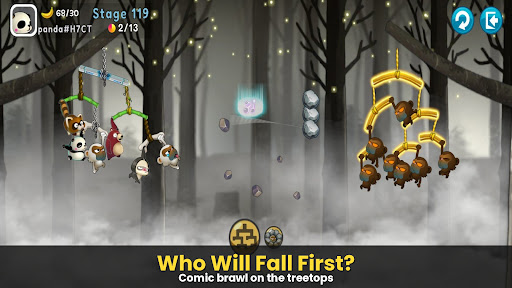
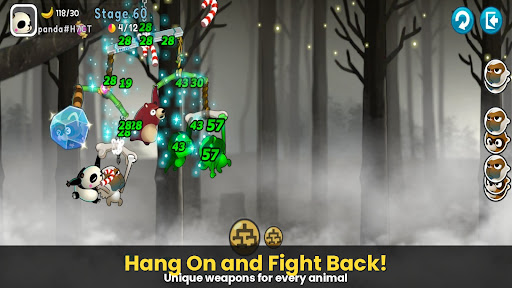
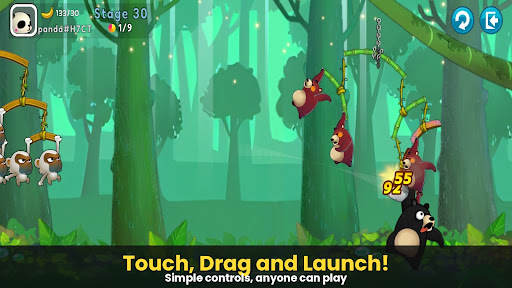
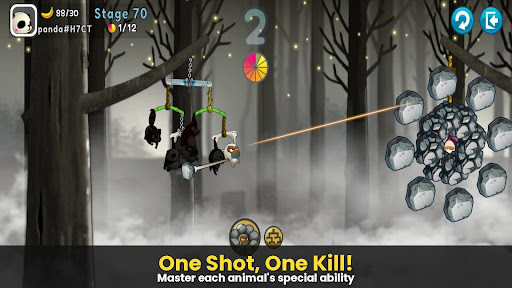
पेड़ों से लटके जानवरों की एक रोमांचक और मज़ेदार जीवन रक्षा जंग!
गुलेल से किए गए एक्शन का वह चरम, जिसने पूरी दुनिया में धूम मचा दी थी, [मंकी बैटल: स्विंग शॉट] वापस आ गया है.
शाखाओं पर चढ़ें और गुरुत्वाकर्षण की शक्ति का उपयोग करके सटीक निशाना लगाएं!
▣ गेम की विशेषताएं
■ टैप करें, खींचें और उछालें! बेहतरीन भौतिकी-आधारित एक्शन
सरल टच-एंड-ड्रैग नियंत्रणों के साथ परिष्कृत भौतिकी इंजन में महारत हासिल करें.
अपनी और दुश्मन दोनों की शाखाओं के हिलने-डुलने का अनुमान लगाकर कमज़ोर बिंदु पर वार करें.
जानवरों की यथार्थवादी और हास्यपूर्ण प्रतिक्रियाओं का आनंद लें जैसे ही उन्हें चोट लगती है!
■ रणनीतिक दस्ता: अपनी खुद की पशु सेना बनाएं
अद्वितीय क्षमताओं वाले पात्रों को इकट्ठा करें, जिनमें बंदर, रैकून, भूरे भालू, स्लॉथ और पांडा शामिल हैं.
जीत आपकी रणनीति पर निर्भर करती है! आपके दस्ते का स्थान और संरचना महत्वपूर्ण हैं.
किसी भी हमले का सामना करने के लिए एक मजबूत रक्षा पंक्ति बनाने के लिए मजबूत शाखाओं में अपग्रेड करें.
■ विभिन्न मोड्स में नॉन-स्टॉप एक्शन
आर्केड मोड: इस ट्रेनिंग ग्राउंड में अपनी क्षमताओं को परखने के लिए अलग-अलग इलाकों और तरकीबों का सामना करें.
आइटम मोड: पारंपरिक गुलेल की लड़ाई, जहां रणनीतिक आइटम का इस्तेमाल खेल का रुख बदल देता है.
स्नाइपर मोड: सटीक निशाना ही सब कुछ है—एक भी निशाना न चूकें.
क्रेज़ी मोड: ज़बरदस्त गति और जबरदस्त मारक क्षमता का अनुभव करें.
***
डिवाइस ऐप एक्सेस अनुमति सूचना
ऐप का उपयोग करते समय आपको निम्नलिखित सेवाएं प्रदान करने के लिए एक्सेस अनुमतियों का अनुरोध किया जाता है.
[अनिवार्य]
कोई नहीं
[वैकल्पिक]
· सूचना: गेम ऐप से भेजी गई जानकारी और विज्ञापन पुश नोटिफिकेशन प्राप्त करने के लिए यह अनुमति आवश्यक है.
[अनुमतियां कैसे हटाएं]
नीचे दिखाए अनुसार अनुमतियां देने के बाद आप उन्हें रीसेट या हटा सकते हैं.
1. Android 6.0 या उससे ऊपर: सेटिंग्स > ऐप्स > ऐप चुनें > अनुमतियाँ > अनुमतियाँ दें या हटाएँ
2. Android 6.0 या उससे नीचे: अनुमतियाँ हटाने के लिए ऑपरेटिंग सिस्टम को अपग्रेड करें या ऐप को डिलीट करें
※ यदि आप Android 6.0 या उससे नीचे का संस्करण उपयोग कर रहे हैं, तो हम आपको 6.0 या उससे ऊपर के संस्करण में अपग्रेड करने की सलाह देते हैं क्योंकि आप वैकल्पिक अनुमतियों को व्यक्तिगत रूप से नहीं बदल सकते.
***
• समर्थित भाषाएँ: कोरियाई, अंग्रेज़ी, सरलीकृत चीनी, पारंपरिक चीनी, फ़्रेंच, जर्मन
• असमर्थित डिवाइस: iPhone 3GS, तीसरी/चौथी पीढ़ी का iPod Touch, iPad 1
• यह ऐप मुफ़्त है और इसमें इन-ऐप खरीदारी की सुविधा है. सशुल्क आइटम खरीदने पर अतिरिक्त शुल्क लग सकता है, और आइटम के प्रकार के आधार पर भुगतान रद्द करने की सुविधा उपलब्ध नहीं हो सकती है.
• इस गेम के उपयोग से संबंधित शर्तें (अनुबंध समाप्ति/भुगतान रद्द करना आदि) गेम में या Com2uS मोबाइल गेम की सेवा शर्तों (वेबसाइट https://terms.withhive.com/terms/policy/view/M121/T1 पर उपलब्ध) में देखी जा सकती हैं.
• गेम से संबंधित पूछताछ के लिए, कृपया Com2uS ग्राहक सहायता (https://customer.withhive.com/com2us) से संपर्क करें.
और दिखाएं

1. MEmu इंस्टॉलर को डाउनलोड करें और इंस्टॉलेशन को पूरा करें

2. MEmu शुरू करें फिर होमपेज पर Google Play खोलें

3. Google Play में Monkey Battle: Swing Shot खोजें
Install
4. Monkey Battle: Swing Shot डाउनलोड कर इंस्टॉल करें
5. इंस्टॉल पूरा होने पर आइकन दबाएं

6. MEmu से पीसी पर Monkey Battle: Swing Shot खेलने का आनंद लें
MEmu Play सबसे बेहतरीन मुफ़्त Android एमुलेटर है और 5 करोड़ लोग पहले ही इसके शानदार Android गेमिंग अनुभव का आनंद ले चुके हैं। MEmu 9 वर्चुअलाइज़ेशन तकनीक आपको अपने PC पर हज़ारों Android गेम, यहाँ तक कि सबसे ज़्यादा ग्राफ़िक्स वाले गेम भी, आसानी से खेलने की सुविधा देती है।
असीमित बैटरी या मोबाइल डेटा के साथ बेहतर ग्राफिक्स के साथ बड़ी स्क्रीन; लंबी अवधि।
कीबोर्ड और माउस या गेमपैड के उत्तम नियंत्रण के लिए संपूर्ण कीमैपिंग का समर्थन करता हैं।
एक ही पीसी पर मल्टी-इंस्टेंस मैनेजर के साथ एक समय में कई गेम खाते या कार्य कर सकते हैं।
Play Monkey Battle: Swing Shot on PC by following steps: