Monkey Battle: Swing Shot
تم التحديث
الإصدار الحالي
1.0.16
تقديم

مع كل شغفك للعب Monkey Battle: Swing Shot ,يديك لايجب ان تكون محدودة بشاشة صغيرة علي تليفونك. العب كمحترف واحصل علي تحكم كامل علي لعبتك عن طريق لوحة المفاتيح والفأره. MEmuيقدم جميع الاشياء التي تتوقعها.حمل والعب Monkey Battle: Swing Shot علي جهاز الحاسوب الخاص بك العب كماتريد ,لايوجد حدود علي البطارية والباقة ولا يوجد اتصالات مزعجة النسخة الجديدة من MEmu7 هو افضل وسيلة للعب Monkey Battle: Swing Shot علي جهاز الحاسب معد عن طريق خبراتنا , لوحة المفاتيح المعده مسبقا تجعل Monkey Battle: Swing Shot العبة لعبة كمبيوتر حقيقة تم برمجتها باقصي استيعابنا .المتحكم في عدة نوافذ يجعل لعب لعبتين او اكثر او استعمال اكثر من حساب اسهل واهم شئ ان المحرك الخاص بنا يمكن ان يخرج كل امكانيات جهازك ويجعل كل شئ اكثر سلاسة نحن لانهتم بكيف تلعب فقط بل ايضا بالسعادة التي تغمرك من اللعب
أظهر المزيد
قم بتنزيل Monkey Battle: Swing Shot على الكمبيوتر بإستخدام جهاز مقلد أندروز MEmu.استمتع بمتعة اللعب على الشاشة الكبيرة. حرب بقاء يائسة ومضحكة في آنٍ واحد، حيث تتدلى الحيوانات من الأشجار!
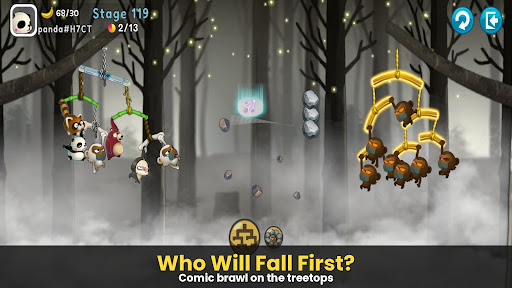
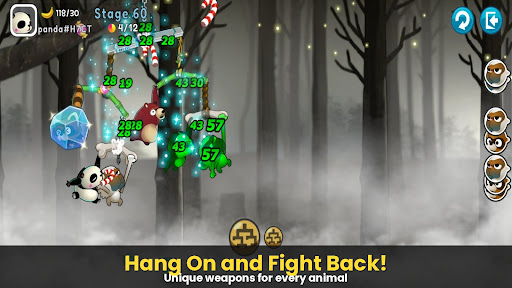
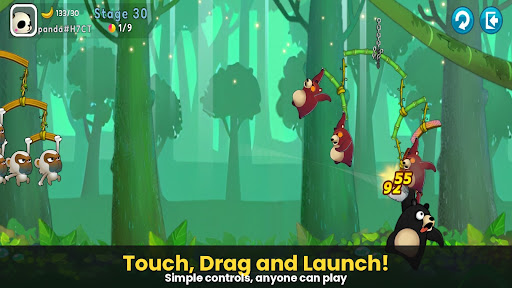
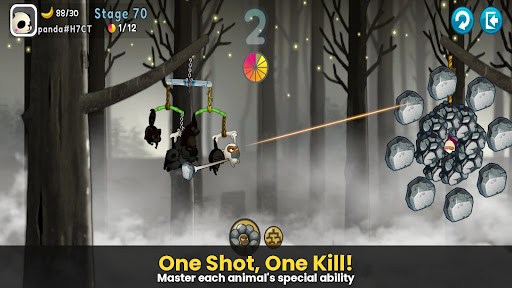
حرب بقاء يائسة ومضحكة في آنٍ واحد، حيث تتدلى الحيوانات من الأشجار!
لعبة [Monkey Battle: Swing Shot]، ذروة ألعاب المقلاع التي اجتاحت العالم، تعود من جديد.
اقفز على الأغصان وأطلق الرمية المثالية مستغلًا قوة الجاذبية!
▣ مميزات اللعبة
■ انقر، اسحب، وانطلق! حركة فائقة تعتمد على الفيزياء
أتقن محرك الفيزياء المتطور باستخدام عناصر تحكم بسيطة باللمس والسحب.
احسب تأرجح الأغصان - أغصانك وأغصان العدو - لضرب نقطة الضعف.
استمتع بردود فعل الحيوانات الواقعية والمضحكة لحظة إصابتها!
■ فرقة استراتيجية: كوّن جيشك الخاص من الحيوانات
اجمع شخصيات ذات قدرات فريدة، بما في ذلك القرود، والراكون، والدببة البنية، والكسلان، والباندا.
النصر يعتمد على استراتيجيتك! فوضع وتشكيل فرقتك هما مفتاح الفوز.
قم بترقية أغصانك إلى أغصان متينة لبناء دفاع منيع يصمد أمام أي هجوم.
■ إثارة متواصلة عبر أوضاع لعب متنوعة
وضع الأركيد: تغلب على تضاريس متنوعة وحيل مبتكرة لاختبار قدراتك في ساحة التدريب هذه.
وضع الأدوات: معارك تقليدية بالمقلاع، حيث يُحدث استخدام الأدوات الاستراتيجية فرقًا كبيرًا.
وضع القناص: الدقة هي كل شيء - لا تُخطئ أي طلقة.
الوضع المجنون: اختبر سرعة فائقة وقوة نارية هائلة.
*** إشعار أذونات الوصول إلى التطبيق
نطلب أذونات الوصول لكي نتمكن من تقديم الخدمات التالية لك عند استخدام التطبيق.
[إلزامي]
لا شيء
[اختياري]
• الإشعارات: هذا الإذن مطلوب لتلقي المعلومات المرسلة من تطبيق اللعبة وإشعارات الإعلانات.
[كيفية إزالة الأذونات]
يمكنك إعادة تعيين الأذونات أو إزالتها بعد منحها كما هو موضح أدناه.
[كيفية إزالة الأذونات] ١. نظام Android 6.0 أو أحدث: الإعدادات > التطبيقات > تحديد التطبيق > الأذونات > السماح بالأذونات أو إزالتها
٢. نظام Android 6.0 أو أقدم: قم بترقية نظام التشغيل لإزالة الأذونات أو احذف التطبيق
※ إذا كنت تستخدم نظام Android 6.0 أو أقدم، فننصحك بالترقية إلى الإصدار 6.0 أو أحدث، حيث لا يمكنك تغيير الأذونات الاختيارية بشكل فردي.
***
• اللغات المدعومة: الكورية، الإنجليزية، الصينية المبسطة، الصينية التقليدية، الفرنسية، الألمانية
• الأجهزة غير المدعومة: iPhone 3GS، iPod Touch من الجيل الثالث/الرابع، iPad 1
• هذا التطبيق مجاني، ويتضمن عمليات شراء داخل التطبيق. قد تُفرض رسوم إضافية على شراء العناصر المدفوعة، وقد لا يكون إلغاء الدفع متاحًا حسب نوع العنصر.
هذا التطبيق مجاني، ويتضمن عمليات شراء داخل التطبيق. • يمكن الاطلاع على شروط استخدام هذه اللعبة (إنهاء العقد/إلغاء الدفع، إلخ) داخل اللعبة أو في شروط خدمة ألعاب Com2uS للهواتف المحمولة (المتوفرة على الموقع الإلكتروني: https://terms.withhive.com/terms/policy/view/M121/T1).
للاستفسارات المتعلقة باللعبة، يُرجى التواصل مع دعم عملاء Com2uS (https://customer.withhive.com/com2us).
أظهر المزيد

1. قم بتنزيل برنامج MEmu واكمال تثبيته

2. قم بتشغيل برنامج MEmu وفتح Google Play على الصفحة الرئيسية

3. ابح Monkey Battle: Swing Shot في Google Play
Install
4. تنزيل وتثبيت Monkey Battle: Swing Shot
5. انقر على الرمز للتشغيل بعد اكتمال التثبيت

6. استمتع بلعب *** على الكمبيوتر Monkey Battle: Swing Shot تخدام برنامج MEmu
تطبيق MEmuهو افضل محاكى اندرويد مجانى وبالفعل 50 مليون شخص يستمتعون حاليا بتجربه اللعب عليه. تمكّنك تقنية MEmu الافتراضية من تشغيل آلاف ألعاب Android بسلاسة على الكمبيوتر الشخصي ، حتى أكثرها استخدامًا للرسومات.
شاشة أكبر وجرافيك افضل ووقت أطول بدون حدود البطارية وباقة التليفون
لوحة مفاتيح كاملة تدعم تحكم كامل عن طريق لوحة المفاتيح و الفأره وجيم باد
عدة العاب وحسابات ومهمات علي جهاز الكمبيوتر في وقت معين عن طريق Memu متعدد النوافذ
Play Monkey Battle: Swing Shot on PC by following steps: